
 GlimmerShaders · 1.20 – 1.21
Glimmer is a Minecraft shaderpack designed to be simple and performant whilst maintaining a physically based and natural look.
Free558,633 downloads
Glint is a physically based shaderpack for Minecraft.
Opens Modrinth · 8,322 downloads there
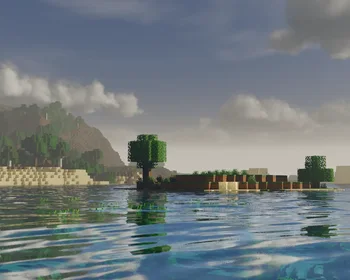

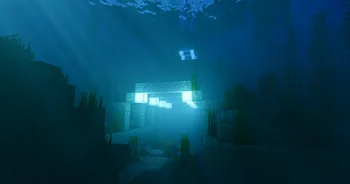
Glint is a physically based shaderpack for Minecraft.
Glint is a shader pack made by jbritain. It supports Minecraft 1.21 – 26.x. It has been downloaded 8,322 times on Modrinth. The last update came out on Jun 24, 2026.
Glint has had 2 releases on Modrinth since Jun 2, 2026. 2 of them came out in the past year. The newest is alpha-four, released on Jun 23, 2026. It is made for Minecraft 1.21.11 – 26.2. It runs on Iris. The download is 87.1 MB.
| Version | Released | Minecraft | Type |
|---|---|---|---|
alpha-four | Jun 23, 2026 | 1.21.11 – 26.2 | Alpha |
alpha-three | Jun 2, 2026 | 1.21.11 – 26.1.2 | Alpha |
Glint is open source. Its newest release on GitHub is Alpha Four, published on Jun 23, 2026.
Before that: Alpha Three (Jun 2, 2026), Alpha Two (May 31, 2026).
Glint is a physically based shaderpack for Minecraft.
The following is required
OptiFine is not supported. MacOS is not supported. Oculus probably won't work.
I would like to thank...
Written by jbritain. Read it with pictures on Modrinth.
Install Iris (with Sodium) or OptiFine for your Minecraft version: shaders need one of them.
Download the .zip file from Modrinth. Do not unzip it.
In Minecraft, open Options, then Video Settings, then Shader Packs, and click Open Shader Pack Folder.
Drop the .zip file into that folder, pick Glint in the list and click Done.
Shaders are heavy on the graphics card. If the game gets slow, pick a lower profile in the shader settings.
| Resource | Downloads | Versions | Last update | Price |
|---|---|---|---|---|
| Glintthe one you looked at | 8,322 | 1.21 – 26.x | Jun 24, 2026 | Free |
| Glimmerjbritain | 559K | 1.20 – 1.21 | Feb 24, 2026 | Free |
 Eclipse Shader_VaDiR_ | 20 | 1.16 | 12 days ago | Free |
 Rethinking Voxelsgri573 | 13.7M | 1.19 – 1.21 | Jun 20, 2025 | Free |
Yes. Glint supports Minecraft 26.x. All supported versions: 26.x, 1.21.
Yes. Glint is free to download from Modrinth.
Yes. The last update came out in the past day.
The closest ones are Glimmer, Eclipse Shader and Rethinking Voxels. Compare all alternatives
GlimmerShaders · 1.20 – 1.21Glimmer is a Minecraft shaderpack designed to be simple and performant whilst maintaining a physically based and natural look.
Eclipse ShaderShaders · 1.16A modern, high-performance shaderpack for Iris featuring cinematic lighting, physically-based water, dynamic shadows, and immersive volumetric fog.
Rethinking VoxelsShaders · 1.19 – 1.21[WIP] A gameplay shaderpack based on complementary reimagined that has coloured block light with sharp shadows
 RedHat ShadersShaders · 1.8 – 26.x
A shaderpack based on older versions of Chocapic13 Shaders.
 Amethyst ShadersShaders · 1.8 – 1.21
[WIP] A Semi-Realistic Minecraft Shaderpack, with a Vibrant Visuals Style. Based on Complementary Reimagined.
 OPAL ShadersShaders · 1.19 – 26.x
OPAL Shaders is a shaderpack for Minecraft Java Edition based on BSL Shaders created by Capt Tatsu. It aims to blend a fantasy atmosphere with natural colors…
Log in to leave a review.