
 More CullingMods · 1.18 – 26.x
A mod that changes how multiple types of culling are handled in order to improve performance
Free73,973,815 downloads

Distribute HUD updates over multiple frames to improve performance

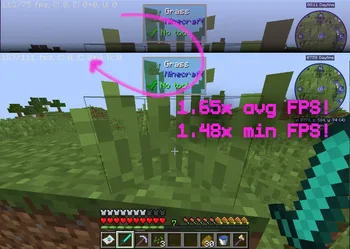

Distribute HUD updates over multiple frames to improve performance
Gnetum is a resource made by decce6. It supports Minecraft 1.12 – 26.x. It has been downloaded 5,355,250 times on Modrinth. The last update came out on Oct 31, 2026.
Gnetum has had 196 releases on Modrinth since Mar 14, 2025. 164 of them came out in the past year. The newest is 4.6.4+26.3-neoforge, released on Oct 31, 2026. It is made for Minecraft 26.3. It runs on NeoForge. The download is 95 KB.
| Version | Released | Minecraft | Type |
|---|---|---|---|
4.6.4+26.3-neoforge | Oct 31, 2026 | 26.3 | Release |
4.6.4+26.3-fabric | Oct 31, 2026 | 26.3 | Release |
4.6.4+26.2-neoforge | Oct 31, 2026 | 26.2 | Release |
4.6.4+26.2-fabric | Oct 31, 2026 | 26.2 | Release |
4.6.4+26.1.2-neoforge | Oct 31, 2026 | 26.1, 26.1.1, 26.1.2 | Release |
A Minecraft mod that improves performance by distributing HUD updates over multiple frames.
Gnetum divides a full HUD update into multiple "passes." Only one pass is rendered each frame, reducing the time taken on HUD updates and improving FPS.
Based on the rendering time of each element, Gnetum automatically distributes their updates over multiple frames, improving both the average FPS and the minimum.
Technical explanations
The idea behind Gnetum is to reduce the framerate of the HUD, which is not cheap to render and does not really change often, to improve the overall performance of the game, in a way that improves both the average and the minimum FPS. To achieve this:
There is also an HUD FPS limiter that defines the maximum FPS of the HUD.
Starting from 4.0.0, integration is implemented with Sodium Config API. The configuration can be accessed from the Video Screen, allowing for adjustment of:
✔️ ImmediatelyFast: fully compatible and recommended.
⚠️ OptiFine: make sure "Fast Render" is disabled (this mod would do nothing otherwise.)
⚠️ StellarCore: make sure their HUD Caching feature is disabled (if you are unsure how to disable it you can ignore this: it's disabled by default.)
This mod is inspired by the HUDCaching mod by Moulberry.
Written by decce6. Read it with pictures on Modrinth.
This mod runs only on your own game. Servers do not need it, so you can use it on any server.
Install Fabric, Forge and NeoForge for Minecraft 1.12 – 26.x.
Download the .jar file from Modrinth and put it in the mods folder of your .minecraft directory.
Start Minecraft with the Fabric profile.
With the CraftRank Launcher you can skip these steps: open Mods, search for Gnetum and click Install.
| Resource | Downloads | Versions | Last update | Price |
|---|---|---|---|---|
| Gnetumthe one you looked at | 5.4M | 1.12 – 26.x | 10 days ago | Free |
| More CullingFX | 74M | 1.18 – 26.x | 1 day ago | Free |
 Concurrent Chunk Management Engineishland | 41.3M | 1.17 – 26.x | 2 days ago | Free |
 Very Many Playersishland | 18M | 1.18 – 26.x | Sep 15, 2026 | Free |
Yes. Gnetum supports Minecraft 26.x. All supported versions: 26.x, 1.21, 1.20, 1.18, 1.12.
Yes. Gnetum is free to download from Modrinth.
Client-side. Gnetum goes in your own mods folder and works on any server, including servers without mods.
Yes. The last update came out in the past day.
The closest ones are More Culling, Concurrent Chunk Management Engine and Very Many Players. Compare all alternatives
More CullingMods · 1.18 – 26.xA mod that changes how multiple types of culling are handled in order to improve performance
Concurrent Chunk Management EngineMods · 1.17 – 26.xA Fabric mod designed to improve the chunk performance of Minecraft.
Very Many PlayersMods · 1.18 – 26.xA Fabric mod designed to improve server performance at high playercounts.
 ScalableLuxMods · 1.21 – 26.x
A Fabric mod based on Starlight that improves the performance of light updates in Minecraft.
 Cull LeavesMods · 1.16 – 26.x
Adds culling to leaf blocks, providing a huge performance boost over vanilla.
 Fast Item FramesMods · 1.20 – 26.x
Supercharged item frames! Less lag, better performance, and now they can change color and vanish!
Log in to leave a review.