
 Fullbright UBTexture packs · 1.19 – 26.x
Experience Fullbright UB in Sodium, Optifine and Vanilla
Free12,342,337 downloads
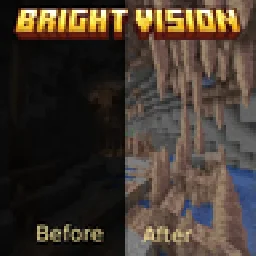
Experience Fullbright in Minecraft with Optifine or Polytone!
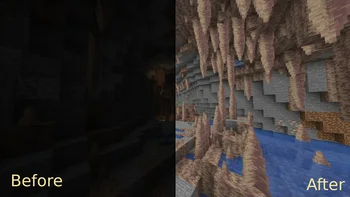
Experience Fullbright in Minecraft with Optifine or Polytone!
Full Light is a texture pack made by sniffercraft34. It supports Minecraft 1.18 – 26.x. It has been downloaded 229,450 times on Modrinth. The last update came out on Oct 26, 2025.
Full Light has had 2 releases on Modrinth since Dec 23, 2024. None of them came out in the past year. The newest is 0.2, released on Oct 26, 2025. It is made for Minecraft 1.21.9 – 26.3. It runs on Minecraft. The download is 780 KB.
| Version | Released | Minecraft | Type |
|---|---|---|---|
0.2 | Oct 26, 2025 | 1.21.9 – 26.3 | Release |
0.1 | Dec 23, 2024 | 1.18 – 1.21.10 | Release |
\
Bright Vision is a texture pack that adds a simple fullbright effect into your game!\
This is similar to the night vision effect, except it is permanent and you don't need potions!\
It works well in rain and thunder, all dimensions!\
Please note this requires OptiFine or Polytone (this means it can work with Sodium!) to work.\
Is this allowed on servers?\
Most servers including Hypixel allow fullbright to be used on their servers, but be sure to check the server's allowed modifications just to be sure.\
\
Enjoy!
Written by sniffercraft34. Read it with pictures on Modrinth.
Download the .zip file from Modrinth. Do not unzip it.
In Minecraft, open Options, then Resource Packs, then Open Pack Folder.
Drop the .zip file into that folder and go back to the game.
Move Full Light to the right-hand list and click Done.
It is made for Minecraft 1.18 – 26.x. On other versions Minecraft marks it as incompatible, but it often still works.
| Resource | Downloads | Versions | Last update | Price |
|---|---|---|---|---|
| Full Lightthe one you looked at | 229K | 1.18 – 26.x | Oct 26, 2025 | Free |
| Fullbright UBworldresourcepack | 12.3M | 1.19 – 26.x | Sep 19, 2026 | Free |
 Spunky PVP Texture Packspunkyinsaan | 2.1M | 1.16 – 26.x | Jan 24, 2025 | Free |
 Short SwordsOculie | 194K | 1.20 – 26.x | Jun 17, 2026 | Free |
Yes. Full Light supports Minecraft 26.x. All supported versions: 26.x, 1.21, 1.20, 1.19, 1.18.
Yes. Full Light is free to download from Modrinth.
Yes. The last update came out in the past day.
The closest ones are Fullbright UB, Spunky PVP Texture Pack and Short Swords. Compare all alternatives
Fullbright UBTexture packs · 1.19 – 26.xExperience Fullbright UB in Sodium, Optifine and Vanilla
Spunky PVP Texture PackTexture packs · 1.16 – 26.xA custom PvP texture pack by Spunky Insaan, designed to enhance your Minecraft PvP & SMP experience.
Short SwordsTexture packs · 1.20 – 26.xExperience a clearer view and smoother swings!
 Better BedwarsTexture packs · 1.8
Better Bedwars is a texture pack that simplifies your experience while still keeping the original look and feel of Minecraft. The aim is to simplify your…
 PhoenixPVPTexture packs · 1.21 – 26.x
PhoenixPVP adds custom textures and visuals to enhance your Minecraft PvP experience. And Some Quality of Life stuff for the best gameplay.
 Crosshair v3Texture packs · 1.8 – 26.x
Simple crosshair to enhance the PvP experience.
Log in to leave a review.