
 WVP ShaderShaders · 1.16 – 26.x
Enhance your Minecraft with vibrant colors, warm lighting, and smooth performance. The ultimate Vanilla+ experience.
Free4,140 downloads
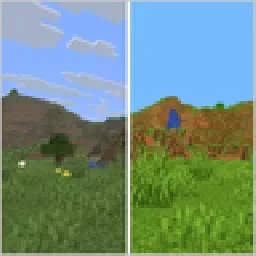
Enhance Minecraft with vivid, vibrant colors - a simple color grading shader.
Opens Modrinth · 7,469 downloads there


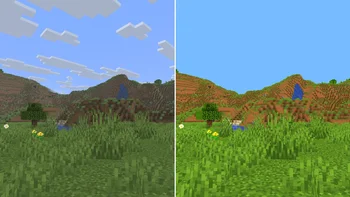
Enhance Minecraft with vivid, vibrant colors - a simple color grading shader.
Vividness is a shader pack made by keumsung. It supports Minecraft 1.16 – 26.x. It has been downloaded 7,469 times on Modrinth. The last update came out on Nov 9, 2026.
The newest is 1.0, released on Nov 2, 2026. It is made for Minecraft 1.16.5 – 26.3. It runs on Iris. The download is 5 KB.
| Version | Released | Minecraft | Type |
|---|---|---|---|
1.0 | Nov 2, 2026 | 1.16.5 – 26.3 | Release |
Vividness is a simple color correction shader that makes Minecraft's colors brighter and more vivid.
Vividness only adjusts colors and doesn't add shadows or other heavy effects.
MIT License
Written by keumsung. Read it with pictures on Modrinth.
Install Iris (with Sodium) or OptiFine for your Minecraft version: shaders need one of them.
Download the .zip file from Modrinth. Do not unzip it.
In Minecraft, open Options, then Video Settings, then Shader Packs, and click Open Shader Pack Folder.
Drop the .zip file into that folder, pick Vividness in the list and click Done.
Shaders are heavy on the graphics card. If the game gets slow, pick a lower profile in the shader settings.
| Resource | Downloads | Versions | Last update | Price |
|---|---|---|---|---|
| Vividnessthe one you looked at | 7,469 | 1.16 – 26.x | 1 day ago | Free |
| WVP Shaderwoztgaming | 4,140 | 1.16 – 26.x | Jul 28, 2026 | Free |
 Negative Colorsmarctgamer | 7,620 | 1.8 – 1.21 | Sep 1, 2024 | Free |
 Found VHS Tapeskyreyreyes | 7,039 | 1.16 – 1.21 | Aug 13, 2026 | Free |
Yes. Vividness supports Minecraft 26.x. All supported versions: 26.x, 1.21, 1.20, 1.19, 1.18, 1.17, 1.16.
Yes. Vividness is free to download from Modrinth.
Yes. The last update came out in the past day.
The closest ones are WVP Shader, Negative Colors and Found VHS Tapes. Compare all alternatives
WVP ShaderShaders · 1.16 – 26.xEnhance your Minecraft with vibrant colors, warm lighting, and smooth performance. The ultimate Vanilla+ experience.
Negative ColorsShaders · 1.8 – 1.21Transform Minecraft with the Negative Color shader,
Found VHS TapesShaders · 1.16 – 1.21Found VHS Tapes is a liminal horror Minecraft shader featuring 11 atmospheric profiles and customizable VHS/CRT effects, fog, lighting, color grading, camera…
 GlamorousSP ShadersShaders · 1.21 – 26.x
A vibrant and customizable shader pack focused on beautiful lighting, rich colors, and smooth performance. GlamorousSP is inspired from Mellow Shader by TheCMK.
 AxolotlShadersShaders · 1.20 – 1.21
AxolotlShaders is a visually enhanced Minecraft shader project focused on delivering vibrant colors, smooth lighting, and a clean, natural look while staying…
 Vivid VisualsShaders · 1.20 – 26.x
Vivid Visuals is a vanilla-friendly Minecraft Java shader pack inspired by Vibrant Visuals
Log in to leave a review.