
 i hate shadowsShaders · 1.8 – 26.x
Fullbright shader, banished every shadow.👋 You’re welcome.
Free37,896 downloads
A lightweight Minecraft shader with only essential VFX to simulate realistic effects such as shadows, rays, etc., to run on integrated GPUs.
Opens Modrinth · 5,854 downloads there

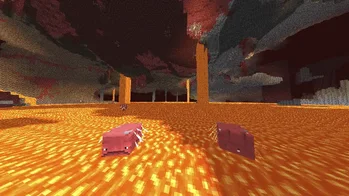

A lightweight Minecraft shader with only essential VFX to simulate realistic effects such as shadows, rays, etc., to run on integrated GPUs.
ESSENTIALS Shader is a shader pack made by itsbuildermc. It supports Minecraft 1.17 – 26.x. It has been downloaded 5,854 times on Modrinth. The last update came out on Jun 13, 2026.
The newest is latest, released on Jun 13, 2026. It is made for Minecraft 1.17 – 26.3. It runs on Iris and Optifine. The download is 22 KB.
| Version | Released | Minecraft | Type |
|---|---|---|---|
latest | Jun 13, 2026 | 1.17 – 26.3 | Release |
ESSENTIALS Shader is open source. Its newest release on GitHub is v2.0.0-beta, published on Jun 11, 2026.
Before that: v1.0.0-indev (Jun 1, 2026).
There are lots of lightweight shaders, and they are said to preserve FPS well, but ESSENTIALS shader takes it to the BARE BONES next level with fake sunrays/moonrays, semi-realistic water, depth-based fogs, and much more. Yeah, it's probably the worst shader you have come across, but it will surely do what it was made for.
Lighting
Shadows
Atmosphere
Water
The shader was tested on a HP Pro office computer from 2012 to prove the point of it's performance.
Component · Spec · Dimension · 8 chunks · 12 chunks
CPU · Intel Core i5-3340 @ 3.10GHz · Overworld · 76 fps · 64 fps
RAM · 4 GB DDR3 (1 GB allocated) · Nether · 63 fps · 55 fps
GPU · Intel HD Graphics 2500 (iGPU) · End · 119 fps · 102 fps
Compatible with OptiFine 1.17+ and Iris (Higly Reccomended) 1.17+. Click to visit the download page.
Written by itsbuildermc. Read it with pictures on Modrinth.
Install Iris (with Sodium) or OptiFine for your Minecraft version: shaders need one of them.
Download the .zip file from Modrinth. Do not unzip it.
In Minecraft, open Options, then Video Settings, then Shader Packs, and click Open Shader Pack Folder.
Drop the .zip file into that folder, pick ESSENTIALS Shader in the list and click Done.
Shaders are heavy on the graphics card. If the game gets slow, pick a lower profile in the shader settings.
| Resource | Downloads | Versions | Last update | Price |
|---|---|---|---|---|
| ESSENTIALS Shaderthe one you looked at | 5,854 | 1.17 – 26.x | Jun 13, 2026 | Free |
| i hate shadowsxsoras | 38K | 1.8 – 26.x | Sep 12, 2026 | Free |
 LumeauNeoz30 | 15K | 1.16 – 26.x | Jun 13, 2026 | Free |
 Simple Shader Onenercone | 7,223 | 1.19 | Jul 26, 2023 | Free |
Yes. ESSENTIALS Shader supports Minecraft 26.x. All supported versions: 26.x, 1.21, 1.20, 1.19, 1.18, 1.17.
Yes. ESSENTIALS Shader is free to download from Modrinth.
Yes. The last update came out in the past day.
The closest ones are i hate shadows, Lumeau and Simple Shader One. Compare all alternatives
i hate shadowsShaders · 1.8 – 26.xFullbright shader, banished every shadow.👋 You’re welcome.
LumeauShaders · 1.16 – 26.xA shader adding shadows, light and waves, while being lightweight to allow older hardware to run at a good number of fps.
Simple Shader OneShaders · 1.19Is there anyone who wants a simple shadow? This shader is lightweight because it only puts round shadows. It’s not perfect, but you can enjoy a different…
 Miniature ShaderShaders · 1.8 – 26.x
Extremely lightweight with shadows and reflections
 Vanilla EnhancedShaders · 1.17 – 26.x
A lightweight shader for realistic lighting & better visuals.
 Vanilish ShadersShaders · 1.8 – 1.21
A lightweight shader that adds a realistic, warm atmosphere and soft lighting to Minecraft while maintaining the vanilla style.
Log in to leave a review.