
 Simple Rich Discord PresenceMods · 1.16 – 26.x
Simple Discord Rich Presence
Free7,582,951 downloads
Expertly edit your books with rich formatting options, page utilities and more!
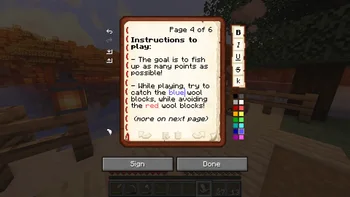
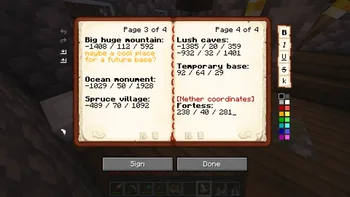
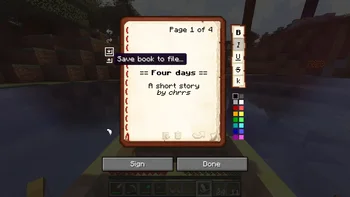
Expertly edit your books with rich formatting options, page utilities and more!
Scribble is a resource made by chrrs. It supports Minecraft 1.20 – 26.x. It has been downloaded 3,171,544 times on Modrinth. The last update came out on Oct 9, 2026.
Scribble has had 115 releases on Modrinth since Jun 18, 2024. 15 of them came out in the past year. The newest is 2.1.0+mc26.3, released on Oct 9, 2026. It is made for Minecraft 26.3. It runs on Fabric, NeoForge and Quilt. The download is 311 KB.
| Version | Released | Minecraft | Type |
|---|---|---|---|
2.1.0+mc26.3 | Oct 9, 2026 | 26.3 | Release |
2.1.0+mc26.1.2 | Oct 9, 2026 | 26.1, 26.1.1, 26.1.2 | Release |
2.1.0-beta1+mc26.3 | Sep 18, 2026 | 26.3 | Beta |
2.1.0-beta1+mc26.2 | Jun 16, 2026 | 26.2 | Beta |
2.1.0-beta1+mc26.1.2 | Jun 16, 2026 | 26.1, 26.1.1, 26.1.2 | Beta |
Scribble is open source. Its newest release on GitHub is v2.1.0, published on Oct 9, 2026.
Read more on Modrinth.
Before that: v2.1.0-beta1 (Sep 18, 2026), v2.0.2 (Apr 30, 2026).
Scribble is a client-side mod to make editing books easier! It comes with a bunch of quality-of-life features,
allowing you to precisely manage pages in your book, format text using colors and various modifiers, save/load your
books to keep a backup, and much more! And the best thing is, **everyone else on the server can see this, even if they
don't have the mod themselves!**
By default, Scribble intentionally keeps very close to vanilla. It doesn't change any behaviour, but takes the intended
book experience, and just sprinkles some nice-to-haves on top. Every single feature is configurable, Scribble gives
you
options when you want it to, and stays out of your way when you need it to.
But there's more! Scribble comes with lots of little features here and there:
toggle this setting in Scribble! This still works seamlessly with every other feature (even lecterns!).
copy-pasting pages.
a page forward and go all the way to the end!
every other GUI in the game. Scribble fixes that!
there, and allow you to edit them.
NOTE: Some features (importantly: 2-page book viewing) are not available for older versions! While the mod does still work for versions such as 1.20.1 and 1.21.1, no new features will be released for them.
NO AI WAS USED IN THE DEVELOPMENT OF THIS MOD. SUPPORT HUMAN ARTISTS.
Written by chrrs. Read it with pictures on Modrinth.
This mod runs only on your own game. Servers do not need it, so you can use it on any server.
Install Fabric, Quilt, Forge and NeoForge for Minecraft 1.20 – 26.x.
Download the .jar file from Modrinth and put it in the mods folder of your .minecraft directory.
Start Minecraft with the Fabric profile.
With the CraftRank Launcher you can skip these steps: open Mods, search for Scribble and click Install.
| Resource | Downloads | Versions | Last update | Price |
|---|---|---|---|---|
| Scribblethe one you looked at | 3.2M | 1.20 – 26.x | Oct 9, 2026 | Free |
| Simple Rich Discord PresenceSunekaer | 7.6M | 1.16 – 26.x | Sep 19, 2026 | Free |
 Scholarmortuusars | 2.9M | 1.20 – 26.x | 6 days ago | Free |
 chance of polyester spiderman edit jumpscarerawe21 | 9 | 1.21 | Sep 19, 2026 | Free |
Yes. Scribble supports Minecraft 26.x. All supported versions: 26.x, 1.21, 1.20.
Yes. Scribble is free to download from Modrinth.
Client-side. Scribble goes in your own mods folder and works on any server, including servers without mods.
Yes. The last update came out in the past day.
The closest ones are Simple Rich Discord Presence, Scholar and chance of polyester spiderman edit jumpscare. Compare all alternatives
Simple Rich Discord PresenceMods · 1.16 – 26.xSimple Discord Rich Presence
ScholarMods · 1.20 – 26.xTwo-page book editing/viewing, easy formatting, colored books, literate mobs and other book-related improvements
chance of polyester spiderman edit jumpscareMods · 1.21theres 1/10000 chance that a polyester spiderman edit will appear on your screen
 No Chat ReportsMods · 1.19 – 26.x
Makes chat unreportable (where possible)
 Essential ModMods · 1.8 – 26.x
Enhance your Minecraft with one simple mod. Host worlds for free, chat with friends, and so much more!
 More Chat HistoryMods · 1.16 – 26.x
Increases the maximum length of chat history.
Log in to leave a review.