
 Xaero's MinimapMods · 1.8 – 26.x
Displays a map of the nearby world terrain, players, mobs, entities in the corner of your screen. Lets you create waypoints which help you find the locations…
Free120,043,097 downloads

Makes CEE pantographs interactable even when assembled on trains
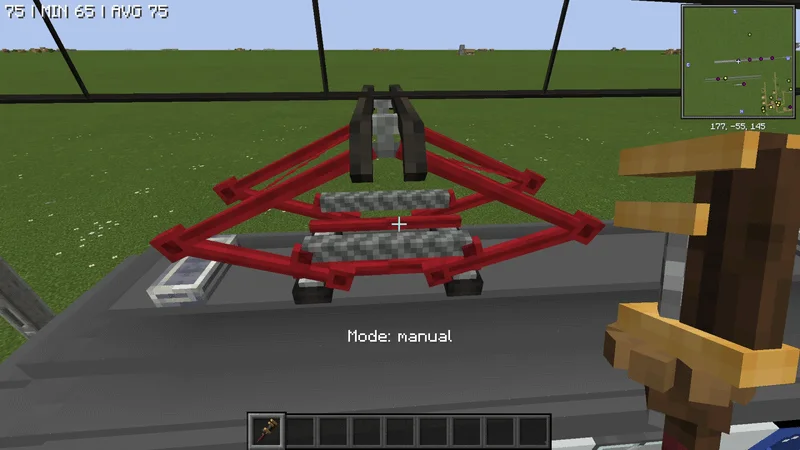
Makes CEE pantographs interactable even when assembled on trains
Create: Interactive pantographs is a resource made by Fake_enderpro. It supports Minecraft 1.21. It has been downloaded 9 times on Modrinth. The last update came out on Oct 11, 2026.
The newest is 1.0.0, released on Oct 11, 2026. It is made for Minecraft 1.21.1. It runs on NeoForge. The download is 331 KB.
| Version | Released | Minecraft | Type |
|---|---|---|---|
1.0.0 | Oct 11, 2026 | 1.21.1 | Release |
Create: Interactive pantographs is open source. Its newest release on GitHub is 1.0.0, published on Oct 11, 2026.
No content.
Normally a CEE pantograph can't be interacted with when assembled in a contraption, this mod makes them interactable and also adds some features and customization
Pantograph Modes
You can switch between these modes with a wrench or by shift-right clicking the pantograph
Written by Fake_enderpro. Read it with pictures on Modrinth.
This mod is needed on both the server and every player who joins.
Install NeoForge for Minecraft 1.21.
Add the mods it needs: Create and Create: Electro Energetics.
Download the .jar file from Modrinth and put it in the mods folder of your .minecraft directory.
Start Minecraft with the NeoForge profile.
With the CraftRank Launcher you can skip these steps: open Mods, search for Create: Interactive pantographs and click Install.
| Resource | Downloads | Versions | Last update | Price |
|---|---|---|---|---|
| Create: Interactive pantographsthe one you looked at | 9 | 1.21 | Oct 11, 2026 | Free |
| Xaero's Minimapthexaero | 120M | 1.8 – 26.x | 16 days ago | Free |
 Create: Steam 'n' RailsIThundxr | 13.5M | 1.18 – 1.20 | Aug 27, 2026 | Free |
 Create: Interiorsa0ax | 4.9M | 1.18 – 1.21 | Jan 29, 2026 | Free |
Not yet. The newest version it supports is Minecraft 1.21.
Yes. Create: Interactive pantographs is free to download from Modrinth.
Both. The server and every player need Create: Interactive pantographs installed.
Yes: Create, Create: Electro Energetics. Install it before Create: Interactive pantographs.
Yes. The last update came out in the past day.
The closest ones are Xaero's Minimap, Create: Steam 'n' Rails and Create: Interiors. Compare all alternatives
Xaero's MinimapMods · 1.8 – 26.xDisplays a map of the nearby world terrain, players, mobs, entities in the corner of your screen. Lets you create waypoints which help you find the locations…
Create: Steam 'n' RailsMods · 1.18 – 1.20Adding depth to Create's rail network & steam system
Create: InteriorsMods · 1.18 – 1.21A complement to the Create mod that adds new furniture.
 Create Stuff 'N AdditionsMods · 1.18 – 1.21
🧲 Dominate your environment with Create technology
 Create Crafts & AdditionsMods · 1.18 – 1.21
Create Crafts & Additions extends Create and acts as a bridge between electricity and kinetic energy
 Create AeronauticsMods · 1.21
Build anything from airships to planes and cars!
Log in to leave a review.