
 Bundle TabMods · 1.21 – 26.x
Manage your Bundle in a way that feels just like vanilla Minecraft.
Free8 downloads
I've tried to make a progression mod. It's just a mod that feels can improve my own game in my like to avoiding factory farms behind.
Progression is a resource made by sumidesu. I've tried to make a progression mod. It's just a mod that feels can improve my own game in my like to avoiding factory farms behind.
It supports Minecraft 26.x. It has been downloaded 2 times on Modrinth. The last update came out on Oct 30, 2026.
The newest is 1.1.3, released on Oct 29, 2026. It is made for Minecraft 26.2. It runs on NeoForge. The download is 247 KB.
| Version | Released | Minecraft | Type |
|---|---|---|---|
1.1.3 | Oct 29, 2026 | 26.2 | Release |
I've tried to make a mod that make me to avoid the factory farms behind. Improving something that I thought make sense.
What I've changed :
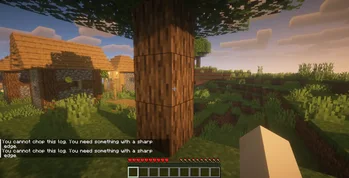
The initial progress. Instead of directly punch the log. Now we cannot do that and should finding a sharp edge that could be sharp enough to chop down the trees,
Chopped down a tree, mining and even fight the enemy is no longer use Wooden Tools. It's just not that sharp enough!
Die is not as punishing with leaving our "inventory" behind. No more disappear into a thin air.
Improving some animals drops so I could respect their life more.
Improving some chest loot.
Written by sumidesu. Read it with pictures on Modrinth.
This mod is needed on both the server and every player who joins.
Install NeoForge for Minecraft 26.x.
Download the .jar file from Modrinth and put it in the mods folder of your .minecraft directory.
Start Minecraft with the NeoForge profile.
With the CraftRank Launcher you can skip these steps: open Mods, search for Progression and click Install.
| Resource | Downloads | Versions | Last update | Price |
|---|---|---|---|---|
| Progressionthe one you looked at | 2 | 26.x | 11 days ago | Free |
| Bundle TabKERS | 8 | 1.21 – 26.x | 26 days ago | Free |
 Entity Texture FeaturesTraben | 110.9M | 1.16 – 26.x | 7 days ago | Free |
 Load My ResourcesKeksuccino | 4.5M | 1.12 – 1.20 | Sep 24, 2023 | Free |
Yes. Progression supports Minecraft 26.x. All supported versions: 26.x.
Yes. Progression is free to download from Modrinth.
Both. The server and every player need Progression installed.
Yes. The last update came out in the past day.
The closest ones are Bundle Tab, Entity Texture Features and Load My Resources. Compare all alternatives
Bundle TabMods · 1.21 – 26.xManage your Bundle in a way that feels just like vanilla Minecraft.
Entity Texture FeaturesMods · 1.16 – 26.xEmissive, Random & Custom texture support for entities in resourcepacks just like Optifine but for Fabric
Load My ResourcesMods · 1.12 – 1.20Load resources on game start, like a resource pack, but enabled by default.
 Joy of PaintingMods · 1.12 – 26.x
This mod lets you craft a blank canvas and a palette, with which you can paint your own pictures and hang them on a wall like the vanilla paintings.
 Just HammersMods · 1.18 – 26.x
Adds hammers to the game that are able to mine in a 3x3, 3x3x3, 5x5x1, 5x5x3 and finally a 5x5x5! They're pretty awesome.
 PC TerminalMods · 1.21
Typing commands in Minecraft is just like using a terminal! Supports /cmd, /shell, and /terminal, and automatically adapts to Windows, Linux, and macOS.
Log in to leave a review.