Newon GoogleMake CraftRank a preferred source in Google SearchAdd on Google ›
CraftRank SitesA free website and store for your server Make yours ›AshlarFree server software built on Paper, with DDoS and backdoor protection See Ashlar ›Security RadarA free check of your server's login, anti-bot and proxy settings, only with your OK See how it works ›CommunityAsk questions, share builds and find people to play with Join the forum ›
Resources / Mods / Among Us Craft 3D

Among Us Craft 3D

A full social-deduction party game in Minecraft: tasks, impostors, meetings, voting, vents, sabotage, cameras and roles. Unofficial fan-made.

ModsFree1.21
by gw_brother · listed from Modrinth
Download ›

Direct download from Modrinth · 3 downloads

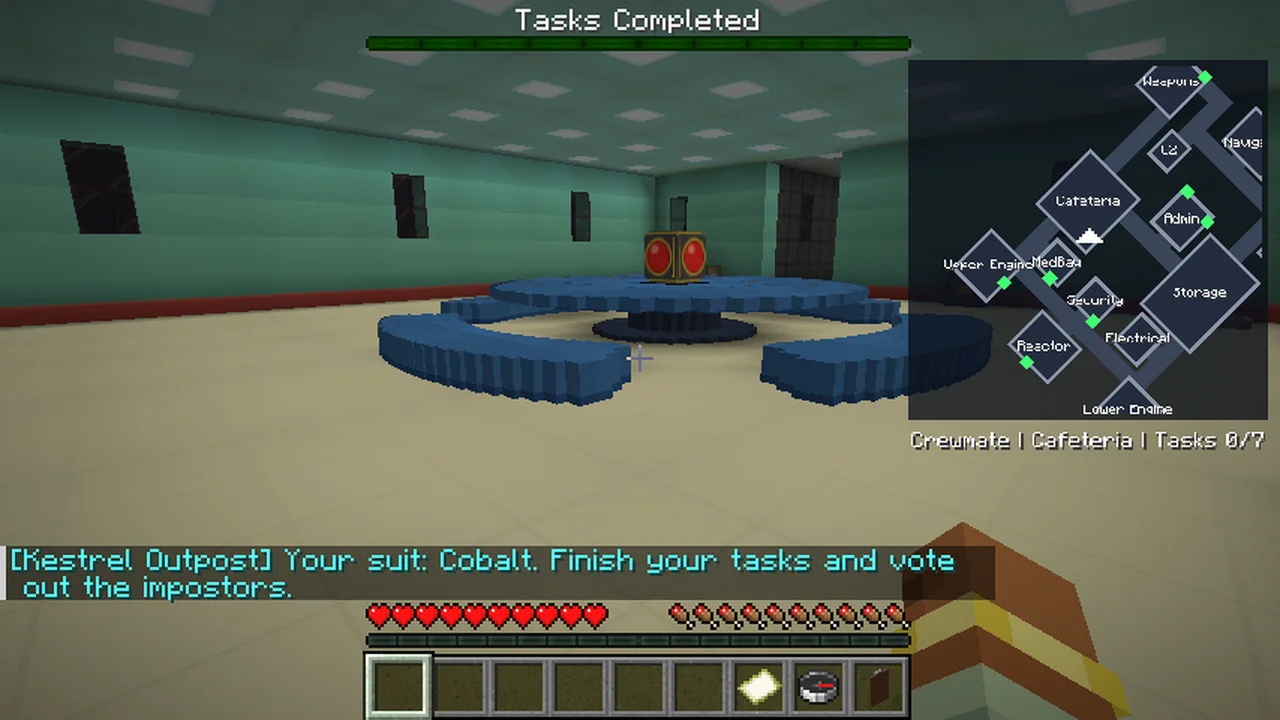
Among Us Craft 3D screenshot 1

What it does

Among Us Craft 3D is a mod made by gw_brother. A full social-deduction party game in Minecraft: tasks, impostors, meetings, voting, vents, sabotage, cameras and roles. Unofficial fan-made.

It supports Minecraft 1.21. It has been downloaded 3 times on Modrinth. The last update came out on Nov 11, 2026.

Supported versions

1.21

Release history

The newest is 2.1, released on Nov 11, 2026. It is made for Minecraft 1.21.11. It runs on Fabric. The download is 2.9 MB.

VersionReleasedMinecraftType
2.1Nov 11, 20261.21.11Release
Description from the author on Modrinth

Among Us Craft

A complete social-deduction party game inside Minecraft. Crewmates run around a hand-built space station finishing tasks. Hidden impostors sabotage, vent and kill. Then everyone meets around the table, argues, and votes someone out.

Made by GW Brother for Fabric 1.21.11. Play it with friends on a server or a LAN/hosted world (4 to 15 players). Bots can fill empty seats.

Unofficial fan-made mod. Not affiliated with, endorsed by or connected to Innersloth or the Among Us game.

Features

  • Kestrel Outpost map with 13 fully furnished 3D rooms: Cafeteria, Upper and Lower Engine, Reactor, Security, MedBay, Electrical, Storage, Admin, O2, Navigation, Weapons and Communications.
  • 8 task types plus 4 sabotage repairs, each with its own drawn panel instead of a chest menu: card swipe (mouse drag at the right speed), wiring, start sequence, matching cores, debris chute, refuelling, body scan and the asteroid cannon.
  • Diesel refuelling: fill a red diesel can at the pump in Storage, then carry it to an engine.
  • Visual tasks: the body scan, cannon lasers and debris dump can be seen by everyone, so they prove who is a crewmate.
  • Impostor kills with a kill animation, bodies left on the floor, and a kill cooldown.
  • Vents: 5 separate vent networks with a vent timer and a peek view.
  • Sabotage from a clickable map: lights out (real darkness that fullbright cannot remove), comms, reactor meltdown, oxygen and door locks.
  • Live security cameras: 4 corridor cameras viewed from a gaming desk in Security.
  • Meetings: emergency button and body reports (G key), discussion and voting screens, confirm ejects, an ejection cutscene, and a list of who died since the last meeting.
  • Roles with counts and chances: Impostor, Viper, Shapeshifter, Phantom, Scientist (live heartbeat vitals), Engineer, Tracker (stick a device on someone up close), Detective (question suspects in a notebook), Judge, Noisemaker and Guardian Angel.
  • Ghosts keep doing their own tasks, can teleport to players, Guardian Angels can shield the living, and dead impostors can still sabotage.
  • AFK vote kick: AFK players are marked at meetings and can be vote-kicked (70% of players, or one operator).
  • Clear HUD: a rotating minimap with your remaining tasks listed under it, and every timer (kill cooldown, shapeshift, poison, vanish, vents, abilities) shown above the hotbar.
  • Fair play: skins are locked for the whole match, name tags can be turned on or off and never show through walls, task sounds are private, and free-camera mods are blocked.
  • Proximity voice chat support through Simple Voice Chat (optional): only meetings and nearby players can be heard, dead players stay silent, impostors get a private channel.

How to start a match

  1. Everyone joins the same world or server with the mod installed.
  2. Open the settings with /blackout settings: map, impostor count, kill cooldown, task counts, roles, name tags and more.
  3. Start with /blackout start. Everyone is taken to the map, sees their role, and the match begins.
  4. Stop at any time with /blackout stop. Players go back to where they were, with their own items.

Other commands: /blackout maps lists the maps, and /blackout practice starts a solo practice round with a chosen role.

How to play

Crewmates

  • Your remaining tasks are listed under the minimap, and the task book in slot 9 shows them too. Right-click a terminal to start a task.
  • Press G next to a body to report it, or press the emergency button in the Cafeteria to call a meeting.
  • Fix sabotage fast: fuse box for lights, relay for comms, both reactor pads, and both oxygen panels.
  • Use the compass to reopen the voting screen during a meeting.

Impostors

  • Left-click a crewmate with your sword to kill when the cooldown is ready.
  • Right-click a vent to hide and travel. Shift + right-click inside a vent to peek out.
  • Right-click the bulb item to open the sabotage map.
  • Your fellow impostors are outlined in red. Blend in, fake tasks, and win the vote.

Winning: crewmates win by finishing every task or ejecting every impostor. Impostors win when they equal the crew, or when a critical sabotage runs out.

Requirements

  • Minecraft 1.21.11 with Fabric Loader 0.18+ and Fabric API
  • Java 21
  • Every player needs the mod installed, as well as the server or host.
  • Optional: Simple Voice Chat for proximity voice.

Screenshots

See the gallery for every room, the task panels, the security cameras and the map with its vent networks and cameras.

Written by gw_brother. Read it with pictures on Modrinth.

How to install Among Us Craft 3D

  1. This mod is needed on both the server and every player who joins.

  2. Install Fabric for Minecraft 1.21.

  3. Add the mods it needs: Fabric API.

  4. Download the .jar file from Modrinth and put it in the mods folder of your .minecraft directory.

  5. Start Minecraft with the Fabric profile.

  6. Easier: in Prism Launcher or the Modrinth App, search for Among Us Craft 3D in your instance's mods and click Install. It adds the loader and the mods it needs for you.

Full guide: How to install Minecraft mods

Compatibility

Minecraft versions
1.21
Runs on
Fabric
Where it runs
Client and server
Edition
Java
Needs
Fabric API
License
Free to use
Price
Free
Upkeep
Actively updated (Nov 18, 2026)

Among Us Craft 3D compared with similar ones Compare all alternatives

ResourceDownloadsVersionsLast updatePrice
Among Us Craft 3Dthe one you looked at31.216 days agoFree
PCA GamesPixelCreatorsAcademy41.203 days agoFree
OculusAsek338.8M1.16 – 1.20Dec 25, 2024Free
RubidiumAsek35.2M1.16 – 1.20Sep 25, 2023Free

Questions

Does Among Us Craft 3D work on Minecraft 26.x?

Not yet. The newest version it supports is Minecraft 1.21.

Is Among Us Craft 3D free?

Yes. Among Us Craft 3D is free to download from Modrinth.

Is Among Us Craft 3D client-side or server-side?

Both. The server and every player need Among Us Craft 3D installed.

Does Among Us Craft 3D need anything else?

Yes: Fabric API. Install it before Among Us Craft 3D.

Is Among Us Craft 3D still updated?

Yes. The last update came out in the past day.

What are the best alternatives to Among Us Craft 3D?

The closest ones are PCA Games, Oculus and Rubidium. Compare all alternatives

Alternatives to Among Us Craft 3D

PCA GamesMods · 1.20

Eight games for your school Minecraft club, run with one command or built into PCA Puzzle rooms: red light, green light, Block Party, Simon Says, Floor is…

Free4 downloads
ReckonersMods · 26.x

Epic powers, weaknesses and the Reckoners who hunt them. An unofficial Brandon Sanderson fan project.
Free40 downloads
FnafCraftMods · 26.x

A Fnaf mod that is meant to recreate the original FNAF game but in minecraft!

Free33 downloads
Compare all alternatives ›

Reviews

–★★★★★
0 reviews
50
40
30
20
10

Log in to leave a review.