A vanilla datapack library that records a player's movements and replays them with a mannequin (or any other living entity)
Direct download from Modrinth · 0 downloads
Source and ownership. This page was generated automatically from public data that Modrinth provides through its public API. The name, descriptions, images, trademarks and all other content of this project belong to Artyu24 and their respective owners. CraftRank is not the author of this project and is not affiliated with, endorsed or sponsored by its author or by Modrinth.
Hosting and distribution. CraftRank does not host, store, upload or distribute the download files of this project, and no such file is kept on CraftRank's servers. Every download is provided directly by Modrinth from its own servers; the Download button only links to the file there. The license stated on Modrinth is MIT.
Use of public APIs. Modrinth, Hangar (PaperMC) and SpigotMC (through the Spiget API) make their APIs publicly available to third-party websites and applications. Modrinth's Terms of Use give API users a license to download, display and query content through their own services (section “API Usage”), and creators who publish on Modrinth grant Modrinth and its licensees the right to display and distribute their content to third parties (section “User Contributions”). CraftRank uses these APIs in line with the platforms' published rules: it identifies itself in every request and respects their rate limits.
No warranty. The information on this page is provided "as is", without any warranty. Downloading and using this project is at your own risk and subject to the license and terms of its author.
Copyright notices (DMCA). Only the copyright owner or someone authorised to act for them may file a notice, and it must come from a person of legal age or from their parent or legal guardian. A valid notice sent to abuse@craftrank.org must contain: the link of this page; the work claimed to be infringed; your full name, postal address, phone number and e-mail; a statement that you believe in good faith that the use is not authorised by the owner, its agent or the law; a statement, under penalty of perjury, that the notice is accurate and that you are the owner or authorised to act for them; and your physical or electronic signature. Incomplete notices are not processed. Valid notices are acted on within 48 hours, with no need to go through Google.
False notices. Anyone who knowingly misrepresents that material is infringing is liable for the damages caused, including costs and attorneys' fees (17 U.S.C. § 512(f)). Notices filed in bad faith or by someone who does not hold the rights are kept on record and will be contested.
Survirec is a resource made by Artyu24. A vanilla datapack library that records a player's movements and replays them with a mannequin (or any other living entity).
It supports Minecraft 26.x. The last update came out on Nov 23, 2026.
The newest is 1.2.0, released on Nov 22, 2026. It is made for Minecraft 26.2. It runs on Data pack. The download is 482 KB.
| Version | Released | Minecraft | Type |
|---|---|---|---|
1.2.0 | Nov 22, 2026 | 26.2 | Release |
Survirec is open source. Its newest release on GitHub is Survirec 1.2.0, published on Nov 21, 2026.
No content.
Before that: v1.1.0 (Nov 21, 2026), Survirec 1.0.0 (Nov 20, 2026).
A vanilla datapack library that records a player's movements and replays them with a mannequin (or any other living entity).
No mods, no resource pack: only commands.
📦 Embedded library: package it inside your datapack rather than shipping it separately. Several datapacks can embed different versions of Survirec in the same world: only the newest one runs (see Conventions).
Developed for Minecraft Java 26.2. Depends on Bookshelf Block (bs.block), already included in Survirec_datapack_with_libs.zip.
Made by Artyu24.
Everything goes through the function tags #survirec:v1/.... Each one takes a single with compound, and every field inside is optional.
function #survirec:v1/start {with:{name:"walk",every:4}}
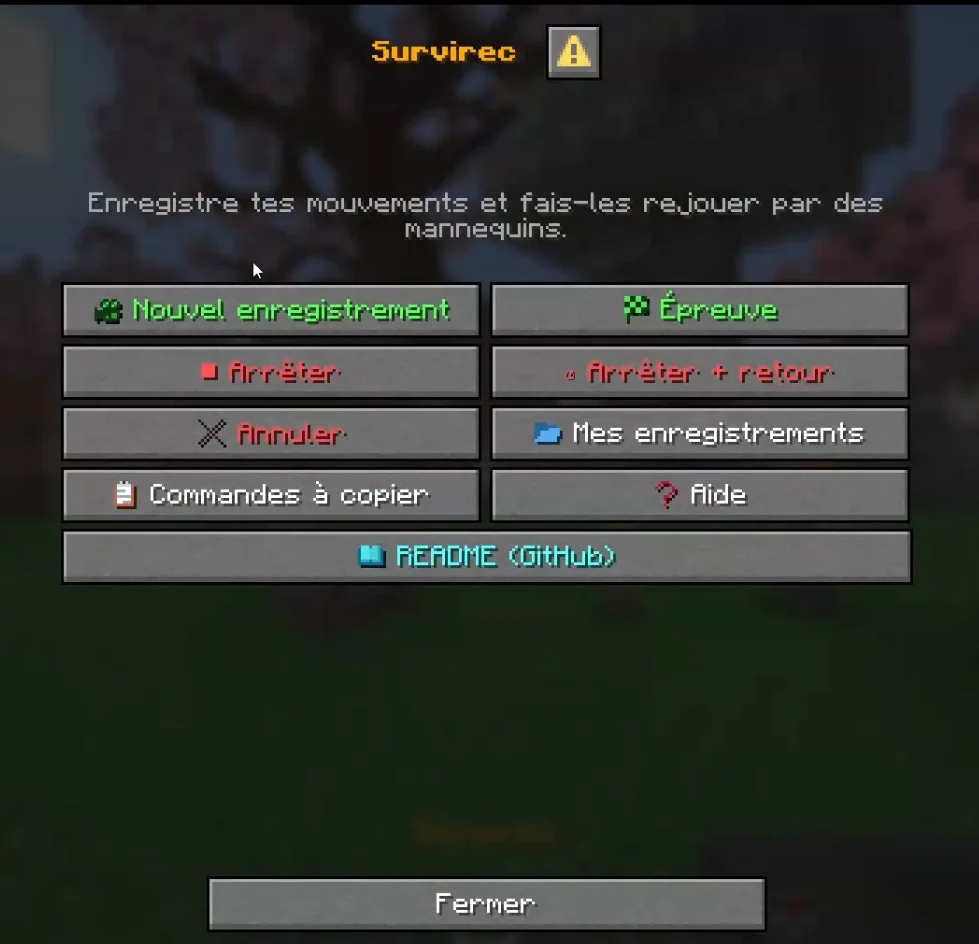
You get a stop item (right-click to stop, sneak + right-click to also walk back to the start) and red buttons in the chat.
When the recording ends, click the yellow button in the chat to copy the playback command, then paste it in a command block.
Run function #survirec:v1/help (as a player) for the in-game help, one dialog per topic with copy buttons.
Function tag · with fields (defaults)
execute as @p run function #survirec:v1/start {with:{name:"walk",every:4}}
execute positioned 10 64 10 run function #survirec:v1/play {with:{name:"walk",loop:1,speed:150}}
execute as @p run function #survirec:v1/challenge {with:{id:"a",time:5,group:"room1"}}
function #survirec:v1/kill {with:{tag:"door"}}
Following an NPC that stops when you get more than 5 blocks away: function #survirec:v1/play {with:{name:"npc",range:5}}.
Only the #survirec:v1/... function tags are public. Everything under survirec:v/ (for example survirec:v1.2.0/) is internal and changes with every version.
execute as @p run function #survirec:v1/menu_item
Gives the Survirec item. Right-click it to open a menu: start a recording, prepare a challenge command (any duration, copied for a command block), stop or cancel it, list your recordings (play one where you stand, copy its command again, delete it), get the useful commands to copy, open the in-game help or this README.
The menu is also in the pause screen, under the Smithed Data Packs list.
Every finished recording is kept in the world under its name: #survirec:v1/play {with:{name:"walk"}} replays it without the copied data.
The item is a camera head (minecraft-heads.com, Custom Head ID 120246). To use another head, paste its base64 textures value in MENU_HEAD_TEXTURE (user/menu.py) and rebuild (empty = spyglass look).
The menu and every chat button run /function, so they only work for operators. A non-operator who gets the item can open the menu but no button does anything.
Dialogs are only loaded when the world or server starts: after updating the datapack, restart instead of /reload.
The command copied after a recording starts with these fields. Edit them before running the command block.
Field · Meaning
name · Sequence name (letters, digits, _)
pos · Where the entity appears. Default: where you started recording. "~ ~ ~" is the center of the command block, "~ ~-0.5 ~" the floor it stands on
entity · minecraft:mannequin (default) or any living entity
size · Scale. 1 normal, 0.5 half, 2 double
loop · 1 loop, 0 play once and stay, 2 play once and disappear (no death animation, nothing dropped)
redstone · 1: at the end of every loop, a redstone block is placed 2 blocks above the command block that started the playback (one block gap, so it does not power the launching command block again), and removed 4 ticks later (a pulse, so a command block placed right next to it fires every time). Nothing is placed if that spot is not empty. With a group, at the end of every group cycle. Default 0
restore · World restoring: 1 at every new loop (default), 2 also when the entity ends (loop 0 or 2), 0 never. kill restores too unless 0
hit_players · 1: the entity's hits also damage players (default 0)
speed · Percent. 100 normal
delay · Start delay in ticks, to desynchronize several entities
range · Pause distance in blocks for this playback: the entity only moves while a player is within range blocks of it. 0 (default) uses the global range (#survirec:v1/range, 128 by default)
tag · Triggering the block again replaces the entity with this tag. The tag is global to the world: use a unique one per build, otherwise two copies of a build erase each other's entities
group · Group name. Entities of the same group start and finish together (see below). loop then applies to the whole group
group_radius · Distance (blocks, default 50) within which an entity joins an existing group of the same name
pose · Empty keeps the recorded poses. Otherwise forced: standing, crouching, swimming, sleeping, fall_flying
skin · Player name (mannequin only)
texture · Base64 textures property value, used if skin is empty
head chest legs feet mainhand offhand · Item overrides. Empty keeps the recorded equipment
data · The recorded sequence (f, n, y, p, d, e, s, a). Do not edit
Every double belongs to a group (main by default). Doubles of the same player and group start and finish together:
a shorter double stays frozen on its last position until the longest one is done, then all of them walk back to their start point (2 seconds) and start again together.
Triggering a challenge again removes the player's previous double for that id and records a new one.
When the time is up, the player is teleported back to where the recording started, facing the same way (tp_back:1, default). With tp_back:0, they stay where they are.
Several players can record at the same time, each one their own sequence or challenge.
With sync:1, the recording does not start immediately: it is armed, and starts exactly when the doubles of the group start a new cycle.
Record a second take while the first one plays, then both start together on every cycle:
execute as @p run function #survirec:v1/challenge {with:{id:"a",time:10,group:"scene1"}}
execute as @p run function #survirec:v1/challenge {with:{id:"b",time:10,group:"scene1",sync:1}}
If the group has no double yet, the recording starts at once. #survirec:v1/abort cancels an armed recording.
While recording, Survirec also notes what you do to the world. During playback, the entity does it again at the same moment and at the same place (relative to its start point):
Action · Recorded when · Played back as
Hit · You hit an entity · Every entity just in front of the entity takes the damage of a player holding the same weapon (fist 1, diamond sword 7...), with knockback. Players only with hit_players:1
Interact · You right-click a button, a lever, a door (not iron), a trapdoor (not iron) or a fence gate · The block is pressed or toggled, so redstone reacts, including through the block the button or lever is attached to (a command block behind it works). Buttons are released after 1 s (stone) or 1.5 s (wood)
Place · You place a block · The same block, with its orientation (doors and beds: both halves)
Break · A block you look at disappears · The block is broken with its particles and sound; nothing is dropped
Pressure plates and tripwires need nothing: the entity walking on them triggers them.
World restoring. Before changing a block, the entity copies it into a hidden dimension of the pack (survirec:vault, a void world no player can reach). With restore:1, every copied block is put back at the start of each loop, in reverse order, so each loop starts from the same world. Only the blocks the entity changed itself are restored: blocks pushed by a piston, flowing water, mobs killed... are not.
Each entity copies a block only once, the first time it changes it: the same copy is used at every loop, so the hidden dimension does not grow while scenes loop. The copies of an entity are freed when it disappears, and #survirec:v1/kill_all resets the whole area.
While recording, your own changes are undone as soon as the recording ends or is interrupted (stop, cancel, disconnection, reset): the entity is the one doing them on playback. Survirec keeps a copy of the 3x3x3 blocks you are looking at, so it knows what was there before you broke, placed or used something.
The dimension is only created when the world or server starts: after installing or updating the datapack, restart instead of /reload.
Limits: hits in the air and blocks broken while not looking at them are not recorded. Enchantments and attack cooldown are not taken into account. Blocks and their full state are read with Bookshelf's block module, so every block of the game version can be placed back.
Challenge groups belong to one player. Classic playbacks (#survir
Written by Artyu24. Read it with pictures on Modrinth.
Yes. Survirec supports Minecraft 26.x. All supported versions: 26.x.
Yes. Survirec is free to download from Modrinth.
Yes. The last update came out in the past day.
Log in to leave a review.
