
Create, customise, and play your own music discs from local MP3 files directly in Minecraft.
Free81 downloads

Any MP3 or OGG on your disk becomes a music disc you can put in a jukebox.
Direct download from Modrinth · 12 downloads
Source and ownership. This page was generated automatically from public data that Modrinth provides through its public API. The name, descriptions, images, trademarks and all other content of this project belong to HooDoo and their respective owners. CraftRank is not the author of this project and is not affiliated with, endorsed or sponsored by its author or by Modrinth.
Hosting and distribution. CraftRank does not host, store, upload or distribute the download files of this project, and no such file is kept on CraftRank's servers. Every download is provided directly by Modrinth from its own servers; the Download button only links to the file there. The license stated on Modrinth is MIT.
Use of public APIs. Modrinth, Hangar (PaperMC) and SpigotMC (through the Spiget API) make their APIs publicly available to third-party websites and applications. Modrinth's Terms of Use give API users a license to download, display and query content through their own services (section “API Usage”), and creators who publish on Modrinth grant Modrinth and its licensees the right to display and distribute their content to third parties (section “User Contributions”). CraftRank uses these APIs in line with the platforms' published rules: it identifies itself in every request and respects their rate limits.
No warranty. The information on this page is provided "as is", without any warranty. Downloading and using this project is at your own risk and subject to the license and terms of its author.
Copyright notices (DMCA). Only the copyright owner or someone authorised to act for them may file a notice, and it must come from a person of legal age or from their parent or legal guardian. A valid notice sent to abuse@craftrank.org must contain: the link of this page; the work claimed to be infringed; your full name, postal address, phone number and e-mail; a statement that you believe in good faith that the use is not authorised by the owner, its agent or the law; a statement, under penalty of perjury, that the notice is accurate and that you are the owner or authorised to act for them; and your physical or electronic signature. Incomplete notices are not processed. Valid notices are acted on within 48 hours, with no need to go through Google.
False notices. Anyone who knowingly misrepresents that material is infringing is liable for the damages caused, including costs and attorneys' fees (17 U.S.C. § 512(f)). Notices filed in bad faith or by someone who does not hold the rights are kept on record and will be contested.
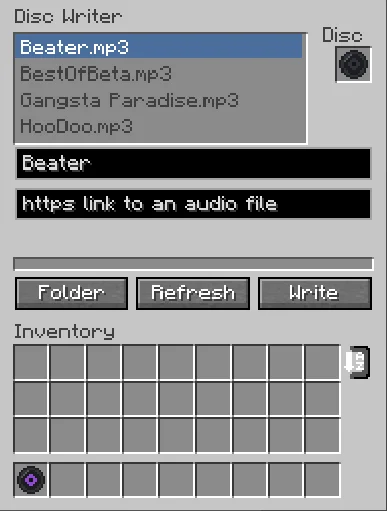
Custom Jukebox Discs is a mod made by HooDoo. Any MP3 or OGG on your disk becomes a music disc you can put in a jukebox.
It supports Minecraft 1.12 – 26.x. It has been downloaded 12 times on Modrinth. The last update came out on Sep 28, 2026.
Custom Jukebox Discs has had 5 releases on Modrinth since Sep 27, 2026. 5 of them came out in the past year. The newest is 0.4.0, released on Sep 28, 2026. It is made for Minecraft 26.1.2. It runs on NeoForge. The download is 724 KB.
| Version | Released | Minecraft | Type |
|---|---|---|---|
0.4.0 | Sep 28, 2026 | 26.1.2 | Beta |
0.4.0 | Sep 28, 2026 | 1.21.1 | Beta |
0.3.0 | Sep 27, 2026 | 1.12.2 | Beta |
0.3.0 | Sep 27, 2026 | 26.1.2 | Beta |
0.3.0 | Sep 27, 2026 | 1.21.1 | Beta |
Any MP3 or OGG on your disk becomes a music disc you can put in a jukebox.
Minecraft 1.21.1 · NeoForge · needs to be on the client and the server · MIT licensed
That is it. The disc is a real music disc from there on: hoppers move it, comparators read it, breaking the jukebox stops the song, walking away makes it quieter.
-
The server decides everything. It re-reads every uploaded file, works out the real length itself, and ignores whatever the client claims about it.
By default only operators can write discs. This trips people up on day one. To open it up:
/customdiscs access mode everyone
/customdiscs access mode allowlist
/customdiscs access allow
/customdiscs access deny
A deny entry beats everything, including operator status.
To see and clean up what people wrote:
/customdiscs tracks list [page]
/customdiscs tracks info
/customdiscs tracks delete
/customdiscs reload
Default limits, all editable in customjukeboxdiscs-server.toml:
File size: 10 MiB
Track length: 10 minutes
Tracks per player: 20
Storage per player: 100 MiB
Storage per server: 2 GiB
Transfer rate: 512 KiB/s per player
Tracks are stored in the world folder under their content hash, so the same song uploaded by five people takes one slot on disk. A player downloads a track once and caches it for that server; listening to it again is free.
Writing from a link
Off by default. Switch on urlUploads.enabled and list the hosts you trust, and players can paste an https link to an audio file instead of using a local file. The server downloads it and puts it through exactly the same checks as an upload.
This is not a streaming mod. It cannot play from YouTube, Spotify or anything like them, and it never will. The link has to point at an actual audio file — your own web space, the Internet Archive, the Free Music Archive, a file you dropped in Discord.
Worth knowing before you install
Written by HooDoo. Read it with pictures on Modrinth.
This mod is needed on both the server and every player who joins.
Install Forge and NeoForge for Minecraft 1.12 – 26.x.
Download the .jar file from Modrinth and put it in the mods folder of your .minecraft directory.
Start Minecraft with the Forge profile.
Easier: in Prism Launcher or the Modrinth App, search for Custom Jukebox Discs in your instance's mods and click Install. It adds the loader and the mods it needs for you.
Full guide: How to install Minecraft mods
| Resource | Downloads | Versions | Last update | Price |
|---|---|---|---|---|
| Custom Jukebox Discsthe one you looked at | 12 | 1.12 – 26.x | Sep 28, 2026 | Free |
| Mp3 Music DiscZazacTTV | 81 | 26.x | Sep 22, 2026 | Free |
 Groovy Mobsinatorcreator | 145 | 26.x | 15 days ago | Free |
 Deltarune Music DiscsMrDiamondDog | 128 | 1.21 | 27 days ago | Free |
Yes. Custom Jukebox Discs supports Minecraft 26.x. All supported versions: 26.x, 1.21, 1.12.
Yes. Custom Jukebox Discs is free to download from Modrinth.
Both. The server and every player need Custom Jukebox Discs installed.
Yes: Sophisticated Backpacks. Install it before Custom Jukebox Discs.
Yes. The last update came out in the past day.
The closest ones are Mp3 Music Disc, Groovy Mobs and Deltarune Music Discs. Compare all alternatives
Create, customise, and play your own music discs from local MP3 files directly in Minecraft.
Groovy MobsMods · 26.xAll mobs will dance when put next to a jukebox.
Deltarune Music DiscsMods · 1.21This mod adds 127 music discs from DELTARUNE to the game! Find the discs under special trees found in forests.
 Playable Record Players for ClutteredMods · 1.21
Cluttered adds beautiful record players, but they don't actually play music discs. This addon fixes that. Every Cluttered record player (all seven colors) and…
 Music MakerMods · 1.13 – 26.x
Music Maker adds music sheets, instruments and other devices to the game for creating and playing music.
 More Armor TrimsMods · 1.20 – 26.x
Adds 13 new armor trims to discover and collect
Log in to leave a review.