
 RHSignItemPlugins · 1.21 – 26.x
Do you want to add a personalized signature to your item? Or maybe rename it? Look no further! ☄️
Free1,463 downloads
A highly customizable plugin that lets players sign their items with custom text. Easily configure signature formats, permissions, messages, filters, and more…
Direct download from Modrinth · 4 downloads
Source and ownership. This page was generated automatically from public data that Modrinth provides through its public API. The name, descriptions, images, trademarks and all other content of this project belong to Blavez and their respective owners. CraftRank is not the author of this project and is not affiliated with, endorsed or sponsored by its author or by Modrinth.
Hosting and distribution. CraftRank does not host, store, upload or distribute the download files of this project, and no such file is kept on CraftRank's servers. Every download is provided directly by Modrinth from its own servers; the Download button only links to the file there. The license stated on Modrinth is GPL-3.0-or-later.
Use of public APIs. Modrinth, Hangar (PaperMC) and SpigotMC (through the Spiget API) make their APIs publicly available to third-party websites and applications. Modrinth's Terms of Use give API users a license to download, display and query content through their own services (section “API Usage”), and creators who publish on Modrinth grant Modrinth and its licensees the right to display and distribute their content to third parties (section “User Contributions”). CraftRank uses these APIs in line with the platforms' published rules: it identifies itself in every request and respects their rate limits.
No warranty. The information on this page is provided "as is", without any warranty. Downloading and using this project is at your own risk and subject to the license and terms of its author.
Copyright notices (DMCA). Only the copyright owner or someone authorised to act for them may file a notice, and it must come from a person of legal age or from their parent or legal guardian. A valid notice sent to abuse@craftrank.org must contain: the link of this page; the work claimed to be infringed; your full name, postal address, phone number and e-mail; a statement that you believe in good faith that the use is not authorised by the owner, its agent or the law; a statement, under penalty of perjury, that the notice is accurate and that you are the owner or authorised to act for them; and your physical or electronic signature. Incomplete notices are not processed. Valid notices are acted on within 48 hours, with no need to go through Google.
False notices. Anyone who knowingly misrepresents that material is infringing is liable for the damages caused, including costs and attorneys' fees (17 U.S.C. § 512(f)). Notices filed in bad faith or by someone who does not hold the rights are kept on record and will be contested.
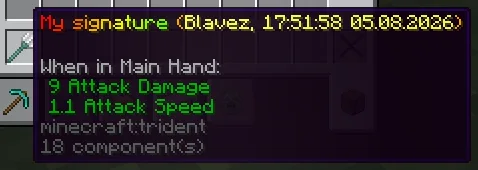
arpSignatures is a plugin for Paper / Spigot servers, made by Blavez. A highly customizable plugin that lets players sign their items with custom text. Easily configure signature formats, permissions, messages, filters, and more…
It supports Minecraft 1.21 – 26.x. It has been downloaded 4 times on Modrinth. That puts it at #96 of the 107 chat plugins listed here. The last update came out on Nov 20, 2026.
arpSignatures has had 2 releases on Modrinth since Aug 5, 2026. 2 of them came out in the past year. The newest is v0.2.0, released on Nov 19, 2026. It is made for Minecraft 26.1.2, 26.2, 26.3. It runs on Folia, Paper and Purpur. The download is 7.1 MB.
| Version | Released | Minecraft | Type |
|---|---|---|---|
v0.2.0 | Nov 19, 2026 | 26.1.2, 26.2, 26.3 | Release |
v0.1.0 | Aug 5, 2026 | 1.21.1 – 26.2 | Release |
The commands named on the Modrinth page of arpSignatures:
/sign/arpsignaturesPermission nodes named there, to give with a plugin like LuckPerms:
arpsignatures.usearpsignatures.reloadarpsignatures.rainbowarpsignatures.sviparpsignatures.viparpSignatures is open source. Its newest release on GitHub is v0.2.0, published on Nov 19, 2026.
Before that: arpSignatures v0.1.0 (Aug 5, 2026).
Players can sign the items they hold with custom text using /sign . ArpSignatures supports customizable formats, permission-based styles, placeholders, and configurable restrictions.
Command · Description · Permission
/sign · Signs the item you are holding. · arpsignatures.use
/arpsignatures reload · Reloads the plugin configuration. · arpsignatures.reload
general.yml
dateFormat: HH:mm:ss dd.MM.yyyy
restrictions:
minCharacters: 3
maxCharacters: 32
itemFilter:
mode: BLACKLIST
materials:
signatureFilter:
mode: BLACKLIST
words: []
regexes: []
permissions:
formats:
default: (, )
arpsignatures.rainbow: (, )
arpsignatures.svip: (, )
arpsignatures.vip: (, )
messages.yml
messages:
invalidUsage: 'Usage: {USAGE}'
noPermission: "You don't have permission to execute this command. ({PERMISSIONS})"
notInRange: 'Your signature ({SIGNATURE}) must be between {MIN} and {MAX} characters long.'
noItem: "You must hold an item to sign it."
blacklistedItem: "You can't sign this item."
invalidSignature: "You can't use that signature."
signed: "Successfully signed your item with '{SIGNATURE}' at {DATE}."
reloading: 'Reloading configuration...'
reloaded: 'Successfully reloaded configuration in {TIME}ms!'
reloadError: 'Failed to reload the configuration. Check the server logs for more information.'
If you encounter a problem or have a suggestion, join our Discord server and create a post in the #issues channel.
Written by Blavez. Read it with pictures on Modrinth.
Make sure your server runs Paper and Spigot on Minecraft 1.21 – 26.x.
Download the .jar file from Modrinth and put it in the plugins folder of your server.
Restart the server. Avoid /reload, many plugins do not handle it well.
Type /plugins in the console: arpSignatures should be listed in green. Its config files are created in the plugins folder on the first start.
Full guide: How to install plugins on a Minecraft server
| Resource | Downloads | Versions | Last update | Price |
|---|---|---|---|---|
| arpSignaturesthe one you looked at | 4 | 1.21 – 26.x | 5 days ago | Free |
| RHSignItemX0R3 | 1,463 | 1.21 – 26.x | Oct 13, 2026 | Free |
 Custom Join MessagesInsprill | 28K | 1.12 – 26.x | Oct 18, 2026 | Free |
 BlockReportsJelly-Pudding | 597 | 1.21 – 26.x | Sep 19, 2026 | Free |
Yes. arpSignatures supports Minecraft 26.x. All supported versions: 26.x, 1.21.
Yes. arpSignatures is free to download from Modrinth.
arpSignatures runs on Paper and Spigot servers.
Yes. arpSignatures is a server plugin: it goes in the plugins folder of the server, not in the mods folder of a player's game.
Yes. The last update came out in the past day.
The closest ones are RHSignItem, Custom Join Messages and BlockReports. Compare all alternatives
RHSignItemPlugins · 1.21 – 26.xDo you want to add a personalized signature to your item? Or maybe rename it? Look no further! ☄️
Custom Join MessagesPlugins · 1.12 – 26.xWelcome players with first-join, join, and quit messages, publicly or privately, via Chat, Titles, Action Bars, Boss Bars, and Sounds. Permission-based and…
BlockReportsPlugins · 1.21 – 26.xPrevents chat reporting by neutralising Minecraft's chat signature system and blocking report-related functionality.
 UltraChatPlugins · 1.20 – 26.x
Rank formats, channels, private messages and a spam, caps and ad filter. Available in 5 languages.
 zChatPlugins · 1.21 – 26.x
Chat formatting per rank, a filter that's hard to dodge, mentions, private messages and anti-spam, in one light plugin.
Private messages with custom formats, sounds, an action bar, ignore, a PM toggle and social spy.
Log in to leave a review.