

Ashlar is free, open source Minecraft server software built on Paper. Java Edition players from 1.8 to 26.x and Bedrock players join the same world, and the protection most servers buy as separate plugins (anti-bot, connection floods, exploit fixes, plugin backdoor checks, login for offline servers) runs inside the server itself.
It is made by the CraftRank team, it is GPL-3.0, and your Paper, Spigot and Bukkit plugins keep working. The current build is Ashlar 26.2 (build 3).
To be clear about the limits: this protects the server process. An attack big enough to fill your whole network line still has to be stopped by your host or network provider, no server software can do that.
Skyblock and minigames also turn off mob AI for spawner mobs. Restart the server after choosing a preset.
Moving from Paper? Stop the server, replace the Paper jar with ashlar-26.2.jar and start it. Worlds, plugins and settings stay as they are; Ashlar adds ashlar.yml on the first start.
Yes. Free and open source under GPL-3.0, and the code is on GitHub.
Will my plugins work?
Ashlar is Paper with additions, so Paper, Spigot and Bukkit plugins load as usual. LuckPerms ran without changes in our tests.
I already use ViaVersion, Geyser, AuthMe or NuVotifier. Will it clash?
Every Ashlar feature has its own switch in ashlar.yml, so you can keep your plugin and turn the Ashlar part off. Login steps aside by itself when AuthMe or a similar plugin is installed; for NuVotifier, just leave the Ashlar vote receiver off.
Can I use it on my host?
Anywhere you can upload a custom jar and run Java 25.
It is made by the CraftRank team, it is GPL-3.0, and your Paper, Spigot and Bukkit plugins keep working. The current build is Ashlar 26.2 (build 3).
- Download: ashlar-26.2.jar on GitHub (with a SHA-256 file)
- Source code: github.com/Kypersw/ashlar
- Full page with every feature: craftrank.org/ashlar.php
Why we made it
A normal public server ends up with a long plugin list just to stay alive: ViaVersion and its two add-ons, Geyser and Floodgate, an anti-bot plugin, an exploit fixer, AuthMe, NuVotifier, a backup plugin, something to hide /plugins... Every one of them is another config file, another update to watch and sometimes another payment. Ashlar puts all of that into one jar with one settings file, ashlar.yml, where every feature has its own on/off switch.Every version, one port
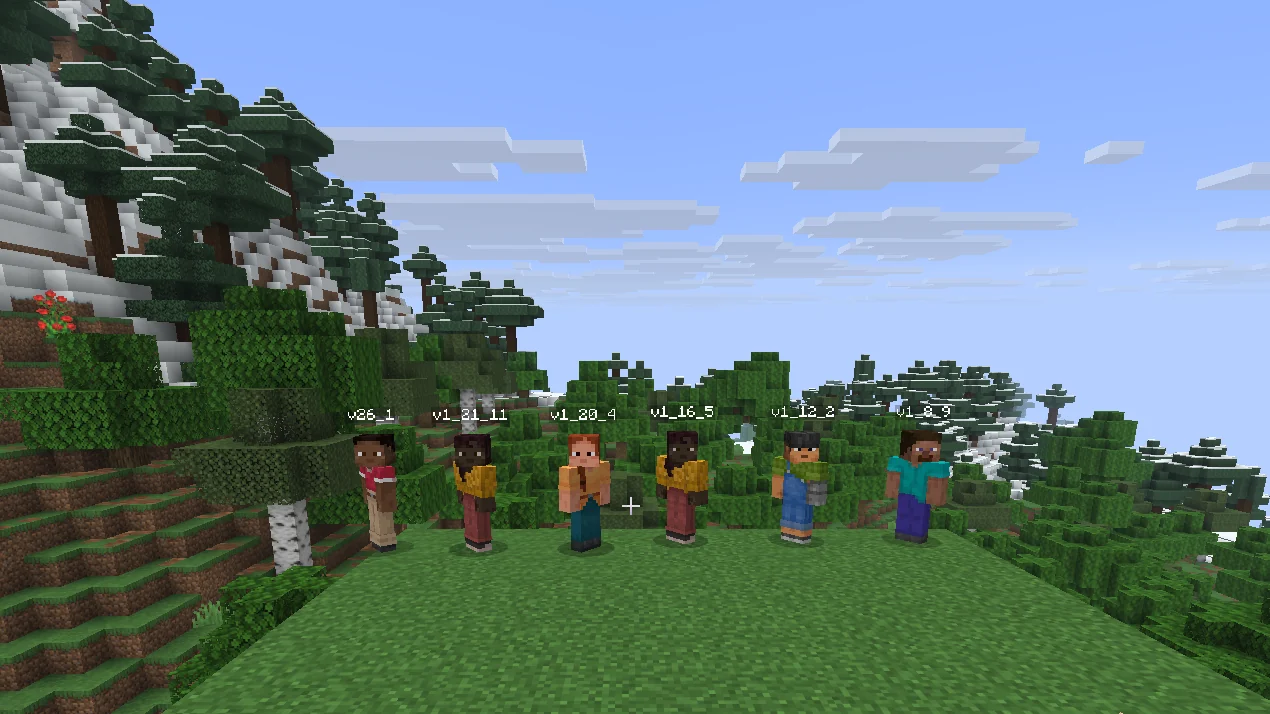
The server runs Minecraft 26.2, and players on Java 1.8 up to 26.x can join on the same port. ViaVersion, ViaBackwards and ViaRewind are built in and set themselves up on the first start. We tested it by joining with 1.8.9, 1.12.2, 1.16.5, 1.19.4, 1.20.4, 1.21.4, 1.21.11 and 26.1 clients at the same time.Bedrock players on the same worlds
On the first start Ashlar downloads Geyser and Floodgate from GeyserMC, checks their SHA-256 and keeps them up to date. Phone and console players join on port 19132 and play on the same worlds with the same plugins. Don't want it? Set bedrock.enabled: false.Protection inside the server
Connection floods
Every new connection is checked before Minecraft does any work for it. Each address has a limit on new and open connections, silent connections are closed after 5 seconds and connections that send too much before joining are cut. When the whole server gets too many new connections, only players who joined before can get in for a few minutes. In our test, 16,000 connections in 12 seconds were dropped while a known player joined normally.To be clear about the limits: this protects the server process. An attack big enough to fill your whole network line still has to be stopped by your host or network provider, no server software can do that.
Bots and spam
- New-player limit per second; above it, new players are paused for a few minutes while known players still get in (/ashlar unlock ends the pause early)
- Join limit per IP address and a check for invalid player names
- Chat and command spam limit with a warning first, then a kick
- Addresses that keep getting blocked are banned for a while, and bans survive restarts
- Optional VPN and proxy check through proxycheck.io (off by default)
Exploits
Oversized books and signs, tab-complete spam, and entity and TNT floods in a single chunk are capped.Plugin backdoors
Most backdoors in leaked plugins work by making someone an operator or giving them every permission. On Ashlar a plugin can't do that unless you allow it in ashlar.yml; the attempt is blocked and shown to staff. On start, Ashlar also reads every plugin jar for code that runs programs, downloads code or hides web addresses (for example a Discord webhook hidden in Base64). It never changes your files, it only tells you. /ashlar plugins lists what it found and which outside addresses each plugin connects to.Login for offline-mode servers
With online-mode off, players use /register and /login. Until they log in they can't move, chat or use commands. Passwords are stored as PBKDF2 hashes and show up as **** in the log. Already using AuthMe? Ashlar leaves login to it.Less lag without lowering view distance
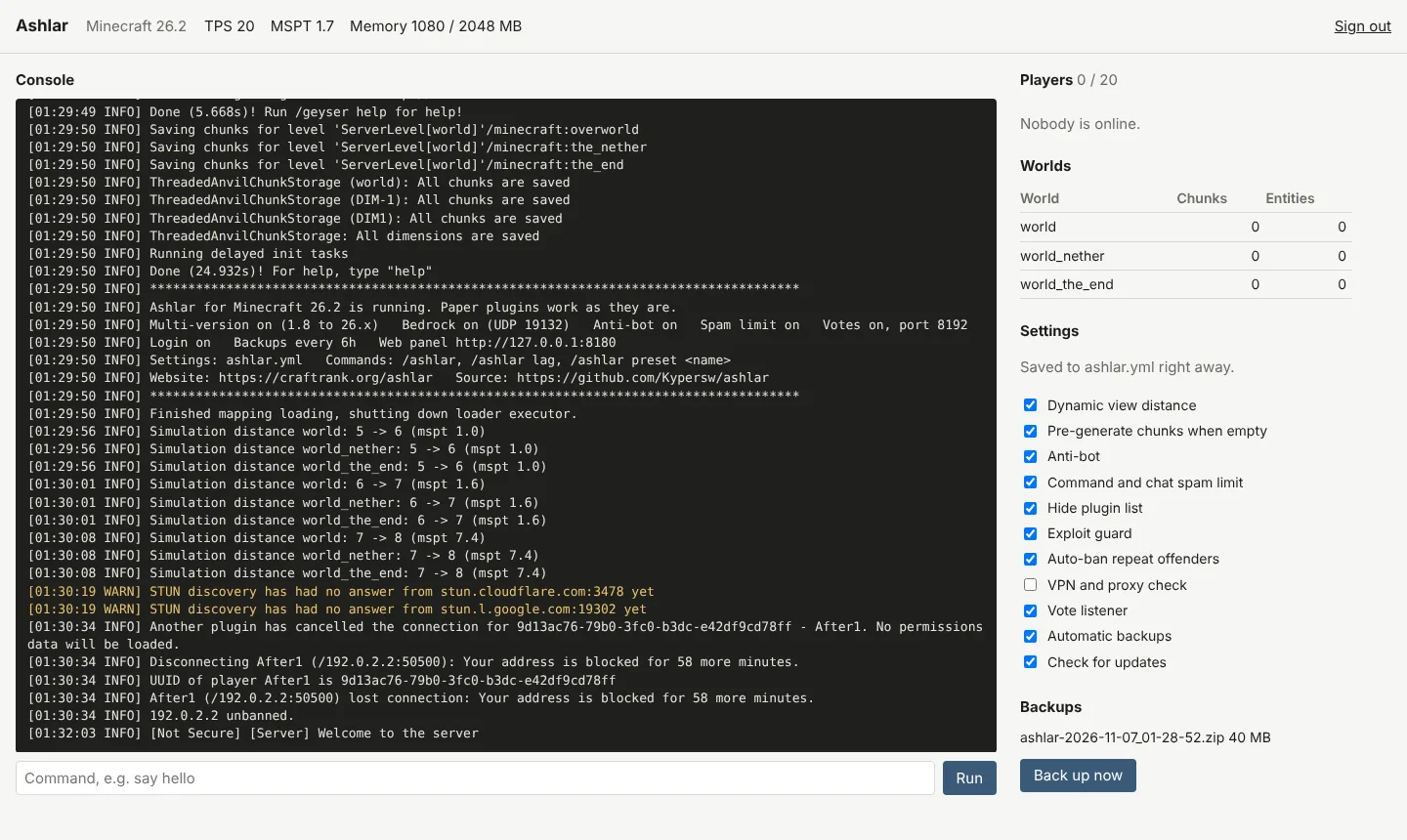
When a tick takes longer than 45 ms, Ashlar ticks a smaller area around players (simulation distance), and raises it again when things calm down. View distance stays the same, so players don't see the world shrink. /ashlar shows TPS, tick time, memory, chunks and entities per world, and /ashlar lag shows the busiest chunks.Presets
/ashlar preset <name> writes tuned settings for the kind of server you run:| Preset | View distance | Simulation distance | Monsters per player | Animals per player |
|---|---|---|---|---|
| survival | 10 | 6 | 50 | 10 |
| smp | 8 | 5 | 40 | 8 |
| skyblock | 6 | 4 | 30 | 6 |
| minigames | 6 | 4 | 10 | 2 |
Web panel, backups, pre-generation, votes
- Web panel: console, players, worlds, backups and feature switches in a browser tab (127.0.0.1:8180 by default, sign in with a token from /ashlar panel)
- Backups: the worlds are zipped every 6 hours and the last 8 are kept; /ashlar backup makes one right now
- Chunk pre-generation: generates 1,000 blocks around spawn while nobody is online and pauses when someone joins
- Votes: a built-in Votifier v2 receiver with reward commands; rewards for offline players wait until they join, so you don't need NuVotifier
- Hidden plugin list: /plugins, /version and /about are hidden from normal players, tab complete included
- Updates: checks the GitHub releases twice a day, verifies the download with SHA-256 and swaps the jar when the server stops
Commands
| Command | What it does |
|---|---|
| /ashlar | TPS, tick time, players, memory, chunks and mobs per world, and which features are on |
| /ashlar lag | The busiest chunks and the most common mobs |
| /ashlar preset <name> | survival, smp, skyblock or minigames |
| /ashlar reload | Reloads ashlar.yml |
| /ashlar unlock | Ends an anti-bot pause early |
| /ashlar pregen [pause|resume|reset] | Pre-generation progress and control |
| /ashlar backup | Backs up the worlds now (/ashlar backup list shows the backups) |
| /ashlar bans | Banned addresses (ban-ip and unban-ip change them) |
| /ashlar plugins | What the plugin guard found |
| /ashlar update | Checks GitHub for a newer build now |
How to install
- Install Java 25. Give the server at least 2 GB of memory; 4 GB or more for a public server. Windows, Linux and macOS all work.
- Download ashlar-26.2.jar from the latest release and put it in an empty folder.
- Start it once, set eula=true in eula.txt and start it again:
java -Xmx4G -jar ashlar-26.2.jar --noguiMoving from Paper? Stop the server, replace the Paper jar with ashlar-26.2.jar and start it. Worlds, plugins and settings stay as they are; Ashlar adds ashlar.yml on the first start.
FAQ
Is it really free?Yes. Free and open source under GPL-3.0, and the code is on GitHub.
Will my plugins work?
Ashlar is Paper with additions, so Paper, Spigot and Bukkit plugins load as usual. LuckPerms ran without changes in our tests.
I already use ViaVersion, Geyser, AuthMe or NuVotifier. Will it clash?
Every Ashlar feature has its own switch in ashlar.yml, so you can keep your plugin and turn the Ashlar part off. Login steps aside by itself when AuthMe or a similar plugin is installed; for NuVotifier, just leave the Ashlar vote receiver off.
Can I use it on my host?
Anywhere you can upload a custom jar and run Java 25.