
 Knight ShadersShader · 1.20 – 26.x
A lightweight Minecraft shader with volumetric lighting, dynamic skies, bloom, god rays, and customizable cinematic visuals.
Kostenlos4,029 Downloads
AV Shader (Advanced Vanilla) is a lightweight Iris shader pack built to elevate Minecraft's default aesthetics with modern lighting, dynamic sky visuals, and…
Direkter Download von Modrinth · 32 Downloads
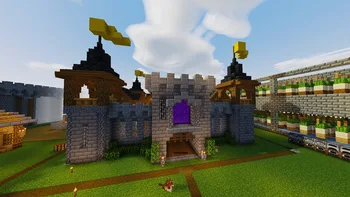
AV Shaders (Shaderpack) stammt von roxzygaming. AV Shader (Advanced Vanilla) is a lightweight Iris shader pack built to elevate Minecraft's default aesthetics with modern lighting, dynamic sky visuals, and…
Unterstützt wird Minecraft 26.x. Auf Modrinth gibt es 32 Downloads. Das letzte Update erschien am 02.11.2026.
Die neueste ist v1.0.0, erschienen am 02.11.2026. Sie ist für Minecraft 26.1 – 26.3 gemacht. Sie läuft auf Iris und Optifine. Der Download ist 129 KB groß.
| Version | Veröffentlicht | Minecraft | Typ |
|---|---|---|---|
v1.0.0 | 02.11.2026 | 26.1 – 26.3 | Release |
AV Shader is a shader pack for Minecraft that runs on Iris. It keeps vanilla's blocky look and adds modern lighting and atmosphere on top. It's built to stay fast on weak PCs.
Its look is inspired by the Photon shader.
Shadows are the biggest FPS cost. Turning them off gains about 25-35%.
If the game runs slowly, start with the Potato or Low profile, or turn shadows off.
Made by Roxzy Gaming (Nimesh Rashmika). Look inspired by the Photon shader.
Geschrieben von roxzygaming. Mit Bildern auf Modrinth lesen.
Installiere Iris (mit Sodium) oder OptiFine für deine Minecraft-Version: Shader brauchen eins davon.
Lade die .zip-Datei von Modrinth herunter. Entpacke sie nicht.
Öffne in Minecraft Optionen, dann Grafikeinstellungen, dann Shaderpacks und klicke auf Shaderpack-Ordner öffnen.
Lege die .zip-Datei in diesen Ordner, wähle AV Shaders in der Liste und klicke auf Fertig.
Shader belasten die Grafikkarte. Wird das Spiel langsam, wähle in den Shader-Einstellungen ein niedrigeres Profil.
| Ressource | Downloads | Versionen | Letztes Update | Preis |
|---|---|---|---|---|
| AV Shadersdie du angesehen hast | 32 | 26.x | vor 8 Tagen | Kostenlos |
| Knight ShadersGlacierDevelopment | 4,029 | 1.20 – 26.x | 2. Juli 2026 | Kostenlos |
 Builder's QOL ShadersBuilderb0y | 715K | 1.12 – 1.20 | 6. Dez. 2023 | Kostenlos |
 DreamLight ShadersHoneyStudios | 134K | 1.18 – 26.x | 9. Aug. 2026 | Kostenlos |
Ja. AV Shaders unterstützt Minecraft 26.x. Alle unterstützten Versionen: 26.x.
Ja. AV Shaders kannst du kostenlos bei Modrinth herunterladen.
Ja. Das letzte Update kam innerhalb des letzten Tages.
Am ähnlichsten sind Knight Shaders, Builder's QOL Shaders und DreamLight Shaders. Alle Alternativen vergleichen
Knight ShadersShader · 1.20 – 26.xA lightweight Minecraft shader with volumetric lighting, dynamic skies, bloom, god rays, and customizable cinematic visuals.
Builder's QOL ShadersShader · 1.12 – 1.20A lightweight shader pack designed to enhance the vanilla aesthetic.
DreamLight ShadersShader · 1.18 – 26.xA good-performing, dreamy, stylized shader pack with colored lighting and fancy visuals.
 Vanilla EnhancedShader · 1.17 – 26.x
A lightweight shader for realistic lighting & better visuals.
 Vanilish ShadersShader · 1.8 – 1.21
A lightweight shader that adds a realistic, warm atmosphere and soft lighting to Minecraft while maintaining the vanilla style.
 Baked Potato ShadersShader · 1.20 – 26.x
Baked Potato is a lightweight shader pack designed for players who want better visuals without sacrificing performance.
Logg dich ein, um eine Bewertung zu schreiben.