
 Knight ShadersShaders · 1.20 – 26.x
A lightweight Minecraft shader with volumetric lighting, dynamic skies, bloom, god rays, and customizable cinematic visuals.
Gratis4,029 descargas
AV Shader (Advanced Vanilla) is a lightweight Iris shader pack built to elevate Minecraft's default aesthetics with modern lighting, dynamic sky visuals, and…
Descarga directa desde Modrinth · 32 descargas
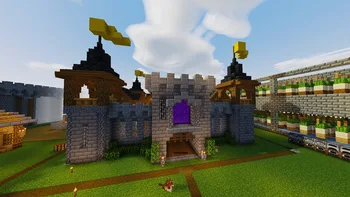
AV Shaders (pack de shaders) es obra de roxzygaming. AV Shader (Advanced Vanilla) is a lightweight Iris shader pack built to elevate Minecraft's default aesthetics with modern lighting, dynamic sky visuals, and…
Es compatible con Minecraft 26.x. Se ha descargado 32 veces en Modrinth. La última actualización salió el 02/11/2026.
La más reciente es v1.0.0, publicada el 02/11/2026. Está hecha para Minecraft 26.1 – 26.3. Funciona en Iris y Optifine. La descarga ocupa 129 KB.
| Versión | Publicado | Minecraft | Tipo |
|---|---|---|---|
v1.0.0 | 02/11/2026 | 26.1 – 26.3 | Estable |
AV Shader is a shader pack for Minecraft that runs on Iris. It keeps vanilla's blocky look and adds modern lighting and atmosphere on top. It's built to stay fast on weak PCs.
Its look is inspired by the Photon shader.
Shadows are the biggest FPS cost. Turning them off gains about 25-35%.
If the game runs slowly, start with the Potato or Low profile, or turn shadows off.
Made by Roxzy Gaming (Nimesh Rashmika). Look inspired by the Photon shader.
Escrita por roxzygaming. Léela con imágenes en Modrinth.
Instala Iris (con Sodium) u OptiFine para tu versión de Minecraft: los shaders necesitan uno de ellos.
Descarga el archivo .zip desde Modrinth. No lo descomprimas.
En Minecraft, abre Opciones, luego Gráficos, luego Shader Packs y pulsa Abrir carpeta de shaders.
Suelta el archivo .zip en esa carpeta, elige AV Shaders en la lista y pulsa Listo.
Los shaders exigen mucho a la tarjeta gráfica. Si el juego va lento, elige un perfil más bajo en sus ajustes.
| Recurso | Descargas | Versiones | Última actualización | Precio |
|---|---|---|---|---|
| AV Shadersel que estabas viendo | 32 | 26.x | hace 9 días | Gratis |
| Knight ShadersGlacierDevelopment | 4,029 | 1.20 – 26.x | 2 jul 2026 | Gratis |
 Builder's QOL ShadersBuilderb0y | 715K | 1.12 – 1.20 | 6 dic 2023 | Gratis |
 DreamLight ShadersHoneyStudios | 134K | 1.18 – 26.x | 9 ago 2026 | Gratis |
Sí. AV Shaders es compatible con Minecraft 26.x. Todas las versiones compatibles: 26.x.
Sí. AV Shaders se puede descargar gratis desde Modrinth.
Sí. La última actualización salió en el último día.
Los más parecidos son Knight Shaders, Builder's QOL Shaders y DreamLight Shaders. Comparar todas las alternativas
Knight ShadersShaders · 1.20 – 26.xA lightweight Minecraft shader with volumetric lighting, dynamic skies, bloom, god rays, and customizable cinematic visuals.
Builder's QOL ShadersShaders · 1.12 – 1.20A lightweight shader pack designed to enhance the vanilla aesthetic.
DreamLight ShadersShaders · 1.18 – 26.xA good-performing, dreamy, stylized shader pack with colored lighting and fancy visuals.
 Vanilla EnhancedShaders · 1.17 – 26.x
A lightweight shader for realistic lighting & better visuals.
 Vanilish ShadersShaders · 1.8 – 1.21
A lightweight shader that adds a realistic, warm atmosphere and soft lighting to Minecraft while maintaining the vanilla style.
 Baked Potato ShadersShaders · 1.20 – 26.x
Baked Potato is a lightweight shader pack designed for players who want better visuals without sacrificing performance.
Inicia sesión para dejar una reseña.