
 Knight ShadersShaders · 1.20 – 26.x
A lightweight Minecraft shader with volumetric lighting, dynamic skies, bloom, god rays, and customizable cinematic visuals.
Gratuit4,029 téléchargements
AV Shader (Advanced Vanilla) is a lightweight Iris shader pack built to elevate Minecraft's default aesthetics with modern lighting, dynamic sky visuals, and…
Téléchargement direct depuis Modrinth · 32 téléchargements
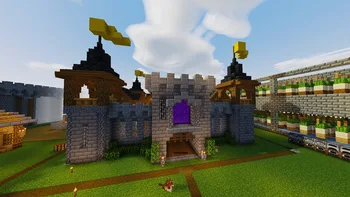
AV Shaders (pack de shaders) est une création de roxzygaming. AV Shader (Advanced Vanilla) is a lightweight Iris shader pack built to elevate Minecraft's default aesthetics with modern lighting, dynamic sky visuals, and…
Versions prises en charge : Minecraft 26.x. On compte 32 téléchargements sur Modrinth. La dernière mise à jour date du 02/11/2026.
La plus récente est v1.0.0, sortie le 02/11/2026. Elle est faite pour Minecraft 26.1 – 26.3. Elle fonctionne sur Iris et Optifine. Le téléchargement fait 129 KB.
| Version | Publié | Minecraft | Type |
|---|---|---|---|
v1.0.0 | 02/11/2026 | 26.1 – 26.3 | Stable |
AV Shader is a shader pack for Minecraft that runs on Iris. It keeps vanilla's blocky look and adds modern lighting and atmosphere on top. It's built to stay fast on weak PCs.
Its look is inspired by the Photon shader.
Shadows are the biggest FPS cost. Turning them off gains about 25-35%.
If the game runs slowly, start with the Potato or Low profile, or turn shadows off.
Made by Roxzy Gaming (Nimesh Rashmika). Look inspired by the Photon shader.
Écrite par roxzygaming. À lire avec les images sur Modrinth.
Installe Iris (avec Sodium) ou OptiFine pour ta version de Minecraft : les shaders ont besoin de l'un des deux.
Télécharge le fichier .zip depuis Modrinth. Ne le décompresse pas.
Dans Minecraft, ouvre Options, puis Paramètres vidéo, puis Shaders, et clique sur Ouvrir le dossier des shaders.
Dépose le fichier .zip dans ce dossier, choisis AV Shaders dans la liste et clique sur Terminé.
Les shaders sollicitent beaucoup la carte graphique. Si le jeu ralentit, choisis un profil plus bas dans leurs réglages.
| Ressource | Téléchargements | Versions | Mise à jour | Prix |
|---|---|---|---|---|
| AV Shaderscelle que tu regardais | 32 | 26.x | il y a 9 jours | Gratuit |
| Knight ShadersGlacierDevelopment | 4,029 | 1.20 – 26.x | 2 juil. 2026 | Gratuit |
 Builder's QOL ShadersBuilderb0y | 715K | 1.12 – 1.20 | 6 déc. 2023 | Gratuit |
 DreamLight ShadersHoneyStudios | 134K | 1.18 – 26.x | 9 août 2026 | Gratuit |
Oui. AV Shaders prend en charge Minecraft 26.x. Toutes les versions prises en charge : 26.x.
Oui. AV Shaders se télécharge gratuitement sur Modrinth.
Oui. La dernière mise à jour date des dernières 24 heures.
Les plus proches sont Knight Shaders, Builder's QOL Shaders et DreamLight Shaders. Comparer toutes les alternatives
Knight ShadersShaders · 1.20 – 26.xA lightweight Minecraft shader with volumetric lighting, dynamic skies, bloom, god rays, and customizable cinematic visuals.
Builder's QOL ShadersShaders · 1.12 – 1.20A lightweight shader pack designed to enhance the vanilla aesthetic.
DreamLight ShadersShaders · 1.18 – 26.xA good-performing, dreamy, stylized shader pack with colored lighting and fancy visuals.
 Vanilla EnhancedShaders · 1.17 – 26.x
A lightweight shader for realistic lighting & better visuals.
 Vanilish ShadersShaders · 1.8 – 1.21
A lightweight shader that adds a realistic, warm atmosphere and soft lighting to Minecraft while maintaining the vanilla style.
 Baked Potato ShadersShaders · 1.20 – 26.x
Baked Potato is a lightweight shader pack designed for players who want better visuals without sacrificing performance.
Connecte-toi pour laisser un avis.