
 Knight ShadersShaderlar · 1.20 – 26.x
A lightweight Minecraft shader with volumetric lighting, dynamic skies, bloom, god rays, and customizable cinematic visuals.
Ücretsiz4,029 indirme
AV Shader (Advanced Vanilla) is a lightweight Iris shader pack built to elevate Minecraft's default aesthetics with modern lighting, dynamic sky visuals, and…
Modrinth üzerinden doğrudan indirme · 32 indirme
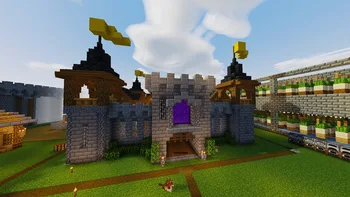
AV Shaders, roxzygaming tarafından yapılmış bir shader paketi. AV Shader (Advanced Vanilla) is a lightweight Iris shader pack built to elevate Minecraft's default aesthetics with modern lighting, dynamic sky visuals, and…
Desteklediği sürümler: Minecraft 26.x. Modrinth üzerinde 32 kez indirildi. Son güncelleme 02.11.2026 tarihinde çıktı.
En yenisi 02.11.2026 tarihinde çıkan v1.0.0. Minecraft 26.1 – 26.3 için yapıldı. Iris ve Optifine üzerinde çalışır. İndirme boyutu 129 KB.
| Sürüm | Yayın tarihi | Minecraft | Tür |
|---|---|---|---|
v1.0.0 | 02.11.2026 | 26.1 – 26.3 | Kararlı |
AV Shader is a shader pack for Minecraft that runs on Iris. It keeps vanilla's blocky look and adds modern lighting and atmosphere on top. It's built to stay fast on weak PCs.
Its look is inspired by the Photon shader.
Shadows are the biggest FPS cost. Turning them off gains about 25-35%.
If the game runs slowly, start with the Potato or Low profile, or turn shadows off.
Made by Roxzy Gaming (Nimesh Rashmika). Look inspired by the Photon shader.
Yazan: roxzygaming. Resimli halini Modrinth sayfasında oku.
Minecraft sürümün için Iris (Sodium ile) ya da OptiFine kur: shaderlar bunlardan birine ihtiyaç duyar.
.zip dosyasını Modrinth üzerinden indir. Zipten çıkarma.
Minecraft'ta Seçenekler, Görüntü Ayarları, Shader Paketleri'ni aç ve Shader Paketi Klasörünü Aç'a tıkla.
.zip dosyasını o klasöre bırak, listeden AV Shaders seç ve Bitti'ye tıkla.
Shaderlar ekran kartını zorlar. Oyun yavaşlarsa shader ayarlarından daha düşük bir profil seç.
| Kaynak | İndirmeler | Sürümler | Son güncelleme | Fiyat |
|---|---|---|---|---|
| AV Shadersbaktığın | 32 | 26.x | 8 gün önce | Ücretsiz |
| Knight ShadersGlacierDevelopment | 4,029 | 1.20 – 26.x | 2 Tem 2026 | Ücretsiz |
 Builder's QOL ShadersBuilderb0y | 715K | 1.12 – 1.20 | 6 Ara 2023 | Ücretsiz |
 DreamLight ShadersHoneyStudios | 134K | 1.18 – 26.x | 9 Ağu 2026 | Ücretsiz |
Evet. AV Shaders, Minecraft 26.x sürümünü destekliyor. Desteklenen tüm sürümler: 26.x.
Evet. AV Shaders, Modrinth üzerinden ücretsiz indirilebilir.
Evet. Son güncelleme son 24 saat içinde çıktı.
En yakın olanlar Knight Shaders, Builder's QOL Shaders ve DreamLight Shaders. Tüm alternatifleri karşılaştır
Knight ShadersShaderlar · 1.20 – 26.xA lightweight Minecraft shader with volumetric lighting, dynamic skies, bloom, god rays, and customizable cinematic visuals.
Builder's QOL ShadersShaderlar · 1.12 – 1.20A lightweight shader pack designed to enhance the vanilla aesthetic.
DreamLight ShadersShaderlar · 1.18 – 26.xA good-performing, dreamy, stylized shader pack with colored lighting and fancy visuals.
 Vanilla EnhancedShaderlar · 1.17 – 26.x
A lightweight shader for realistic lighting & better visuals.
 Vanilish ShadersShaderlar · 1.8 – 1.21
A lightweight shader that adds a realistic, warm atmosphere and soft lighting to Minecraft while maintaining the vanilla style.
 Baked Potato ShadersShaderlar · 1.20 – 26.x
Baked Potato is a lightweight shader pack designed for players who want better visuals without sacrificing performance.
Yorum yazmak için giriş yap.