
 Knight ShadersShaders · 1.20 – 26.x
A lightweight Minecraft shader with volumetric lighting, dynamic skies, bloom, god rays, and customizable cinematic visuals.
Grátis4,049 downloads
AV Shader (Advanced Vanilla) is a lightweight Iris shader pack built to elevate Minecraft's default aesthetics with modern lighting, dynamic sky visuals, and…
Download direto do Modrinth · 49 downloads
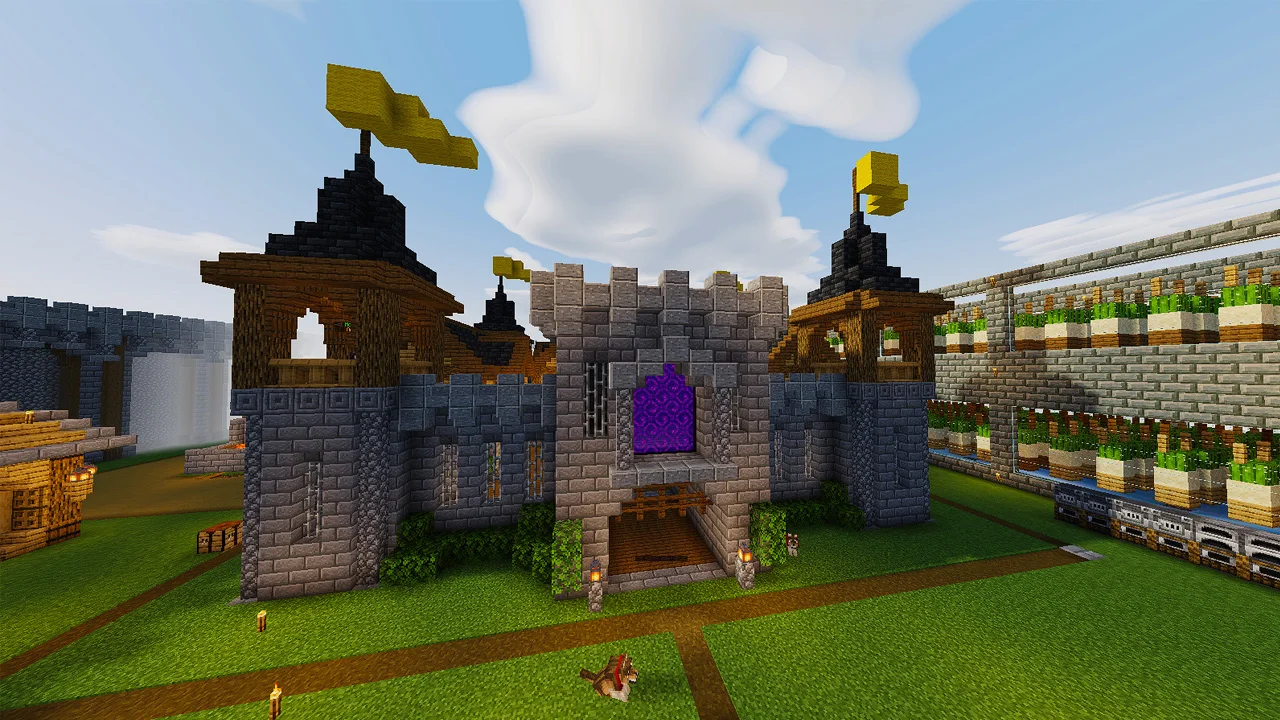
AV Shaders (pacote de shaders) é obra de roxzygaming. AV Shader (Advanced Vanilla) is a lightweight Iris shader pack built to elevate Minecraft's default aesthetics with modern lighting, dynamic sky visuals, and…
É compatível com o Minecraft 26.x. Tem 49 downloads em Modrinth. A última atualização saiu em 02/11/2026.
A mais recente é v1.0.0, lançada em 02/11/2026. Ela é feita para o Minecraft 26.1 – 26.3. Ela roda em Iris e Optifine. O download tem 129 KB.
| Versão | Lançado | Minecraft | Tipo |
|---|---|---|---|
v1.0.0 | 02/11/2026 | 26.1 – 26.3 | Estável |
AV Shader is a shader pack for Minecraft that runs on Iris. It keeps vanilla's blocky look and adds modern lighting and atmosphere on top. It's built to stay fast on weak PCs.
Its look is inspired by the Photon shader.
Shadows are the biggest FPS cost. Turning them off gains about 25-35%.
If the game runs slowly, start with the Potato or Low profile, or turn shadows off.
Made by Roxzy Gaming (Nimesh Rashmika). Look inspired by the Photon shader.
Escrita por roxzygaming. Leia com imagens no Modrinth.
Instale o Iris (com Sodium) ou o OptiFine para sua versão do Minecraft: shaders precisam de um deles.
Baixe o arquivo .zip pelo Modrinth. Não descompacte.
No Minecraft, abra Opções, depois Gráficos, depois Shader Packs e clique em Abrir pasta de shaders.
Coloque o arquivo .zip nessa pasta, escolha AV Shaders na lista e clique em Concluído.
Shaders pesam na placa de vídeo. Se o jogo ficar lento, escolha um perfil mais baixo nas configurações.
| Recurso | Downloads | Versões | Última atualização | Preço |
|---|---|---|---|---|
| AV Shaderso que você estava vendo | 49 | 26.x | há 10 dias | Grátis |
| Knight ShadersGlacierDevelopment | 4,049 | 1.20 – 26.x | 2 jul 2026 | Grátis |
 Builder's QOL ShadersBuilderb0y | 715K | 1.12 – 1.20 | 6 dez 2023 | Grátis |
 DreamLight ShadersHoneyStudios | 134K | 1.18 – 26.x | 9 ago 2026 | Grátis |
Sim. AV Shaders é compatível com o Minecraft 26.x. Todas as versões compatíveis: 26.x.
Sim. Você pode baixar AV Shaders de graça em Modrinth.
Sim. A última atualização saiu no último dia.
Os mais parecidos são Knight Shaders, Builder's QOL Shaders e DreamLight Shaders. Comparar todas as alternativas
Knight ShadersShaders · 1.20 – 26.xA lightweight Minecraft shader with volumetric lighting, dynamic skies, bloom, god rays, and customizable cinematic visuals.
Builder's QOL ShadersShaders · 1.12 – 1.20A lightweight shader pack designed to enhance the vanilla aesthetic.
DreamLight ShadersShaders · 1.18 – 26.xA good-performing, dreamy, stylized shader pack with colored lighting and fancy visuals.
 Vanilla EnhancedShaders · 1.17 – 26.x
A lightweight shader for realistic lighting & better visuals.
 Vanilish ShadersShaders · 1.8 – 1.21
A lightweight shader that adds a realistic, warm atmosphere and soft lighting to Minecraft while maintaining the vanilla style.
 Baked Potato ShadersShaders · 1.20 – 26.x
Baked Potato is a lightweight shader pack designed for players who want better visuals without sacrificing performance.
Entre para deixar uma avaliação.