
 Knight ShadersShaders · 1.20 – 26.x
A lightweight Minecraft shader with volumetric lighting, dynamic skies, bloom, god rays, and customizable cinematic visuals.
Free4,016 downloads
AV Shader (Advanced Vanilla) is a lightweight Iris shader pack built to elevate Minecraft's default aesthetics with modern lighting, dynamic sky visuals, and…
Direct download from Modrinth · 15 downloads
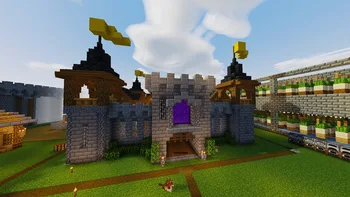
AV Shaders is a shader pack made by roxzygaming. AV Shader (Advanced Vanilla) is a lightweight Iris shader pack built to elevate Minecraft's default aesthetics with modern lighting, dynamic sky visuals, and…
It supports Minecraft 26.x. It has been downloaded 15 times on Modrinth. The last update came out on Nov 2, 2026.
The newest is v1.0.0, released on Nov 2, 2026. It is made for Minecraft 26.1 – 26.3. It runs on Iris and Optifine. The download is 129 KB.
| Version | Released | Minecraft | Type |
|---|---|---|---|
v1.0.0 | Nov 2, 2026 | 26.1 – 26.3 | Release |
AV Shader is a shader pack for Minecraft that runs on Iris. It keeps vanilla's blocky look and adds modern lighting and atmosphere on top. It's built to stay fast on weak PCs.
Its look is inspired by the Photon shader.
Shadows are the biggest FPS cost. Turning them off gains about 25-35%.
If the game runs slowly, start with the Potato or Low profile, or turn shadows off.
Made by Roxzy Gaming (Nimesh Rashmika). Look inspired by the Photon shader.
Written by roxzygaming. Read it with pictures on Modrinth.
Install Iris (with Sodium) or OptiFine for your Minecraft version: shaders need one of them.
Download the .zip file from Modrinth. Do not unzip it.
In Minecraft, open Options, then Video Settings, then Shader Packs, and click Open Shader Pack Folder.
Drop the .zip file into that folder, pick AV Shaders in the list and click Done.
Shaders are heavy on the graphics card. If the game gets slow, pick a lower profile in the shader settings.
| Resource | Downloads | Versions | Last update | Price |
|---|---|---|---|---|
| AV Shadersthe one you looked at | 15 | 26.x | 8 days ago | Free |
| Knight ShadersGlacierDevelopment | 4,016 | 1.20 – 26.x | Jul 2, 2026 | Free |
 Builder's QOL ShadersBuilderb0y | 714K | 1.12 – 1.20 | Dec 6, 2023 | Free |
 DreamLight ShadersHoneyStudios | 134K | 1.18 – 26.x | Aug 9, 2026 | Free |
Yes. AV Shaders supports Minecraft 26.x. All supported versions: 26.x.
Yes. AV Shaders is free to download from Modrinth.
Yes. The last update came out in the past day.
The closest ones are Knight Shaders, Builder's QOL Shaders and DreamLight Shaders. Compare all alternatives
Knight ShadersShaders · 1.20 – 26.xA lightweight Minecraft shader with volumetric lighting, dynamic skies, bloom, god rays, and customizable cinematic visuals.
Builder's QOL ShadersShaders · 1.12 – 1.20A lightweight shader pack designed to enhance the vanilla aesthetic.
DreamLight ShadersShaders · 1.18 – 26.xA good-performing, dreamy, stylized shader pack with colored lighting and fancy visuals.
 Vanilla EnhancedShaders · 1.17 – 26.x
A lightweight shader for realistic lighting & better visuals.
 Vanilish ShadersShaders · 1.8 – 1.21
A lightweight shader that adds a realistic, warm atmosphere and soft lighting to Minecraft while maintaining the vanilla style.
 Baked Potato ShadersShaders · 1.20 – 26.x
Baked Potato is a lightweight shader pack designed for players who want better visuals without sacrificing performance.
Log in to leave a review.