
A mod that lets you see the actual biome grid
Direkter Download von Modrinth · 8 Downloads
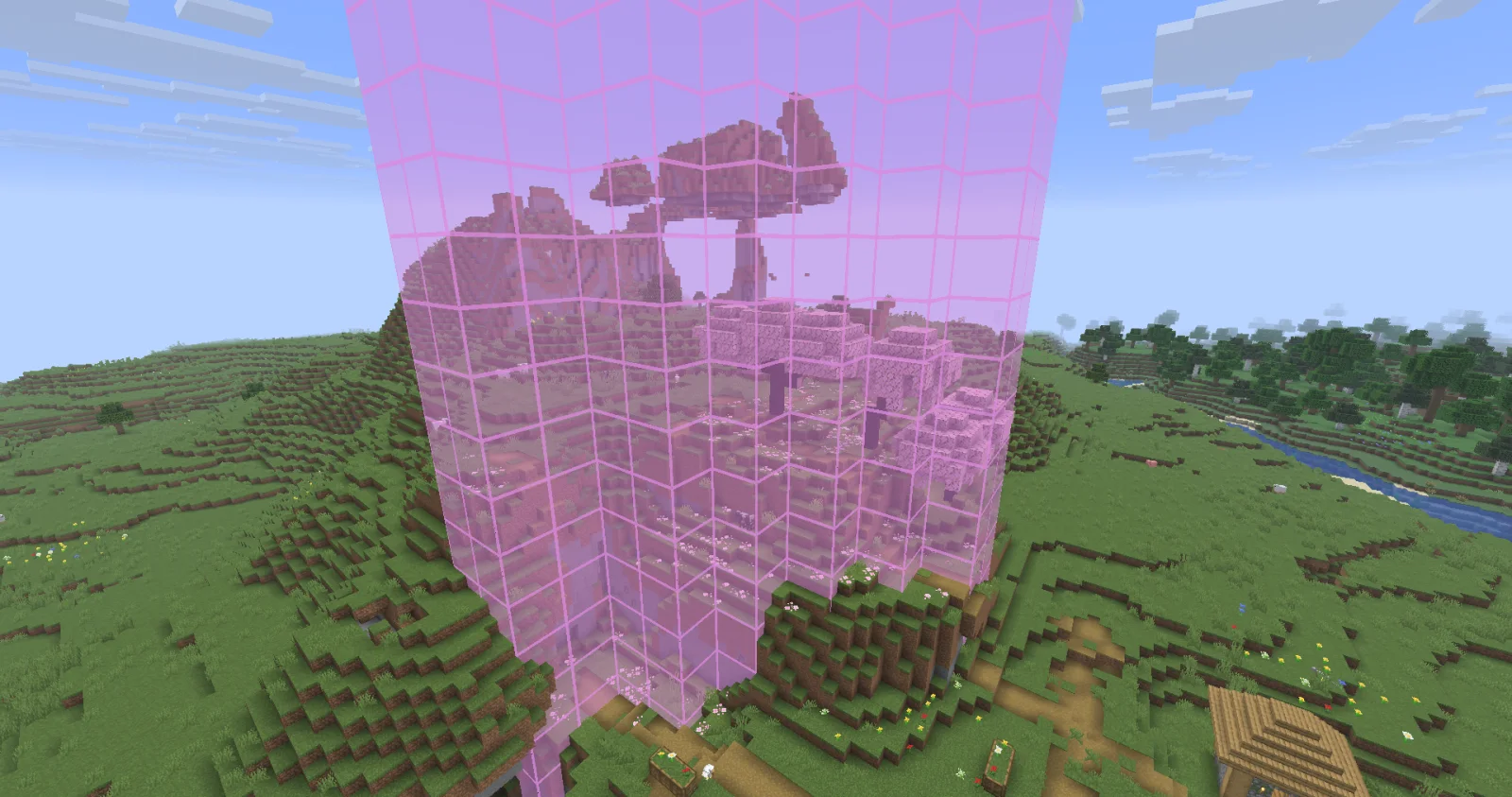
Biome Grid Viewer (Mod) stammt von kokiriglade. A mod that lets you see the actual biome grid.
Unterstützt wird Minecraft 26.x. Auf Modrinth gibt es 8 Downloads. Das letzte Update erschien am 19.09.2026.
Biome Grid Viewer hat seit 18.09.2026 2 Versionen auf Modrinth veröffentlicht. 2 davon erschienen im letzten Jahr. Die neueste ist 1.0.1, erschienen am 18.09.2026. Sie ist für Minecraft 26.3 gemacht. Sie läuft auf Fabric. Der Download ist 54 KB groß.
| Version | Veröffentlicht | Minecraft | Typ |
|---|---|---|---|
1.0.1 | 18.09.2026 | 26.3 | Release |
1.0.0 | 18.09.2026 | 26.3 | Release |
A mod that lets you view the actual 3D biome grid. In Minecraft, biomes are stored on a smaller grid than that of
blocks. Each voxel of the biome grid is 4x4x4 in block-space. The game then uses some randomness to determine which
biome is actually used on biome borders. This is great for gameplay but maybe not so great for world generation
developers trying to accurately determine where their biomes are being placed
Press F3 + F6 to open the Debug Options screen, scroll down to the bottom of Debug Renderers, and change the
biome_grid renderer to either In Overlay to make it appear when the debug overlay is open, or Always to always
appear.
Additional keyboard controls exist to control the range and opacity of the biome grid renderer. See the Controls menu!
Biome Colors are determined the same way [jacobsjo's datapack map viewer][dpmap] does.
See the [documentation][biome-color-docs]. If no color is supplied then the color is determined from the biome's id.
MIT license! The ColorUtil class is taken from [Worldgen Devtools by jacobsjo][wgdtcolorutil] (also MIT licensed)
[dpmap]: map.jacobsjo.eu/
[biome-color-docs]: github.com/jacobsjo/mc-datapack-map/wiki/Biome-…
[wgdtcolorutil]: github.com/jacobsjo/worldgen-devtools/blob/634e…
Geschrieben von kokiriglade. Mit Bildern auf Modrinth lesen.
Diese Mod läuft nur in deinem eigenen Spiel. Server brauchen sie nicht, du kannst sie also auf jedem Server nutzen.
Installiere Fabric für Minecraft 26.x.
Lade die .jar-Datei von Modrinth herunter und lege sie in den mods-Ordner deines .minecraft-Verzeichnisses.
Starte Minecraft mit dem Fabric-Profil.
Einfacher: Suche in Prism Launcher oder der Modrinth App in den Mods deiner Instanz nach Biome Grid Viewer und klicke auf Install. Loader und benötigte Mods werden für dich hinzugefügt.
Ja. Biome Grid Viewer unterstützt Minecraft 26.x. Alle unterstützten Versionen: 26.x.
Ja. Biome Grid Viewer kannst du kostenlos bei Modrinth herunterladen.
Clientseitig. Biome Grid Viewer kommt in deinen eigenen mods-Ordner und funktioniert auf jedem Server, auch auf Servern ohne Mods.
Ja. Das letzte Update kam innerhalb des letzten Tages.
Logg dich ein, um eine Bewertung zu schreiben.
