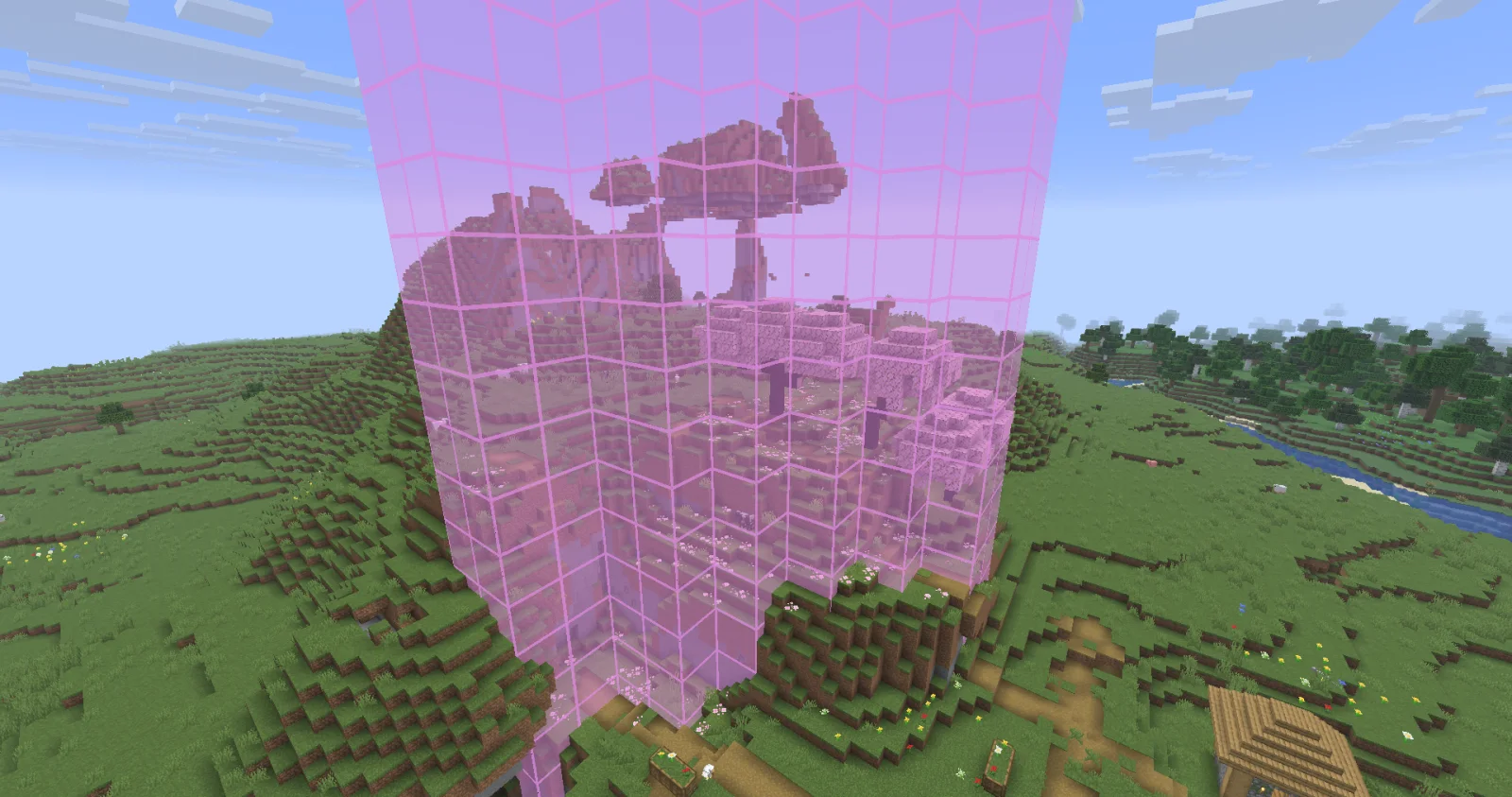
Biome Grid Viewer (mod) é obra de kokiriglade. A mod that lets you see the actual biome grid.
É compatível com o Minecraft 26.x. Tem 8 downloads em Modrinth. A última atualização saiu em 19/09/2026.
Biome Grid Viewer teve 2 versões no Modrinth desde 18/09/2026. 2 saíram no último ano. A mais recente é 1.0.1, lançada em 18/09/2026. Ela é feita para o Minecraft 26.3. Ela roda em Fabric. O download tem 54 KB.
| Versão | Lançado | Minecraft | Tipo |
|---|---|---|---|
1.0.1 | 18/09/2026 | 26.3 | Estável |
1.0.0 | 18/09/2026 | 26.3 | Estável |
A mod that lets you view the actual 3D biome grid. In Minecraft, biomes are stored on a smaller grid than that of
blocks. Each voxel of the biome grid is 4x4x4 in block-space. The game then uses some randomness to determine which
biome is actually used on biome borders. This is great for gameplay but maybe not so great for world generation
developers trying to accurately determine where their biomes are being placed
Press F3 + F6 to open the Debug Options screen, scroll down to the bottom of Debug Renderers, and change the
biome_grid renderer to either In Overlay to make it appear when the debug overlay is open, or Always to always
appear.
Additional keyboard controls exist to control the range and opacity of the biome grid renderer. See the Controls menu!
Biome Colors are determined the same way [jacobsjo's datapack map viewer][dpmap] does.
See the [documentation][biome-color-docs]. If no color is supplied then the color is determined from the biome's id.
MIT license! The ColorUtil class is taken from [Worldgen Devtools by jacobsjo][wgdtcolorutil] (also MIT licensed)
[dpmap]: map.jacobsjo.eu/
[biome-color-docs]: github.com/jacobsjo/mc-datapack-map/wiki/Biome-…
[wgdtcolorutil]: github.com/jacobsjo/worldgen-devtools/blob/634e…
Escrita por kokiriglade. Leia com imagens no Modrinth.
Este mod roda só no seu jogo. Os servidores não precisam dele, então você pode usar em qualquer servidor.
Instale Fabric para o Minecraft 26.x.
Baixe o arquivo .jar pelo Modrinth e coloque na pasta mods do seu diretório .minecraft.
Abra o Minecraft com o perfil Fabric.
Mais fácil: no Prism Launcher ou no Modrinth App, procure Biome Grid Viewer nos mods da sua instância e clique em Install. Ele adiciona o loader e os mods necessários para você.
Sim. Biome Grid Viewer é compatível com o Minecraft 26.x. Todas as versões compatíveis: 26.x.
Sim. Você pode baixar Biome Grid Viewer de graça em Modrinth.
Do lado do cliente. Biome Grid Viewer vai na sua própria pasta mods e funciona em qualquer servidor, inclusive sem mods.
Sim. A última atualização saiu no último dia.
Entre para deixar uma avaliação.