
A mod that lets you see the actual biome grid
Téléchargement direct depuis Modrinth · 8 téléchargements
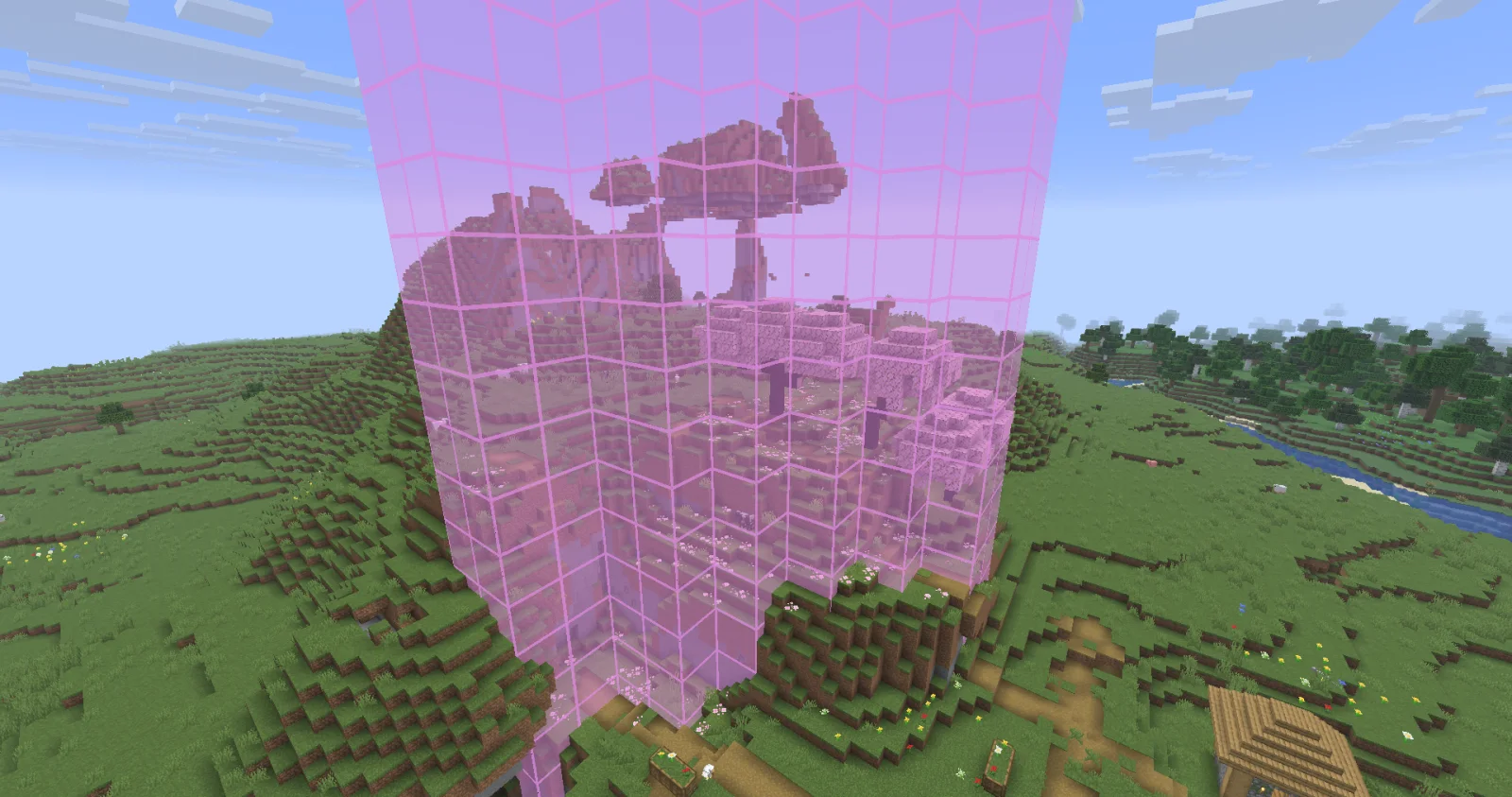
Biome Grid Viewer (mod) est une création de kokiriglade. A mod that lets you see the actual biome grid.
Versions prises en charge : Minecraft 26.x. On compte 8 téléchargements sur Modrinth. La dernière mise à jour date du 19/09/2026.
Biome Grid Viewer a publié 2 versions sur Modrinth depuis le 18/09/2026. 2 sont sorties au cours de l'année passée. La plus récente est 1.0.1, sortie le 18/09/2026. Elle est faite pour Minecraft 26.3. Elle fonctionne sur Fabric. Le téléchargement fait 54 KB.
| Version | Publié | Minecraft | Type |
|---|---|---|---|
1.0.1 | 18/09/2026 | 26.3 | Stable |
1.0.0 | 18/09/2026 | 26.3 | Stable |
A mod that lets you view the actual 3D biome grid. In Minecraft, biomes are stored on a smaller grid than that of
blocks. Each voxel of the biome grid is 4x4x4 in block-space. The game then uses some randomness to determine which
biome is actually used on biome borders. This is great for gameplay but maybe not so great for world generation
developers trying to accurately determine where their biomes are being placed
Press F3 + F6 to open the Debug Options screen, scroll down to the bottom of Debug Renderers, and change the
biome_grid renderer to either In Overlay to make it appear when the debug overlay is open, or Always to always
appear.
Additional keyboard controls exist to control the range and opacity of the biome grid renderer. See the Controls menu!
Biome Colors are determined the same way [jacobsjo's datapack map viewer][dpmap] does.
See the [documentation][biome-color-docs]. If no color is supplied then the color is determined from the biome's id.
MIT license! The ColorUtil class is taken from [Worldgen Devtools by jacobsjo][wgdtcolorutil] (also MIT licensed)
[dpmap]: map.jacobsjo.eu/
[biome-color-docs]: github.com/jacobsjo/mc-datapack-map/wiki/Biome-…
[wgdtcolorutil]: github.com/jacobsjo/worldgen-devtools/blob/634e…
Écrite par kokiriglade. À lire avec les images sur Modrinth.
Ce mod fonctionne uniquement dans ton jeu. Les serveurs n'en ont pas besoin, tu peux donc l'utiliser sur n'importe quel serveur.
Installe Fabric pour Minecraft 26.x.
Télécharge le fichier .jar depuis Modrinth et place-le dans le dossier mods de ton répertoire .minecraft.
Lance Minecraft avec le profil Fabric.
Plus simple : dans Prism Launcher ou la Modrinth App, cherche Biome Grid Viewer dans les mods de ton instance et clique sur Install. Le loader et les mods requis sont ajoutés pour toi.
Oui. Biome Grid Viewer prend en charge Minecraft 26.x. Toutes les versions prises en charge : 26.x.
Oui. Biome Grid Viewer se télécharge gratuitement sur Modrinth.
Côté client. Biome Grid Viewer se place dans ton propre dossier mods et fonctionne sur n'importe quel serveur, même sans mods.
Oui. La dernière mise à jour date des dernières 24 heures.
Connecte-toi pour laisser un avis.
