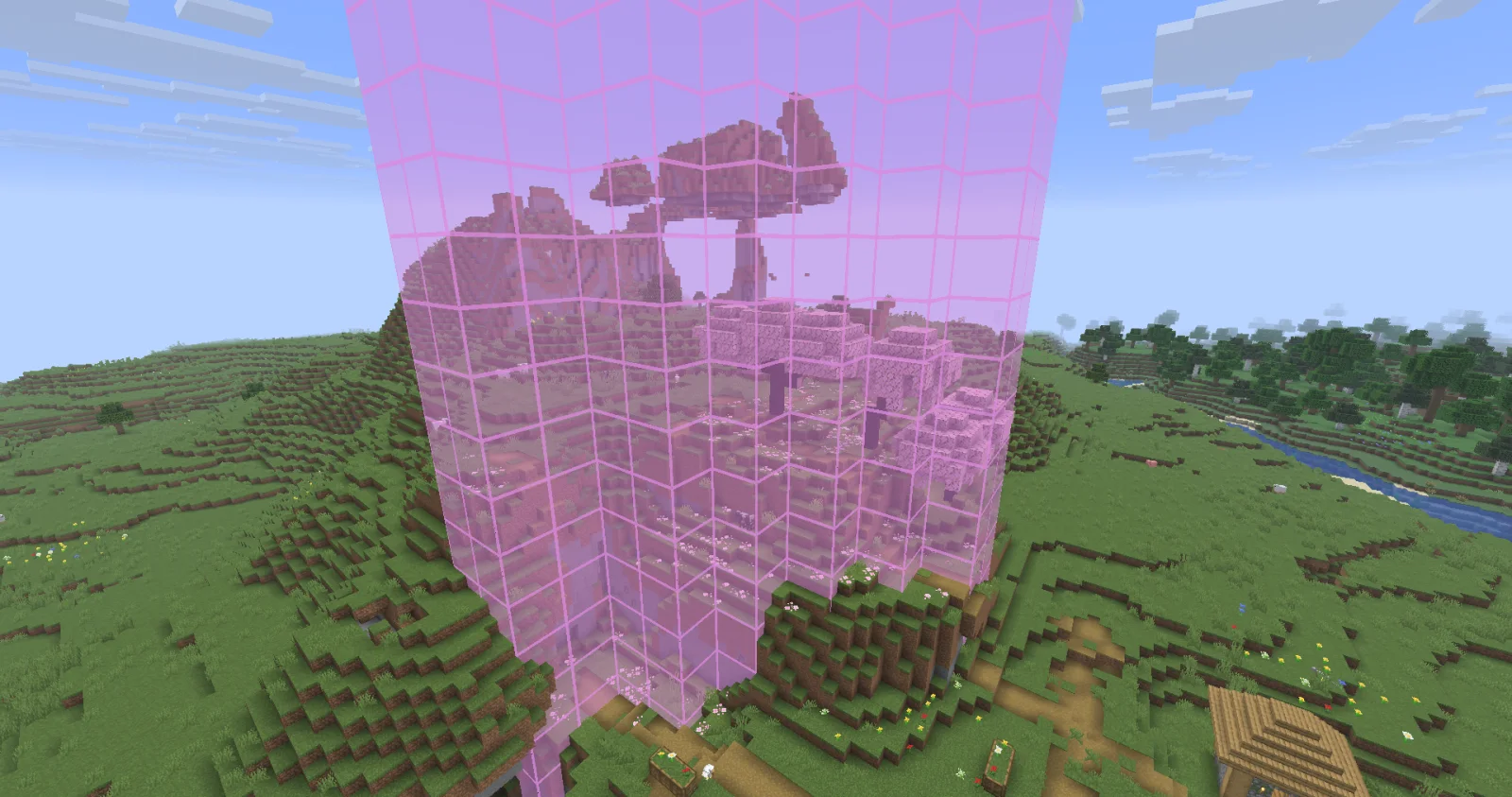
Biome Grid Viewer, kokiriglade tarafından yapılmış bir mod. A mod that lets you see the actual biome grid.
Desteklediği sürümler: Minecraft 26.x. Modrinth üzerinde 8 kez indirildi. Son güncelleme 19.09.2026 tarihinde çıktı.
Biome Grid Viewer, 18.09.2026 tarihinden beri Modrinth üzerinde 2 sürüm yayınladı. Bunların 2 tanesi son bir yılda çıktı. En yenisi 18.09.2026 tarihinde çıkan 1.0.1. Minecraft 26.3 için yapıldı. Fabric üzerinde çalışır. İndirme boyutu 54 KB.
| Sürüm | Yayın tarihi | Minecraft | Tür |
|---|---|---|---|
1.0.1 | 18.09.2026 | 26.3 | Kararlı |
1.0.0 | 18.09.2026 | 26.3 | Kararlı |
A mod that lets you view the actual 3D biome grid. In Minecraft, biomes are stored on a smaller grid than that of
blocks. Each voxel of the biome grid is 4x4x4 in block-space. The game then uses some randomness to determine which
biome is actually used on biome borders. This is great for gameplay but maybe not so great for world generation
developers trying to accurately determine where their biomes are being placed
Press F3 + F6 to open the Debug Options screen, scroll down to the bottom of Debug Renderers, and change the
biome_grid renderer to either In Overlay to make it appear when the debug overlay is open, or Always to always
appear.
Additional keyboard controls exist to control the range and opacity of the biome grid renderer. See the Controls menu!
Biome Colors are determined the same way [jacobsjo's datapack map viewer][dpmap] does.
See the [documentation][biome-color-docs]. If no color is supplied then the color is determined from the biome's id.
MIT license! The ColorUtil class is taken from [Worldgen Devtools by jacobsjo][wgdtcolorutil] (also MIT licensed)
[dpmap]: map.jacobsjo.eu/
[biome-color-docs]: github.com/jacobsjo/mc-datapack-map/wiki/Biome-…
[wgdtcolorutil]: github.com/jacobsjo/worldgen-devtools/blob/634e…
Yazan: kokiriglade. Resimli halini Modrinth sayfasında oku.
Bu mod yalnızca senin oyununda çalışır. Sunucuların buna ihtiyacı yok, bu yüzden her sunucuda kullanabilirsin.
Minecraft 26.x için Fabric kur.
.jar dosyasını Modrinth üzerinden indir ve .minecraft klasöründeki mods klasörüne koy.
Minecraft'ı Fabric profiliyle başlat.
Daha kolayı: Prism Launcher veya Modrinth App'te instance'ının modlarında Biome Grid Viewer ara ve Install'a tıkla. Mod yükleyiciyi ve gereken modları senin için ekler.
Evet. Biome Grid Viewer, Minecraft 26.x sürümünü destekliyor. Desteklenen tüm sürümler: 26.x.
Evet. Biome Grid Viewer, Modrinth üzerinden ücretsiz indirilebilir.
İstemci tarafı. Biome Grid Viewer kendi mods klasörüne kurulur ve modsuz sunucular dahil her sunucuda çalışır.
Evet. Son güncelleme son 24 saat içinde çıktı.
Yorum yazmak için giriş yap.