
A mod that lets you see the actual biome grid
Direct download from Modrinth · 8 downloads
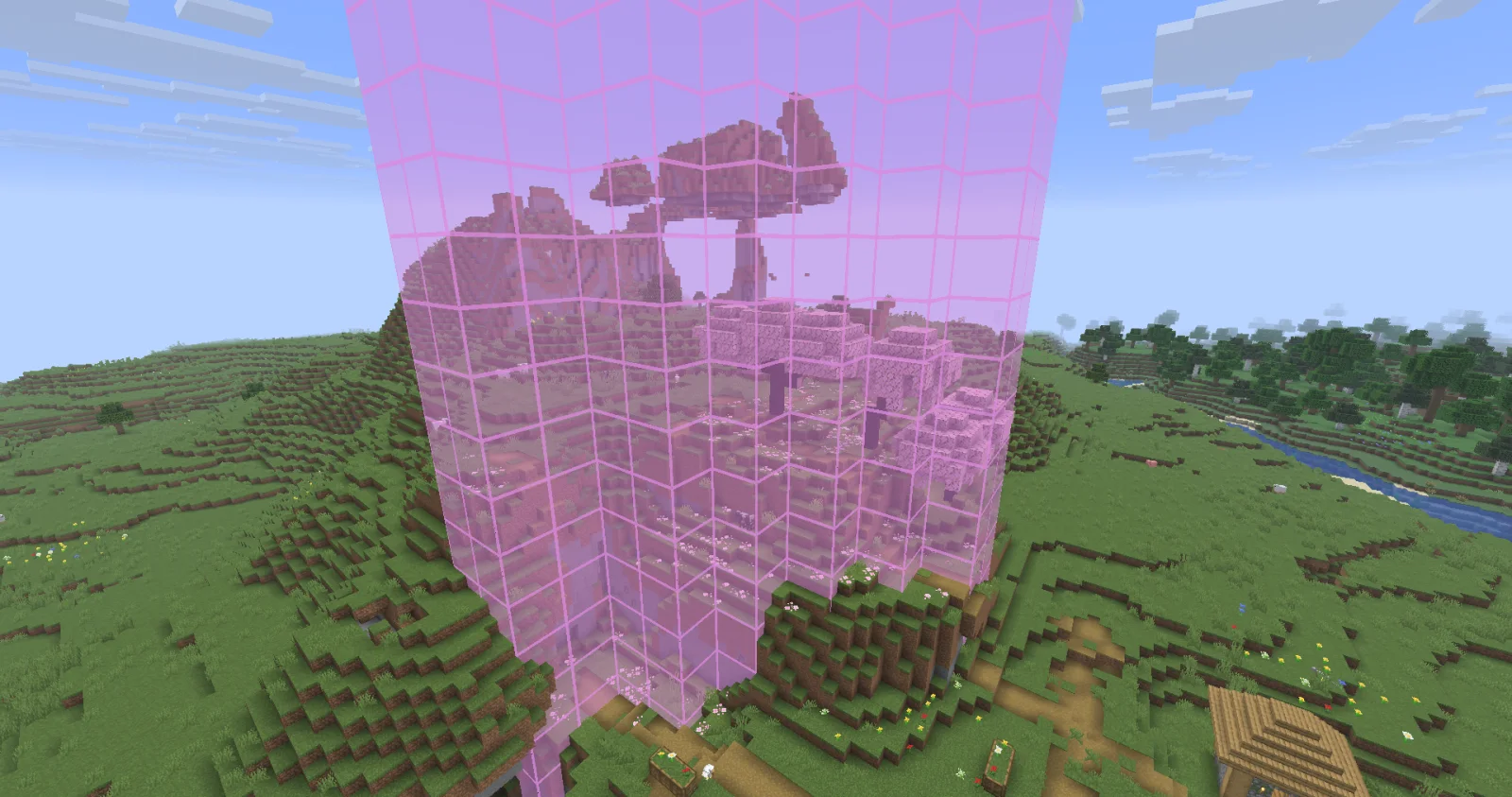
Biome Grid Viewer is a mod made by kokiriglade. A mod that lets you see the actual biome grid.
It supports Minecraft 26.x. It has been downloaded 8 times on Modrinth. The last update came out on Sep 19, 2026.
Biome Grid Viewer has had 2 releases on Modrinth since Sep 18, 2026. 2 of them came out in the past year. The newest is 1.0.1, released on Sep 18, 2026. It is made for Minecraft 26.3. It runs on Fabric. The download is 54 KB.
| Version | Released | Minecraft | Type |
|---|---|---|---|
1.0.1 | Sep 18, 2026 | 26.3 | Release |
1.0.0 | Sep 18, 2026 | 26.3 | Release |
A mod that lets you view the actual 3D biome grid. In Minecraft, biomes are stored on a smaller grid than that of
blocks. Each voxel of the biome grid is 4x4x4 in block-space. The game then uses some randomness to determine which
biome is actually used on biome borders. This is great for gameplay but maybe not so great for world generation
developers trying to accurately determine where their biomes are being placed
Press F3 + F6 to open the Debug Options screen, scroll down to the bottom of Debug Renderers, and change the
biome_grid renderer to either In Overlay to make it appear when the debug overlay is open, or Always to always
appear.
Additional keyboard controls exist to control the range and opacity of the biome grid renderer. See the Controls menu!
Biome Colors are determined the same way [jacobsjo's datapack map viewer][dpmap] does.
See the [documentation][biome-color-docs]. If no color is supplied then the color is determined from the biome's id.
MIT license! The ColorUtil class is taken from [Worldgen Devtools by jacobsjo][wgdtcolorutil] (also MIT licensed)
[dpmap]: map.jacobsjo.eu/
[biome-color-docs]: github.com/jacobsjo/mc-datapack-map/wiki/Biome-…
[wgdtcolorutil]: github.com/jacobsjo/worldgen-devtools/blob/634e…
Written by kokiriglade. Read it with pictures on Modrinth.
This mod runs only on your own game. Servers do not need it, so you can use it on any server.
Install Fabric for Minecraft 26.x.
Download the .jar file from Modrinth and put it in the mods folder of your .minecraft directory.
Start Minecraft with the Fabric profile.
Easier: in Prism Launcher or the Modrinth App, search for Biome Grid Viewer in your instance's mods and click Install. It adds the loader and the mods it needs for you.
Full guide: How to install Minecraft mods
Yes. Biome Grid Viewer supports Minecraft 26.x. All supported versions: 26.x.
Yes. Biome Grid Viewer is free to download from Modrinth.
Client-side. Biome Grid Viewer goes in your own mods folder and works on any server, including servers without mods.
Yes. The last update came out in the past day.
Log in to leave a review.
