
A mod that lets you see the actual biome grid
Descarga directa desde Modrinth · 8 descargas
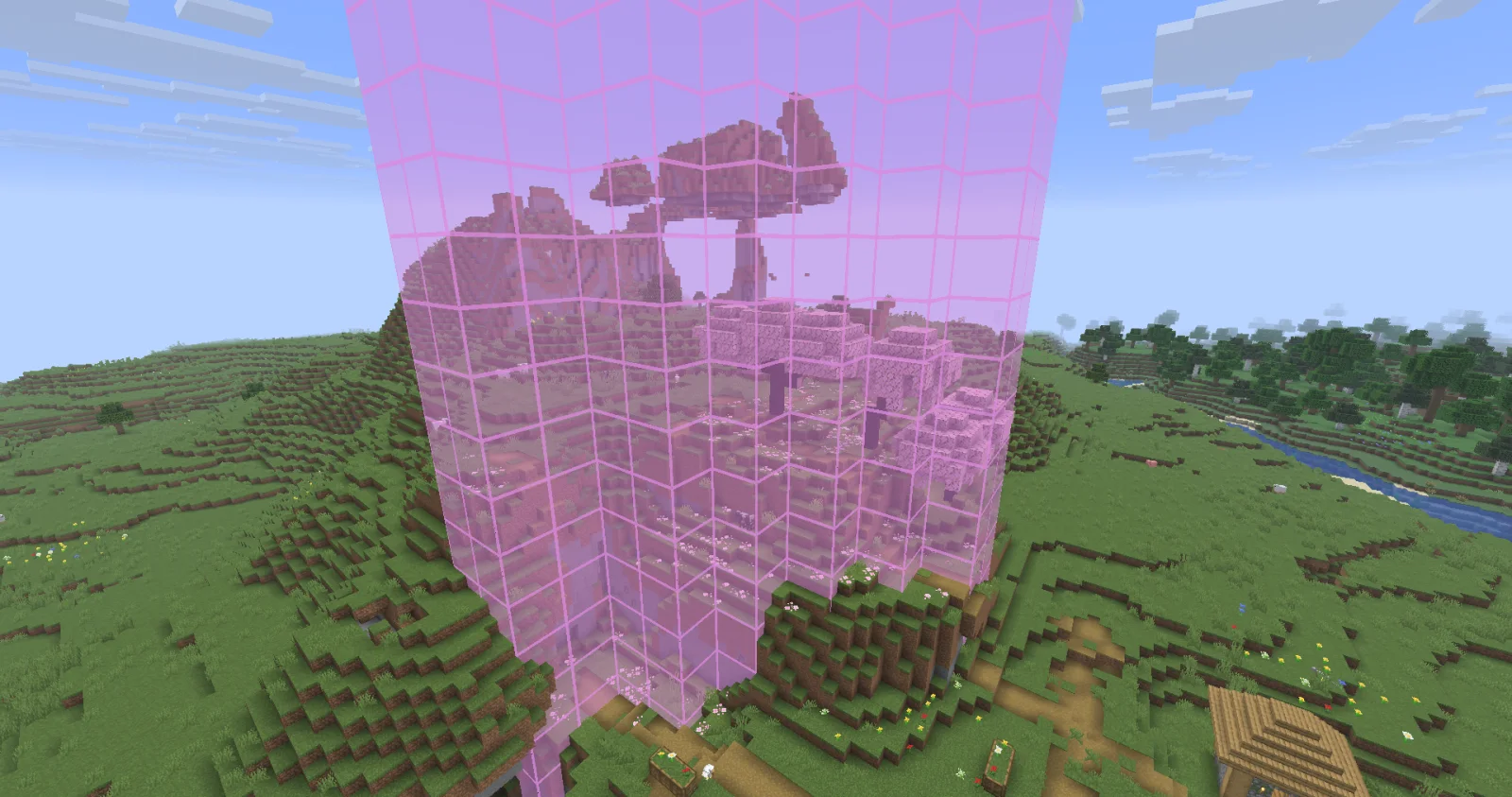
Biome Grid Viewer (mod) es obra de kokiriglade. A mod that lets you see the actual biome grid.
Es compatible con Minecraft 26.x. Se ha descargado 8 veces en Modrinth. La última actualización salió el 19/09/2026.
Biome Grid Viewer ha publicado 2 versiones en Modrinth desde el 18/09/2026. 2 salieron en el último año. La más reciente es 1.0.1, publicada el 18/09/2026. Está hecha para Minecraft 26.3. Funciona en Fabric. La descarga ocupa 54 KB.
| Versión | Publicado | Minecraft | Tipo |
|---|---|---|---|
1.0.1 | 18/09/2026 | 26.3 | Estable |
1.0.0 | 18/09/2026 | 26.3 | Estable |
A mod that lets you view the actual 3D biome grid. In Minecraft, biomes are stored on a smaller grid than that of
blocks. Each voxel of the biome grid is 4x4x4 in block-space. The game then uses some randomness to determine which
biome is actually used on biome borders. This is great for gameplay but maybe not so great for world generation
developers trying to accurately determine where their biomes are being placed
Press F3 + F6 to open the Debug Options screen, scroll down to the bottom of Debug Renderers, and change the
biome_grid renderer to either In Overlay to make it appear when the debug overlay is open, or Always to always
appear.
Additional keyboard controls exist to control the range and opacity of the biome grid renderer. See the Controls menu!
Biome Colors are determined the same way [jacobsjo's datapack map viewer][dpmap] does.
See the [documentation][biome-color-docs]. If no color is supplied then the color is determined from the biome's id.
MIT license! The ColorUtil class is taken from [Worldgen Devtools by jacobsjo][wgdtcolorutil] (also MIT licensed)
[dpmap]: map.jacobsjo.eu/
[biome-color-docs]: github.com/jacobsjo/mc-datapack-map/wiki/Biome-…
[wgdtcolorutil]: github.com/jacobsjo/worldgen-devtools/blob/634e…
Escrita por kokiriglade. Léela con imágenes en Modrinth.
Este mod funciona solo en tu propio juego. Los servidores no lo necesitan, así que puedes usarlo en cualquier servidor.
Instala Fabric para Minecraft 26.x.
Descarga el archivo .jar desde Modrinth y ponlo en la carpeta mods de tu directorio .minecraft.
Inicia Minecraft con el perfil de Fabric.
Más fácil: en Prism Launcher o la Modrinth App, busca Biome Grid Viewer en los mods de tu instancia y haz clic en Install. Añade el loader y los mods que necesita por ti.
Sí. Biome Grid Viewer es compatible con Minecraft 26.x. Todas las versiones compatibles: 26.x.
Sí. Biome Grid Viewer se puede descargar gratis desde Modrinth.
Del lado del cliente. Biome Grid Viewer va en tu propia carpeta mods y funciona en cualquier servidor, incluso en servidores sin mods.
Sí. La última actualización salió en el último día.
Inicia sesión para dejar una reseña.
