
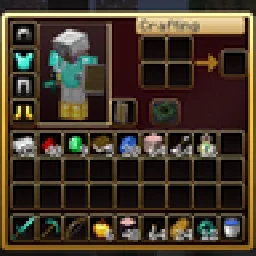
 RBZ GUITexturenpakete · 26.x
Dark crimson and gold redesign of the vanilla menus and HUD: inventory, crafting table, furnaces, chests, villagers, hotbar, hearts, buttons and more – in HD.
Kostenlos1 Downloads

A dark interface with obsidian-violet details: redesigned inventory, containers, HUD, buttons, menus and main-menu panorama.
Direkter Download von Modrinth · 5 Downloads
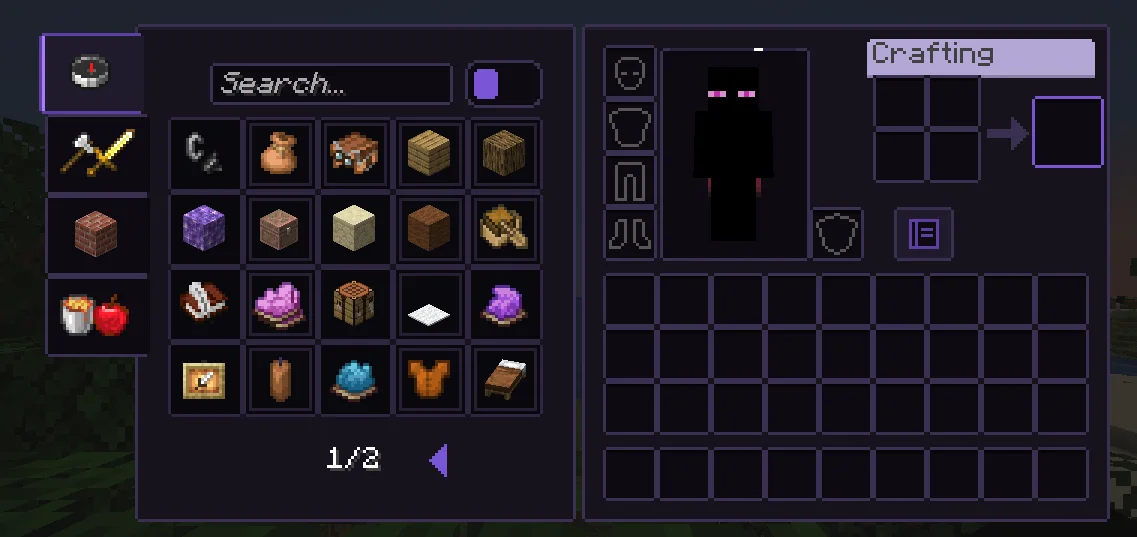
Obsidian UI-Amethyst (Texturenpaket) stammt von Troncoh. A dark interface with obsidian-violet details: redesigned inventory, containers, HUD, buttons, menus and main-menu panorama.
Unterstützt wird Minecraft 1.20 – 26.x. Auf Modrinth gibt es 5 Downloads. Das letzte Update erschien am 08.11.2026.
Obsidian UI-Amethyst hat seit 08.11.2026 2 Versionen auf Modrinth veröffentlicht. 2 davon erschienen im letzten Jahr. Die neueste ist 26.3, erschienen am 08.11.2026. Sie ist für Minecraft 26.2, 26.3 gemacht. Sie läuft auf Minecraft. Der Download ist 1.1 MB groß.
| Version | Veröffentlicht | Minecraft | Typ |
|---|---|---|---|
26.3 | 08.11.2026 | 26.2, 26.3 | Release |
1.21.11 | 08.11.2026 | 1.20.2 – 1.21.1 | Release |
A clean, dark, minimalist interface for Minecraft: Java Edition with discreet obsidian-violet accents. Obsidian UI restyles the inventory, containers, HUD, menus and main-menu panorama with consistent 1px borders, soft corners and a restrained palette, while staying close to Minecraft's pixel identity.
Near-black surfaces with a faint violet tint, thin graphite borders. The main-menu panorama is a dark void with soft violet glass shards.
Geschrieben von Troncoh. Mit Bildern auf Modrinth lesen.
Lade die .zip-Datei von Modrinth herunter. Entpacke sie nicht.
Öffne in Minecraft Optionen, dann Ressourcenpakete, dann Paketordner öffnen.
Lege die .zip-Datei in diesen Ordner und gehe zurück ins Spiel.
Schiebe Obsidian UI-Amethyst in die rechte Liste und klicke auf Fertig.
Es ist für Minecraft 1.20 – 26.x gemacht. Auf anderen Versionen markiert Minecraft es als inkompatibel, oft funktioniert es aber trotzdem.
| Ressource | Downloads | Versionen | Letztes Update | Preis |
|---|---|---|---|---|
| Obsidian UI-Amethystdie du angesehen hast | 5 | 1.20 – 26.x | vor 7 Tagen | Kostenlos |
| RBZ GUIRedBlockZ | 1 | 26.x | vor 8 Tagen | Kostenlos |
 Better GUI for Sophisticated BackpacksMoongosu | 367K | 1.16 – 1.21 | 4. Jan. 2025 | Kostenlos |
 PVP zegarn+Anime skyzegarn | 867K | 1.8 – 26.x | 7. Juli 2026 | Kostenlos |
Ja. Obsidian UI-Amethyst unterstützt Minecraft 26.x. Alle unterstützten Versionen: 26.x, 1.21, 1.20.
Ja. Obsidian UI-Amethyst kannst du kostenlos bei Modrinth herunterladen.
Ja. Das letzte Update kam innerhalb des letzten Tages.
Am ähnlichsten sind RBZ GUI, Better GUI for Sophisticated Backpacks und PVP zegarn+Anime sky. Alle Alternativen vergleichen
RBZ GUITexturenpakete · 26.xDark crimson and gold redesign of the vanilla menus and HUD: inventory, crafting table, furnaces, chests, villagers, hotbar, hearts, buttons and more – in HD.
Better GUI for Sophisticated BackpacksTexturenpakete · 1.16 – 1.21A complete redesign of the Sophisticated Backpacks interface, buttons, slots, indicators and much more!
PVP zegarn+Anime skyTexturenpakete · 1.8 – 26.x[UPD 1.3.6] Minimalistic PvP resource pack with dark UI, custom sky, clean HUD & crosshair, small fire, and refined visuals (see description)
 Default Dark ModeTexturenpakete · 1.8 – 26.x
🌙 The Dark Mode Resource Pack for Minecraft: Java Edition
 Mandala's GUITexturenpakete · 1.12 – 1.21
Mandala GUI is an elegant theme, in the style of Mandala Creations. It is specifically made for people who like Dark mode. It only changes the UI of…
 Unique Dark RefinedTexturenpakete · 1.18 – 26.x
Dark UI with unique textures for functional blocks. Different version of Unique Dark
Logg dich ein, um eine Bewertung zu schreiben.