
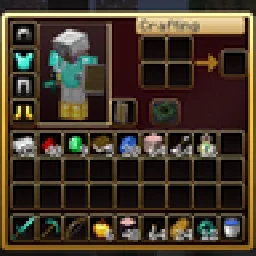
 RBZ GUIPacks de texturas · 26.x
Dark crimson and gold redesign of the vanilla menus and HUD: inventory, crafting table, furnaces, chests, villagers, hotbar, hearts, buttons and more – in HD.
Gratis1 descargas

A dark interface with obsidian-violet details: redesigned inventory, containers, HUD, buttons, menus and main-menu panorama.
Descarga directa desde Modrinth · 5 descargas
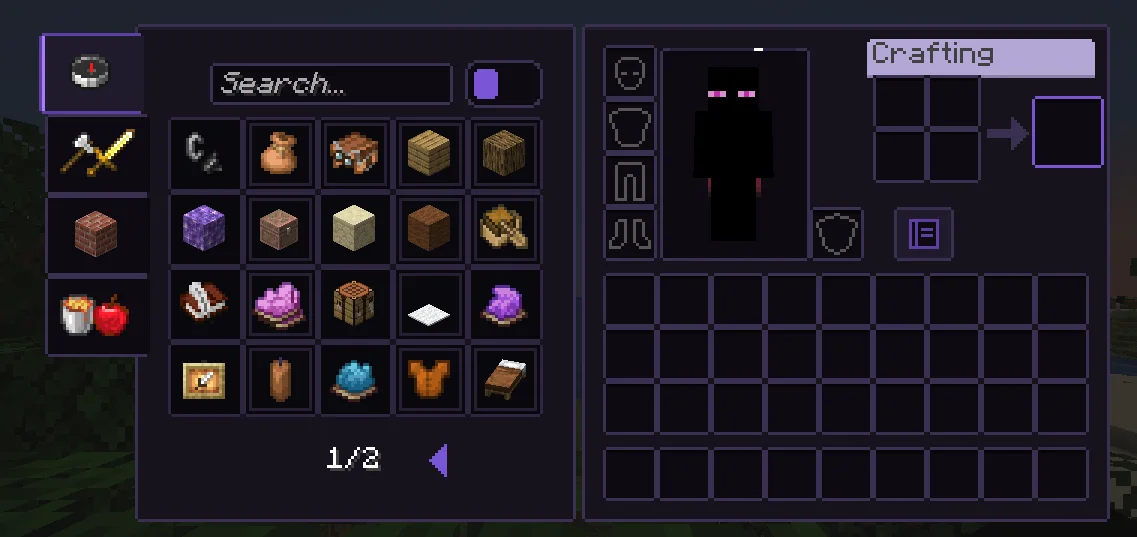
Obsidian UI-Amethyst (pack de texturas) es obra de Troncoh. A dark interface with obsidian-violet details: redesigned inventory, containers, HUD, buttons, menus and main-menu panorama.
Es compatible con Minecraft 1.20 – 26.x. Se ha descargado 5 veces en Modrinth. La última actualización salió el 08/11/2026.
Obsidian UI-Amethyst ha publicado 2 versiones en Modrinth desde el 08/11/2026. 2 salieron en el último año. La más reciente es 26.3, publicada el 08/11/2026. Está hecha para Minecraft 26.2, 26.3. Funciona en Minecraft. La descarga ocupa 1.1 MB.
| Versión | Publicado | Minecraft | Tipo |
|---|---|---|---|
26.3 | 08/11/2026 | 26.2, 26.3 | Estable |
1.21.11 | 08/11/2026 | 1.20.2 – 1.21.1 | Estable |
A clean, dark, minimalist interface for Minecraft: Java Edition with discreet obsidian-violet accents. Obsidian UI restyles the inventory, containers, HUD, menus and main-menu panorama with consistent 1px borders, soft corners and a restrained palette, while staying close to Minecraft's pixel identity.
Near-black surfaces with a faint violet tint, thin graphite borders. The main-menu panorama is a dark void with soft violet glass shards.
Escrita por Troncoh. Léela con imágenes en Modrinth.
Descarga el archivo .zip desde Modrinth. No lo descomprimas.
En Minecraft, abre Opciones, luego Paquetes de recursos y luego Abrir carpeta de paquetes.
Suelta el archivo .zip en esa carpeta y vuelve al juego.
Mueve Obsidian UI-Amethyst a la lista de la derecha y pulsa Hecho.
Está hecho para Minecraft 1.20 – 26.x. En otras versiones Minecraft lo marca como incompatible, pero a menudo funciona igual.
| Recurso | Descargas | Versiones | Última actualización | Precio |
|---|---|---|---|---|
| Obsidian UI-Amethystel que estabas viendo | 5 | 1.20 – 26.x | hace 7 días | Gratis |
| RBZ GUIRedBlockZ | 1 | 26.x | hace 8 días | Gratis |
 Better GUI for Sophisticated BackpacksMoongosu | 367K | 1.16 – 1.21 | 4 ene 2025 | Gratis |
 PVP zegarn+Anime skyzegarn | 867K | 1.8 – 26.x | 7 jul 2026 | Gratis |
Sí. Obsidian UI-Amethyst es compatible con Minecraft 26.x. Todas las versiones compatibles: 26.x, 1.21, 1.20.
Sí. Obsidian UI-Amethyst se puede descargar gratis desde Modrinth.
Sí. La última actualización salió en el último día.
Los más parecidos son RBZ GUI, Better GUI for Sophisticated Backpacks y PVP zegarn+Anime sky. Comparar todas las alternativas
RBZ GUIPacks de texturas · 26.xDark crimson and gold redesign of the vanilla menus and HUD: inventory, crafting table, furnaces, chests, villagers, hotbar, hearts, buttons and more – in HD.
Better GUI for Sophisticated BackpacksPacks de texturas · 1.16 – 1.21A complete redesign of the Sophisticated Backpacks interface, buttons, slots, indicators and much more!
PVP zegarn+Anime skyPacks de texturas · 1.8 – 26.x[UPD 1.3.6] Minimalistic PvP resource pack with dark UI, custom sky, clean HUD & crosshair, small fire, and refined visuals (see description)
 Default Dark ModePacks de texturas · 1.8 – 26.x
🌙 The Dark Mode Resource Pack for Minecraft: Java Edition
 Mandala's GUIPacks de texturas · 1.12 – 1.21
Mandala GUI is an elegant theme, in the style of Mandala Creations. It is specifically made for people who like Dark mode. It only changes the UI of…
 Unique Dark RefinedPacks de texturas · 1.18 – 26.x
Dark UI with unique textures for functional blocks. Different version of Unique Dark
Inicia sesión para dejar una reseña.