
 SpaceFrog's Shulker Rules & ToolsMods · 1.20
Adds whitelists & blacklists for shulker box storage, allows shulkers to stack & nest, adds Drag & Drop function for shulkers, & patches out incompatibilities…
Gratis3 descargas
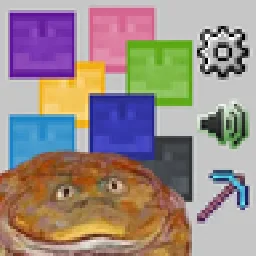
Adds 16 blocks to the game registry server-side that can be configured by players/ops to have custom names, textures, sounds, recipes, & mining properties…
Descarga directa desde Modrinth · 2 descargas
Origen y titularidad. Esta página se generó automáticamente a partir de datos públicos que Modrinth ofrece a través de su API pública. El nombre, las descripciones, las imágenes, las marcas y todo el demás contenido de este proyecto pertenecen a spacefrog1984 y a sus respectivos titulares. CraftRank no es el autor de este proyecto y no está afiliado, respaldado ni patrocinado por su autor ni por Modrinth.
Alojamiento y distribución. CraftRank no aloja, almacena, sube ni distribuye los archivos de descarga de este proyecto, y no conserva ningún archivo de ese tipo en sus servidores. Todas las descargas las proporciona directamente Modrinth desde sus propios servidores; el botón Descargar solo enlaza al archivo allí. La licencia indicada en Modrinth es CC0-1.0.
Uso de API públicas. Modrinth, Hangar (PaperMC) y SpigotMC (a través de la API de Spiget) ponen sus API a disposición pública de sitios web y aplicaciones de terceros. Los Términos de uso de Modrinth otorgan a los usuarios de la API una licencia para descargar, mostrar y consultar contenido a través de sus propios servicios (sección “API Usage”), y los creadores que publican en Modrinth conceden a Modrinth y a sus licenciatarios el derecho a mostrar y distribuir su contenido a terceros (sección “User Contributions”). CraftRank utiliza estas API conforme a las normas publicadas de las plataformas: se identifica en cada solicitud y respeta sus límites de uso.
Sin garantía. La información de esta página se ofrece "tal cual", sin ninguna garantía. Descargar y usar este proyecto es bajo su propia responsabilidad y está sujeto a la licencia y las condiciones de su autor.
Avisos de derechos de autor (DMCA). Solo el titular de los derechos de autor o alguien autorizado a actuar en su nombre puede presentar un aviso, y debe hacerlo una persona mayor de edad o su padre, madre o tutor legal. Un aviso válido enviado a abuse@craftrank.org debe incluir: el enlace de esta página; la obra presuntamente infringida; su nombre completo, dirección postal, teléfono y correo electrónico; una declaración de que cree de buena fe que el uso no está autorizado por el titular, su agente o la ley; una declaración, bajo pena de perjurio, de que el aviso es exacto y de que usted es el titular o está autorizado a actuar en su nombre; y su firma física o electrónica. Los avisos incompletos no se tramitan. Los avisos válidos se atienden en un plazo de 48 horas, sin necesidad de pasar por Google.
Avisos falsos. Quien afirme a sabiendas y falsamente que un material es infractor responde de los daños causados, incluidas las costas y los honorarios de abogados (17 U.S.C. § 512(f)). Los avisos presentados de mala fe o por quien no es titular de los derechos quedan registrados y serán impugnados.
SpaceFrog's Frog Blocks (mod) es obra de spacefrog1984. Adds 16 blocks to the game registry server-side that can be configured by players/ops to have custom names, textures, sounds, recipes, & mining properties…
Es compatible con Minecraft 1.20. Se ha descargado 2 veces en Modrinth. La última actualización salió el 19/10/2026.
La más reciente es 1.0.26, publicada el 19/10/2026. Está hecha para Minecraft 1.20.1. Funciona en Fabric. La descarga ocupa 6.0 MB.
| Versión | Publicado | Minecraft | Tipo |
|---|---|---|---|
1.0.26 | 19/10/2026 | 1.20.1 | Beta |
Frog Blocks is a Fabric mod designed for Minecraft 1.20.1 with the aim to expand to support
additional game versions. It adds 16 blocks to the game registry, each of which can be configured
by the user through either ***Mod Menu*** or the configuration
file (config/frogblocks/frogblocks_config.json). Each block can be independently configured
to have a custom name, custom texture, sound effects, crafting recipe, and mining properties
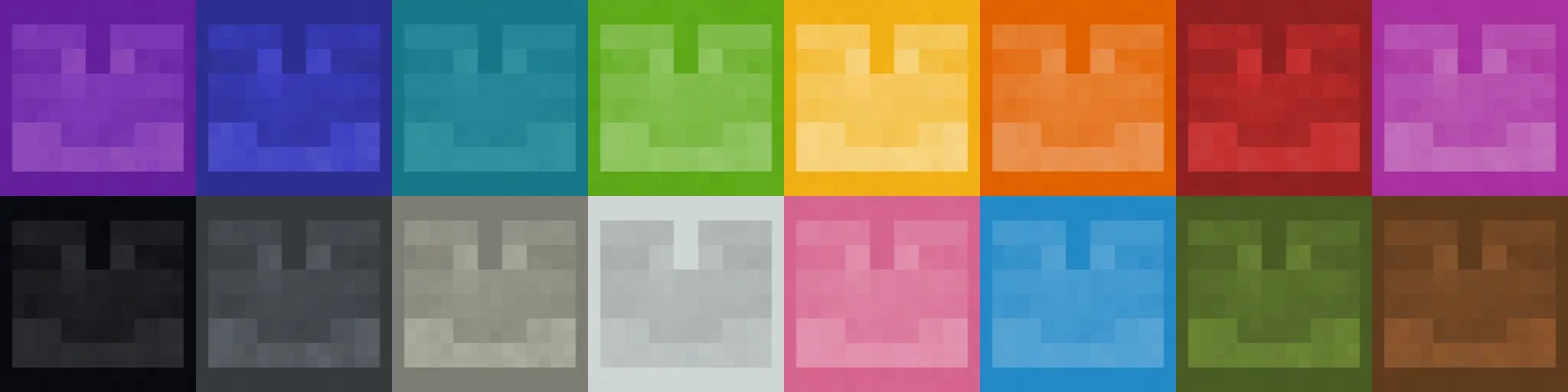
(tool requirements and drops). The default textures for these blocks blend with the textures
of the 16 vanilla concrete blocks and have and friendly Minecraft frog face in the center.
On their own they can be used as building and decoration blocks with no customizations. By
default, the blocks are not craftable; crafting must be enabled by the user in the config file
or through Mod Menu. The default crafting recipe is shapeless: 1 concrete block + 1 slime ball.
Custom crafting can be enabled where the user can choose from shapeless crafting, shaped crafting,
or smelting (smelting times for furnaces, blast furnaces, and smokers can be independently
configures or disabled).
Frog blocks also serves the purpose of being place holders for customizations by resource packs
and datapacks – leave the blocks unconfigured in the frogblocks_config.json config file and
use resource packs and datapacks to customize each block's properties, recipes, etc.
Mod Menu interface for in-game block connfiguration:
Blocks are registered in the "frogblocks" namespace with IDs of the pattern "block_##" where
"##" represents an incremental two digit ID number. ID's are based on alphabetical color order
(e.g., black is first in the alphabetical order of the 16 standard Minecraft colored block
colors, so frogblocks:block_01 is named "Black Frog Block"; yellow is last in the alphabetical
order, so frogblocks:block_16 is named "Yellow Frog Block").
Supported custom texture files must be .png format and 16x16 pixels (as of the current version
of the mod, textures for blocks with rotation states or models other than the standard 16x16x16
cube shape are not supported). If the user selects a custom texture for a Frog Block, they
must supply that texture in the config folder with a name following the pattern "block_##.png"
where "##" represents the two digit ID number (e.g., the custom texture file for frogblocks:block_01
should be located at config/frogblocks/textures/block_01.png).
Supported custom sound files are .ogg format, and up to 4 custom .ogg files can be used per
sound type (place, break, step), 12 sounds total. Custom sound files must be placed in the
config/frogblocks/sounds/block_##/ directory where "##" represents the two digit ID number.
Sound files should be named for the sounds type (place, break, step) followed by the index
of 1-4 and the ".ogg" file extension. E.g., the first custom place sound for frogblocks:block_01
should be located at config/frogblocks/sounds/block_01/place1.ogg.
The server's config/frogblocks/frogblocks_config.json controls the settings used while players
are connected to a remote server. On remote server logins, Frog Blocks sends the settings to
the client and enables custom texture & sound files, which temporarily applies them as resource
overrides and removes them when the player disconnects. The client does not initiate a resource
reload on disconnect; it restores the local resource override files for the next normal resource
reload. Integrated singleplayer worlds continue to use the local config and assets.
Every player still needs the Frog Blocks mod installed on their client so the block and item
registries exist. Custom sound IDs selected in "Vanilla" option must also refer to sounds available
to that client (e.g., from a client resource pack or installed mod). A block's vanilla sound
ID must not point back to that same Frog Blocks sound event.
Generated client resource overrides are stored in config/frogblocks/resourcepack and loaded
internally; they are not exposed as a selectable resource pack.
Join the ***FroggyCraft*** Discord to report bugs: *https://discord.gg/WBQRfBgQEY*
Escrita por spacefrog1984. Léela con imágenes en Modrinth.
Este mod hace falta en el servidor y en cada jugador que entra.
Instala Fabric para Minecraft 1.20.
Descarga el archivo .jar desde Modrinth y ponlo en la carpeta mods de tu directorio .minecraft.
Inicia Minecraft con el perfil de Fabric.
Más fácil: en Prism Launcher o la Modrinth App, busca SpaceFrog's Frog Blocks en los mods de tu instancia y haz clic en Install. Añade el loader y los mods que necesita por ti.
| Recurso | Descargas | Versiones | Última actualización | Precio |
|---|---|---|---|---|
| SpaceFrog's Frog Blocksel que estabas viendo | 2 | 1.20 | 19 oct 2026 | Gratis |
| SpaceFrog's Shulker Rules & Toolsspacefrog1984 | 3 | 1.20 | hace 26 días | Gratis |
 HighlightThatGravyBoat | 11.4M | 1.19 – 26.x | hace 18 días | Gratis |
 Sound Physics Remasteredhenkelmax | 58.1M | 1.19 – 26.x | hace 10 días | Gratis |
Todavía no. La versión más reciente que admite es Minecraft 1.20.
Sí. SpaceFrog's Frog Blocks se puede descargar gratis desde Modrinth.
Ambos. El servidor y cada jugador necesitan SpaceFrog's Frog Blocks instalado.
Sí. La última actualización salió en el último día.
Los más parecidos son SpaceFrog's Shulker Rules & Tools, Highlight y Sound Physics Remastered. Comparar todas las alternativas
SpaceFrog's Shulker Rules & ToolsMods · 1.20Adds whitelists & blacklists for shulker box storage, allows shulkers to stack & nest, adds Drag & Drop function for shulkers, & patches out incompatibilities…
HighlightMods · 1.19 – 26.xHighlight changes the visualization of specific blocks in the game to have more aligned selections to their models.
Sound Physics RemasteredMods · 1.19 – 26.xA Minecraft mod that provides realistic sound attenuation, reverberation, and absorption through blocks.
 Drip SoundsMods · 1.16 – 26.x
Adds sounds for drip particles landing & settings for block particles
 Configured DefaultsMods · 1.18 – 26.x
Allows for providing defaults for files absent in .minecraft like configs. A quintessential modpack utility.
 Shield FixesMods · 1.19 – 26.x
Resolves issues with shield sounds and corrects the animation glitch where the player's shield doesn't display blocking properly.
Inicia sesión para dejar una reseña.