
 SpaceFrog's Shulker Rules & ToolsМоды · 1.20
Adds whitelists & blacklists for shulker box storage, allows shulkers to stack & nest, adds Drag & Drop function for shulkers, & patches out incompatibilities…
БесплатноЗагрузок: 3
Adds 16 blocks to the game registry server-side that can be configured by players/ops to have custom names, textures, sounds, recipes, & mining properties…
Прямая загрузка с Modrinth · 2 загрузок
Источник и права. Эта страница создана автоматически на основе открытых данных, которые Modrinth предоставляет через свой публичный API. Название, описания, изображения, товарные знаки и всё прочее содержимое этого проекта принадлежат spacefrog1984 и соответствующим правообладателям. CraftRank не является автором этого проекта и не связан с его автором или Modrinth, не одобрен и не спонсируется ими.
Размещение и распространение. CraftRank не размещает, не хранит, не загружает и не распространяет файлы для скачивания этого проекта, и ни один такой файл не хранится на серверах CraftRank. Каждое скачивание предоставляется напрямую Modrinth с его собственных серверов; кнопка «Скачать» лишь ведёт к файлу там. Лицензия, указанная на Modrinth: CC0-1.0.
Использование публичных API. Modrinth, Hangar (PaperMC) и SpigotMC (через API Spiget) открыто предоставляют свои API сторонним сайтам и приложениям. Условия использования Modrinth дают пользователям API лицензию на скачивание, отображение и запрос контента через их собственные сервисы (раздел «API Usage»), а авторы, публикующиеся на Modrinth, предоставляют Modrinth и его лицензиатам право показывать и распространять их контент третьим лицам (раздел «User Contributions»). CraftRank использует эти API в соответствии с опубликованными правилами платформ: представляется в каждом запросе и соблюдает их лимиты.
Отказ от гарантий. Информация на этой странице предоставляется «как есть», без каких-либо гарантий. Скачивание и использование этого проекта осуществляется на ваш риск и регулируется лицензией и условиями его автора.
Уведомления об авторском праве (DMCA). Подать уведомление может только правообладатель или лицо, уполномоченное действовать от его имени, и оно должно исходить от совершеннолетнего лица либо его родителя или законного представителя. Действительное уведомление, отправленное на abuse@craftrank.org, должно содержать: ссылку на эту страницу; произведение, права на которое якобы нарушены; ваши полное имя, почтовый адрес, телефон и e-mail; заявление о том, что вы добросовестно полагаете, что использование не разрешено правообладателем, его представителем или законом; заявление под страхом ответственности за лжесвидетельство о том, что уведомление точно и вы являетесь правообладателем или уполномочены действовать от его имени; а также вашу физическую или электронную подпись. Неполные уведомления не рассматриваются. Действительные уведомления обрабатываются в течение 48 часов, без обращения в Google.
Ложные уведомления. Тот, кто заведомо ложно заявляет о нарушении, несёт ответственность за причинённый ущерб, включая расходы и оплату услуг юристов (17 U.S.C. § 512(f)). Уведомления, поданные недобросовестно или лицами, не обладающими правами, фиксируются и будут оспорены.
SpaceFrog's Frog Blocks — мод от spacefrog1984. Adds 16 blocks to the game registry server-side that can be configured by players/ops to have custom names, textures, sounds, recipes, & mining properties…
Поддерживаемые версии: Minecraft 1.20. Скачиваний на Modrinth: 2. Последнее обновление: 19.10.2026.
Новейшая — 1.0.26, вышла 19.10.2026. Она сделана для Minecraft 1.20.1. Работает на Fabric. Размер файла — 6.0 MB.
| Версия | Выпущен | Minecraft | Тип |
|---|---|---|---|
1.0.26 | 19.10.2026 | 1.20.1 | Бета |
Frog Blocks is a Fabric mod designed for Minecraft 1.20.1 with the aim to expand to support
additional game versions. It adds 16 blocks to the game registry, each of which can be configured
by the user through either ***Mod Menu*** or the configuration
file (config/frogblocks/frogblocks_config.json). Each block can be independently configured
to have a custom name, custom texture, sound effects, crafting recipe, and mining properties
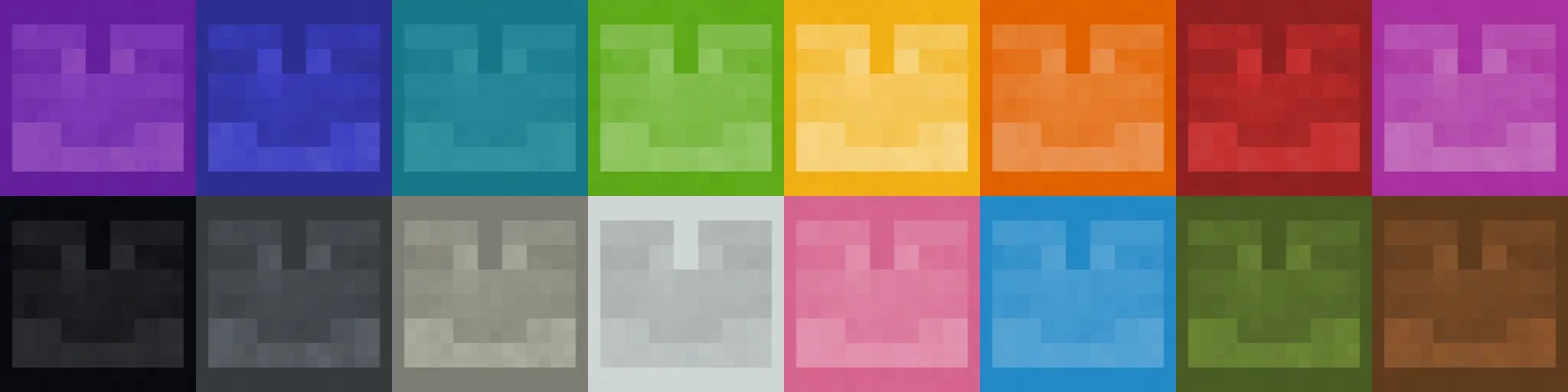
(tool requirements and drops). The default textures for these blocks blend with the textures
of the 16 vanilla concrete blocks and have and friendly Minecraft frog face in the center.
On their own they can be used as building and decoration blocks with no customizations. By
default, the blocks are not craftable; crafting must be enabled by the user in the config file
or through Mod Menu. The default crafting recipe is shapeless: 1 concrete block + 1 slime ball.
Custom crafting can be enabled where the user can choose from shapeless crafting, shaped crafting,
or smelting (smelting times for furnaces, blast furnaces, and smokers can be independently
configures or disabled).
Frog blocks also serves the purpose of being place holders for customizations by resource packs
and datapacks – leave the blocks unconfigured in the frogblocks_config.json config file and
use resource packs and datapacks to customize each block's properties, recipes, etc.
Mod Menu interface for in-game block connfiguration:
Blocks are registered in the "frogblocks" namespace with IDs of the pattern "block_##" where
"##" represents an incremental two digit ID number. ID's are based on alphabetical color order
(e.g., black is first in the alphabetical order of the 16 standard Minecraft colored block
colors, so frogblocks:block_01 is named "Black Frog Block"; yellow is last in the alphabetical
order, so frogblocks:block_16 is named "Yellow Frog Block").
Supported custom texture files must be .png format and 16x16 pixels (as of the current version
of the mod, textures for blocks with rotation states or models other than the standard 16x16x16
cube shape are not supported). If the user selects a custom texture for a Frog Block, they
must supply that texture in the config folder with a name following the pattern "block_##.png"
where "##" represents the two digit ID number (e.g., the custom texture file for frogblocks:block_01
should be located at config/frogblocks/textures/block_01.png).
Supported custom sound files are .ogg format, and up to 4 custom .ogg files can be used per
sound type (place, break, step), 12 sounds total. Custom sound files must be placed in the
config/frogblocks/sounds/block_##/ directory where "##" represents the two digit ID number.
Sound files should be named for the sounds type (place, break, step) followed by the index
of 1-4 and the ".ogg" file extension. E.g., the first custom place sound for frogblocks:block_01
should be located at config/frogblocks/sounds/block_01/place1.ogg.
The server's config/frogblocks/frogblocks_config.json controls the settings used while players
are connected to a remote server. On remote server logins, Frog Blocks sends the settings to
the client and enables custom texture & sound files, which temporarily applies them as resource
overrides and removes them when the player disconnects. The client does not initiate a resource
reload on disconnect; it restores the local resource override files for the next normal resource
reload. Integrated singleplayer worlds continue to use the local config and assets.
Every player still needs the Frog Blocks mod installed on their client so the block and item
registries exist. Custom sound IDs selected in "Vanilla" option must also refer to sounds available
to that client (e.g., from a client resource pack or installed mod). A block's vanilla sound
ID must not point back to that same Frog Blocks sound event.
Generated client resource overrides are stored in config/frogblocks/resourcepack and loaded
internally; they are not exposed as a selectable resource pack.
Join the ***FroggyCraft*** Discord to report bugs: *https://discord.gg/WBQRfBgQEY*
Автор: spacefrog1984. С картинками — на Modrinth.
Этот мод нужен и на сервере, и у каждого игрока.
Установи Fabric для Minecraft 1.20.
Скачай .jar-файл с Modrinth и положи его в папку mods в каталоге .minecraft.
Запусти Minecraft с профилем Fabric.
Проще: в Prism Launcher или Modrinth App найдите SpaceFrog's Frog Blocks в модах своей сборки и нажмите Install. Загрузчик и нужные моды добавятся сами.
| Ресурс | Загрузки | Версии | Обновление | Цена |
|---|---|---|---|---|
| SpaceFrog's Frog Blocksтот, что ты смотрел | 2 | 1.20 | 19 окт. 2026 | Бесплатно |
| SpaceFrog's Shulker Rules & Toolsspacefrog1984 | 3 | 1.20 | 26 дн. назад | Бесплатно |
 HighlightThatGravyBoat | 11.4M | 1.19 – 26.x | 18 дн. назад | Бесплатно |
 Sound Physics Remasteredhenkelmax | 58.1M | 1.19 – 26.x | 10 дн. назад | Бесплатно |
Пока нет. Последняя поддерживаемая версия — Minecraft 1.20.
Да. SpaceFrog's Frog Blocks можно бесплатно скачать на Modrinth.
И там, и там. SpaceFrog's Frog Blocks нужен и на сервере, и у каждого игрока.
Да. Последнее обновление вышло за последние сутки.
Ближе всего к нему SpaceFrog's Shulker Rules & Tools, Highlight и Sound Physics Remastered. Сравнить все альтернативы
SpaceFrog's Shulker Rules & ToolsМоды · 1.20Adds whitelists & blacklists for shulker box storage, allows shulkers to stack & nest, adds Drag & Drop function for shulkers, & patches out incompatibilities…
HighlightМоды · 1.19 – 26.xHighlight changes the visualization of specific blocks in the game to have more aligned selections to their models.
Sound Physics RemasteredМоды · 1.19 – 26.xA Minecraft mod that provides realistic sound attenuation, reverberation, and absorption through blocks.
 Drip SoundsМоды · 1.16 – 26.x
Adds sounds for drip particles landing & settings for block particles
 Configured DefaultsМоды · 1.18 – 26.x
Allows for providing defaults for files absent in .minecraft like configs. A quintessential modpack utility.
 Shield FixesМоды · 1.19 – 26.x
Resolves issues with shield sounds and corrects the animation glitch where the player's shield doesn't display blocking properly.
Войди, чтобы оставить отзыв.