
 SpaceFrog's Shulker Rules & ToolsMods · 1.20
Adds whitelists & blacklists for shulker box storage, allows shulkers to stack & nest, adds Drag & Drop function for shulkers, & patches out incompatibilities…
Gratuit3 téléchargements
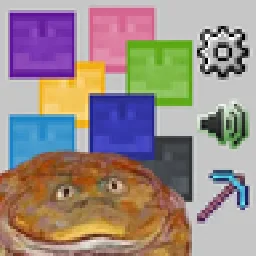
Adds 16 blocks to the game registry server-side that can be configured by players/ops to have custom names, textures, sounds, recipes, & mining properties…
Téléchargement direct depuis Modrinth · 2 téléchargements
Source et propriété. Cette page a été générée automatiquement à partir de données publiques que Modrinth fournit via son API publique. Le nom, les descriptions, les images, les marques et tout autre contenu de ce projet appartiennent à spacefrog1984 et à leurs ayants droit respectifs. CraftRank n'est pas l'auteur de ce projet et n'est ni affilié, ni approuvé, ni sponsorisé par son auteur ou par Modrinth.
Hébergement et distribution. CraftRank n'héberge, ne stocke, ne téléverse et ne distribue pas les fichiers de téléchargement de ce projet, et aucun fichier de ce type n'est conservé sur les serveurs de CraftRank. Chaque téléchargement est fourni directement par Modrinth depuis ses propres serveurs ; le bouton Télécharger renvoie seulement vers le fichier là-bas. La licence indiquée sur Modrinth est CC0-1.0.
Utilisation d'API publiques. Modrinth, Hangar (PaperMC) et SpigotMC (via l'API Spiget) mettent leurs API à la disposition publique des sites web et applications tiers. Les Conditions d'utilisation de Modrinth accordent aux utilisateurs de l'API une licence pour télécharger, afficher et interroger le contenu via leurs propres services (section « API Usage »), et les créateurs qui publient sur Modrinth accordent à Modrinth et à ses licenciés le droit d'afficher et de distribuer leur contenu à des tiers (section « User Contributions »). CraftRank utilise ces API conformément aux règles publiées des plateformes : il s'identifie à chaque requête et respecte leurs limites de débit.
Absence de garantie. Les informations de cette page sont fournies « en l'état », sans aucune garantie. Le téléchargement et l'utilisation de ce projet se font à vos propres risques et sont soumis à la licence et aux conditions de son auteur.
Notifications de droit d'auteur (DMCA). Seul le titulaire du droit d'auteur ou une personne autorisée à agir en son nom peut envoyer une notification, et celle-ci doit émaner d'une personne majeure ou de son représentant légal. Une notification valable envoyée à abuse@craftrank.org doit contenir : le lien de cette page ; l'œuvre prétendument contrefaite ; vos nom complet, adresse postale, numéro de téléphone et e-mail ; une déclaration selon laquelle vous estimez de bonne foi que l'utilisation n'est autorisée ni par le titulaire, ni par son mandataire, ni par la loi ; une déclaration, sous peine de parjure, attestant que la notification est exacte et que vous êtes le titulaire ou êtes autorisé à agir en son nom ; ainsi que votre signature physique ou électronique. Les notifications incomplètes ne sont pas traitées. Les notifications valables sont traitées sous 48 heures, sans passer par Google.
Notifications abusives. Quiconque affirme sciemment et à tort qu'un contenu est contrefaisant est responsable des dommages causés, y compris les frais et honoraires d'avocat (17 U.S.C. § 512(f)). Les notifications de mauvaise foi ou émanant de personnes qui ne détiennent pas les droits sont conservées et seront contestées.
SpaceFrog's Frog Blocks (mod) est une création de spacefrog1984. Adds 16 blocks to the game registry server-side that can be configured by players/ops to have custom names, textures, sounds, recipes, & mining properties…
Versions prises en charge : Minecraft 1.20. On compte 2 téléchargements sur Modrinth. La dernière mise à jour date du 19/10/2026.
La plus récente est 1.0.26, sortie le 19/10/2026. Elle est faite pour Minecraft 1.20.1. Elle fonctionne sur Fabric. Le téléchargement fait 6.0 MB.
| Version | Publié | Minecraft | Type |
|---|---|---|---|
1.0.26 | 19/10/2026 | 1.20.1 | Bêta |
Frog Blocks is a Fabric mod designed for Minecraft 1.20.1 with the aim to expand to support
additional game versions. It adds 16 blocks to the game registry, each of which can be configured
by the user through either ***Mod Menu*** or the configuration
file (config/frogblocks/frogblocks_config.json). Each block can be independently configured
to have a custom name, custom texture, sound effects, crafting recipe, and mining properties
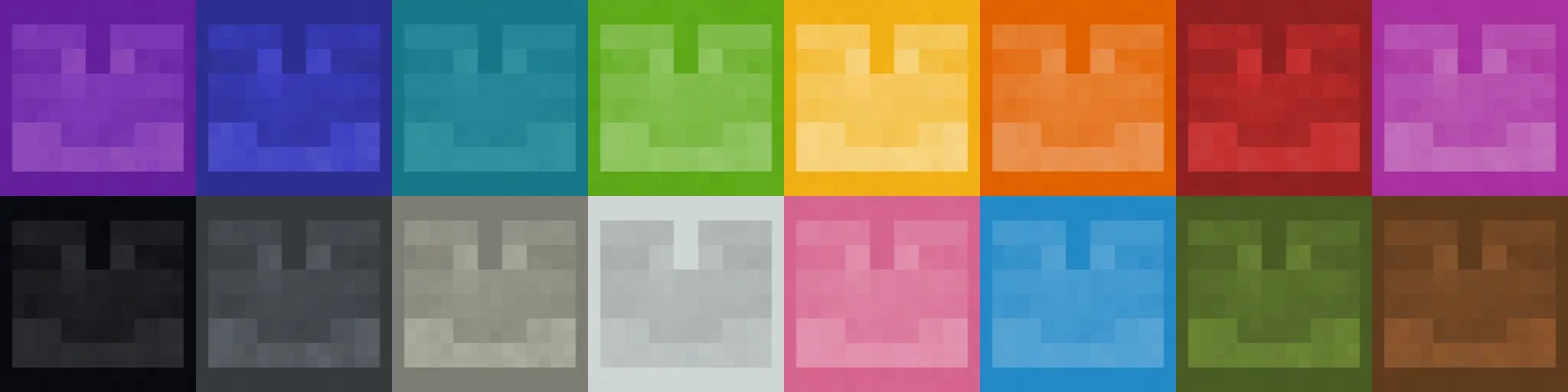
(tool requirements and drops). The default textures for these blocks blend with the textures
of the 16 vanilla concrete blocks and have and friendly Minecraft frog face in the center.
On their own they can be used as building and decoration blocks with no customizations. By
default, the blocks are not craftable; crafting must be enabled by the user in the config file
or through Mod Menu. The default crafting recipe is shapeless: 1 concrete block + 1 slime ball.
Custom crafting can be enabled where the user can choose from shapeless crafting, shaped crafting,
or smelting (smelting times for furnaces, blast furnaces, and smokers can be independently
configures or disabled).
Frog blocks also serves the purpose of being place holders for customizations by resource packs
and datapacks – leave the blocks unconfigured in the frogblocks_config.json config file and
use resource packs and datapacks to customize each block's properties, recipes, etc.
Mod Menu interface for in-game block connfiguration:
Blocks are registered in the "frogblocks" namespace with IDs of the pattern "block_##" where
"##" represents an incremental two digit ID number. ID's are based on alphabetical color order
(e.g., black is first in the alphabetical order of the 16 standard Minecraft colored block
colors, so frogblocks:block_01 is named "Black Frog Block"; yellow is last in the alphabetical
order, so frogblocks:block_16 is named "Yellow Frog Block").
Supported custom texture files must be .png format and 16x16 pixels (as of the current version
of the mod, textures for blocks with rotation states or models other than the standard 16x16x16
cube shape are not supported). If the user selects a custom texture for a Frog Block, they
must supply that texture in the config folder with a name following the pattern "block_##.png"
where "##" represents the two digit ID number (e.g., the custom texture file for frogblocks:block_01
should be located at config/frogblocks/textures/block_01.png).
Supported custom sound files are .ogg format, and up to 4 custom .ogg files can be used per
sound type (place, break, step), 12 sounds total. Custom sound files must be placed in the
config/frogblocks/sounds/block_##/ directory where "##" represents the two digit ID number.
Sound files should be named for the sounds type (place, break, step) followed by the index
of 1-4 and the ".ogg" file extension. E.g., the first custom place sound for frogblocks:block_01
should be located at config/frogblocks/sounds/block_01/place1.ogg.
The server's config/frogblocks/frogblocks_config.json controls the settings used while players
are connected to a remote server. On remote server logins, Frog Blocks sends the settings to
the client and enables custom texture & sound files, which temporarily applies them as resource
overrides and removes them when the player disconnects. The client does not initiate a resource
reload on disconnect; it restores the local resource override files for the next normal resource
reload. Integrated singleplayer worlds continue to use the local config and assets.
Every player still needs the Frog Blocks mod installed on their client so the block and item
registries exist. Custom sound IDs selected in "Vanilla" option must also refer to sounds available
to that client (e.g., from a client resource pack or installed mod). A block's vanilla sound
ID must not point back to that same Frog Blocks sound event.
Generated client resource overrides are stored in config/frogblocks/resourcepack and loaded
internally; they are not exposed as a selectable resource pack.
Join the ***FroggyCraft*** Discord to report bugs: *https://discord.gg/WBQRfBgQEY*
Écrite par spacefrog1984. À lire avec les images sur Modrinth.
Ce mod est nécessaire sur le serveur et chez chaque joueur qui rejoint.
Installe Fabric pour Minecraft 1.20.
Télécharge le fichier .jar depuis Modrinth et place-le dans le dossier mods de ton répertoire .minecraft.
Lance Minecraft avec le profil Fabric.
Plus simple : dans Prism Launcher ou la Modrinth App, cherche SpaceFrog's Frog Blocks dans les mods de ton instance et clique sur Install. Le loader et les mods requis sont ajoutés pour toi.
| Ressource | Téléchargements | Versions | Mise à jour | Prix |
|---|---|---|---|---|
| SpaceFrog's Frog Blockscelle que tu regardais | 2 | 1.20 | 19 oct. 2026 | Gratuit |
| SpaceFrog's Shulker Rules & Toolsspacefrog1984 | 3 | 1.20 | il y a 26 jours | Gratuit |
 HighlightThatGravyBoat | 11.4M | 1.19 – 26.x | il y a 18 jours | Gratuit |
 Sound Physics Remasteredhenkelmax | 58.1M | 1.19 – 26.x | il y a 10 jours | Gratuit |
Pas encore. La version la plus récente prise en charge est Minecraft 1.20.
Oui. SpaceFrog's Frog Blocks se télécharge gratuitement sur Modrinth.
Les deux. Le serveur et chaque joueur doivent avoir SpaceFrog's Frog Blocks installé.
Oui. La dernière mise à jour date des dernières 24 heures.
Les plus proches sont SpaceFrog's Shulker Rules & Tools, Highlight et Sound Physics Remastered. Comparer toutes les alternatives
SpaceFrog's Shulker Rules & ToolsMods · 1.20Adds whitelists & blacklists for shulker box storage, allows shulkers to stack & nest, adds Drag & Drop function for shulkers, & patches out incompatibilities…
HighlightMods · 1.19 – 26.xHighlight changes the visualization of specific blocks in the game to have more aligned selections to their models.
Sound Physics RemasteredMods · 1.19 – 26.xA Minecraft mod that provides realistic sound attenuation, reverberation, and absorption through blocks.
 Drip SoundsMods · 1.16 – 26.x
Adds sounds for drip particles landing & settings for block particles
 Configured DefaultsMods · 1.18 – 26.x
Allows for providing defaults for files absent in .minecraft like configs. A quintessential modpack utility.
 Shield FixesMods · 1.19 – 26.x
Resolves issues with shield sounds and corrects the animation glitch where the player's shield doesn't display blocking properly.
Connecte-toi pour laisser un avis.