
 SpaceFrog's Shulker Rules & ToolsMody · 1.20
Adds whitelists & blacklists for shulker box storage, allows shulkers to stack & nest, adds Drag & Drop function for shulkers, & patches out incompatibilities…
Za darmoPobrania: 3
Adds 16 blocks to the game registry server-side that can be configured by players/ops to have custom names, textures, sounds, recipes, & mining properties…
Bezpośrednie pobieranie z Modrinth · 2 pobrań
Źródło i własność. Ta strona została wygenerowana automatycznie z publicznych danych, które Modrinth udostępnia przez swoje publiczne API. Nazwa, opisy, obrazy, znaki towarowe i wszelkie inne treści tego projektu należą do spacefrog1984 i ich odpowiednich właścicieli. CraftRank nie jest autorem tego projektu i nie jest powiązany z jego autorem ani z Modrinth, ani przez nich popierany lub sponsorowany.
Hosting i dystrybucja. CraftRank nie hostuje, nie przechowuje, nie wgrywa i nie rozpowszechnia plików do pobrania tego projektu, a na serwerach CraftRank nie jest przechowywany żaden taki plik. Każde pobranie jest udostępniane bezpośrednio przez Modrinth z jego własnych serwerów; przycisk Pobierz jedynie prowadzi do pliku tam. Licencja podana na Modrinth to CC0-1.0.
Korzystanie z publicznych API. Modrinth, Hangar (PaperMC) i SpigotMC (przez API Spiget) udostępniają publicznie swoje API zewnętrznym stronom i aplikacjom. Warunki korzystania z Modrinth dają użytkownikom API licencję na pobieranie, wyświetlanie i odpytywanie treści przez ich własne usługi (sekcja „API Usage”), a twórcy publikujący na Modrinth udzielają Modrinth i jego licencjobiorcom prawa do wyświetlania i rozpowszechniania ich treści osobom trzecim (sekcja „User Contributions”). CraftRank korzysta z tych API zgodnie z opublikowanymi zasadami platform: przedstawia się w każdym zapytaniu i przestrzega limitów.
Brak gwarancji. Informacje na tej stronie są udostępniane „tak jak są”, bez żadnej gwarancji. Pobieranie i używanie tego projektu odbywa się na własne ryzyko i podlega licencji oraz warunkom jego autora.
Zgłoszenia naruszeń praw autorskich (DMCA). Zgłoszenie może złożyć wyłącznie właściciel praw autorskich lub osoba upoważniona do działania w jego imieniu, a musi ono pochodzić od osoby pełnoletniej albo jej rodzica lub opiekuna prawnego. Ważne zgłoszenie wysłane na abuse@craftrank.org musi zawierać: link do tej strony; utwór, którego naruszenie się zarzuca; Twoje imię i nazwisko, adres pocztowy, numer telefonu i e-mail; oświadczenie, że w dobrej wierze uważasz, iż korzystanie nie jest dozwolone przez właściciela, jego przedstawiciela ani prawo; oświadczenie, złożone pod rygorem odpowiedzialności za fałszywe zeznania, że zgłoszenie jest prawdziwe i że jesteś właścicielem lub osobą upoważnioną; oraz Twój podpis fizyczny lub elektroniczny. Niekompletne zgłoszenia nie są rozpatrywane. Ważne zgłoszenia są obsługiwane w ciągu 48 godzin, bez potrzeby zgłaszania przez Google.
Fałszywe zgłoszenia. Kto świadomie i nieprawdziwie twierdzi, że materiał narusza prawa, odpowiada za wyrządzone szkody, w tym koszty i honoraria prawników (17 U.S.C. § 512(f)). Zgłoszenia składane w złej wierze lub przez osoby, którym nie przysługują prawa, są rejestrowane i będą kwestionowane.
SpaceFrog's Frog Blocks to mod, autor: spacefrog1984. Adds 16 blocks to the game registry server-side that can be configured by players/ops to have custom names, textures, sounds, recipes, & mining properties…
Obsługiwane wersje: Minecraft 1.20. Liczba pobrań w serwisie Modrinth: 2. Ostatnia aktualizacja: 19.10.2026.
Najnowsza to 1.0.26, wydana 19.10.2026. Jest zrobiona dla Minecraft 1.20.1. Działa na Fabric. Plik ma 6.0 MB.
| Wersja | Wydano | Minecraft | Typ |
|---|---|---|---|
1.0.26 | 19.10.2026 | 1.20.1 | Beta |
Frog Blocks is a Fabric mod designed for Minecraft 1.20.1 with the aim to expand to support
additional game versions. It adds 16 blocks to the game registry, each of which can be configured
by the user through either ***Mod Menu*** or the configuration
file (config/frogblocks/frogblocks_config.json). Each block can be independently configured
to have a custom name, custom texture, sound effects, crafting recipe, and mining properties
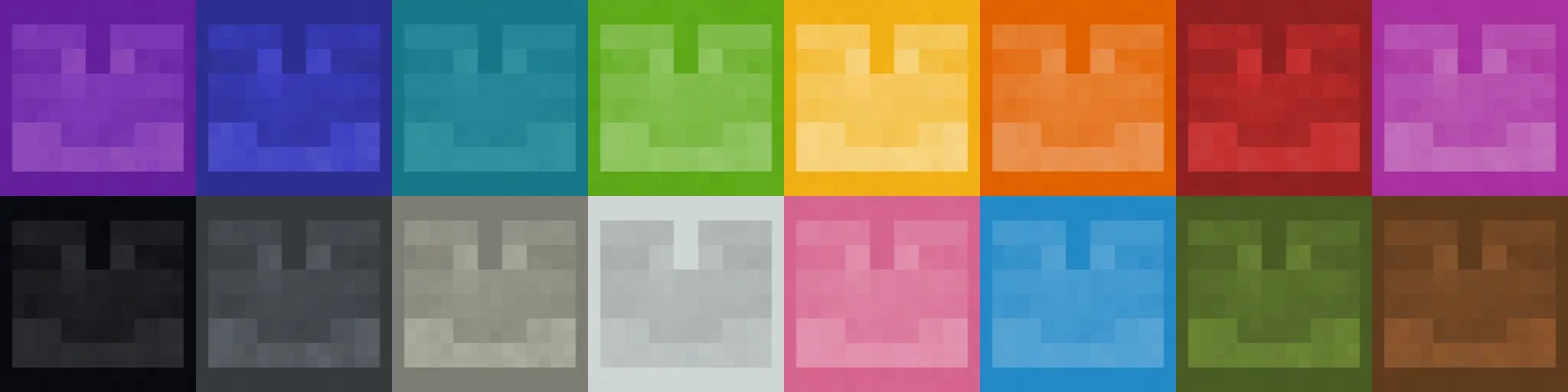
(tool requirements and drops). The default textures for these blocks blend with the textures
of the 16 vanilla concrete blocks and have and friendly Minecraft frog face in the center.
On their own they can be used as building and decoration blocks with no customizations. By
default, the blocks are not craftable; crafting must be enabled by the user in the config file
or through Mod Menu. The default crafting recipe is shapeless: 1 concrete block + 1 slime ball.
Custom crafting can be enabled where the user can choose from shapeless crafting, shaped crafting,
or smelting (smelting times for furnaces, blast furnaces, and smokers can be independently
configures or disabled).
Frog blocks also serves the purpose of being place holders for customizations by resource packs
and datapacks – leave the blocks unconfigured in the frogblocks_config.json config file and
use resource packs and datapacks to customize each block's properties, recipes, etc.
Mod Menu interface for in-game block connfiguration:
Blocks are registered in the "frogblocks" namespace with IDs of the pattern "block_##" where
"##" represents an incremental two digit ID number. ID's are based on alphabetical color order
(e.g., black is first in the alphabetical order of the 16 standard Minecraft colored block
colors, so frogblocks:block_01 is named "Black Frog Block"; yellow is last in the alphabetical
order, so frogblocks:block_16 is named "Yellow Frog Block").
Supported custom texture files must be .png format and 16x16 pixels (as of the current version
of the mod, textures for blocks with rotation states or models other than the standard 16x16x16
cube shape are not supported). If the user selects a custom texture for a Frog Block, they
must supply that texture in the config folder with a name following the pattern "block_##.png"
where "##" represents the two digit ID number (e.g., the custom texture file for frogblocks:block_01
should be located at config/frogblocks/textures/block_01.png).
Supported custom sound files are .ogg format, and up to 4 custom .ogg files can be used per
sound type (place, break, step), 12 sounds total. Custom sound files must be placed in the
config/frogblocks/sounds/block_##/ directory where "##" represents the two digit ID number.
Sound files should be named for the sounds type (place, break, step) followed by the index
of 1-4 and the ".ogg" file extension. E.g., the first custom place sound for frogblocks:block_01
should be located at config/frogblocks/sounds/block_01/place1.ogg.
The server's config/frogblocks/frogblocks_config.json controls the settings used while players
are connected to a remote server. On remote server logins, Frog Blocks sends the settings to
the client and enables custom texture & sound files, which temporarily applies them as resource
overrides and removes them when the player disconnects. The client does not initiate a resource
reload on disconnect; it restores the local resource override files for the next normal resource
reload. Integrated singleplayer worlds continue to use the local config and assets.
Every player still needs the Frog Blocks mod installed on their client so the block and item
registries exist. Custom sound IDs selected in "Vanilla" option must also refer to sounds available
to that client (e.g., from a client resource pack or installed mod). A block's vanilla sound
ID must not point back to that same Frog Blocks sound event.
Generated client resource overrides are stored in config/frogblocks/resourcepack and loaded
internally; they are not exposed as a selectable resource pack.
Join the ***FroggyCraft*** Discord to report bugs: *https://discord.gg/WBQRfBgQEY*
Autor: spacefrog1984. Z obrazkami na Modrinth.
Ten mod jest potrzebny na serwerze i u każdego gracza, który dołącza.
Zainstaluj Fabric dla Minecraft 1.20.
Pobierz plik .jar z Modrinth i wrzuć go do folderu mods w katalogu .minecraft.
Uruchom Minecraft z profilem Fabric.
Prościej: w Prism Launcher lub Modrinth App wyszukaj SpaceFrog's Frog Blocks w modach swojej instancji i kliknij Install. Loader i potrzebne mody zostaną dodane za ciebie.
| Zasób | Pobrania | Wersje | Aktualizacja | Cena |
|---|---|---|---|---|
| SpaceFrog's Frog Blocksten, który oglądałeś | 2 | 1.20 | 19 paź 2026 | Za darmo |
| SpaceFrog's Shulker Rules & Toolsspacefrog1984 | 3 | 1.20 | 26 d. temu | Za darmo |
 HighlightThatGravyBoat | 11.4M | 1.19 – 26.x | 18 d. temu | Za darmo |
 Sound Physics Remasteredhenkelmax | 58.1M | 1.19 – 26.x | 10 d. temu | Za darmo |
Jeszcze nie. Najnowsza obsługiwana wersja to Minecraft 1.20.
Tak. SpaceFrog's Frog Blocks można pobrać za darmo z serwisu Modrinth.
Obie. Serwer i każdy gracz muszą mieć zainstalowany SpaceFrog's Frog Blocks.
Tak. Ostatnia aktualizacja wyszła w ciągu ostatniej doby.
Najbliższe to SpaceFrog's Shulker Rules & Tools, Highlight i Sound Physics Remastered. Porównaj wszystkie alternatywy
SpaceFrog's Shulker Rules & ToolsMody · 1.20Adds whitelists & blacklists for shulker box storage, allows shulkers to stack & nest, adds Drag & Drop function for shulkers, & patches out incompatibilities…
HighlightMody · 1.19 – 26.xHighlight changes the visualization of specific blocks in the game to have more aligned selections to their models.
Sound Physics RemasteredMody · 1.19 – 26.xA Minecraft mod that provides realistic sound attenuation, reverberation, and absorption through blocks.
 Drip SoundsMody · 1.16 – 26.x
Adds sounds for drip particles landing & settings for block particles
 Configured DefaultsMody · 1.18 – 26.x
Allows for providing defaults for files absent in .minecraft like configs. A quintessential modpack utility.
 Shield FixesMody · 1.19 – 26.x
Resolves issues with shield sounds and corrects the animation glitch where the player's shield doesn't display blocking properly.
Zaloguj się, aby wystawić opinię.