
 SpaceFrog's Shulker Rules & ToolsMods · 1.20
Adds whitelists & blacklists for shulker box storage, allows shulkers to stack & nest, adds Drag & Drop function for shulkers, & patches out incompatibilities…
Grátis3 downloads
Adds 16 blocks to the game registry server-side that can be configured by players/ops to have custom names, textures, sounds, recipes, & mining properties…
Download direto do Modrinth · 2 downloads
Origem e propriedade. Esta página foi gerada automaticamente a partir de dados públicos que o Modrinth oferece por meio de sua API pública. O nome, as descrições, as imagens, as marcas e todo o restante do conteúdo deste projeto pertencem a spacefrog1984 e aos respectivos titulares. O CraftRank não é o autor deste projeto e não tem afiliação, endosso ou patrocínio do autor nem do Modrinth.
Hospedagem e distribuição. O CraftRank não hospeda, não armazena, não envia e não distribui os arquivos de download deste projeto, e nenhum arquivo desse tipo é mantido nos servidores do CraftRank. Todos os downloads são fornecidos diretamente pelo Modrinth a partir de seus próprios servidores; o botão Baixar apenas leva ao arquivo lá. A licença informada no Modrinth é CC0-1.0.
Uso de APIs públicas. Modrinth, Hangar (PaperMC) e SpigotMC (por meio da API Spiget) disponibilizam publicamente suas APIs para sites e aplicativos de terceiros. Os Termos de Uso do Modrinth concedem aos usuários da API uma licença para baixar, exibir e consultar conteúdo por meio de seus próprios serviços (seção “API Usage”), e os criadores que publicam no Modrinth concedem ao Modrinth e a seus licenciados o direito de exibir e distribuir seu conteúdo a terceiros (seção “User Contributions”). O CraftRank usa essas APIs de acordo com as regras publicadas das plataformas: se identifica em cada requisição e respeita os limites de uso.
Sem garantia. As informações desta página são fornecidas "como estão", sem qualquer garantia. Baixar e usar este projeto é por sua conta e risco e está sujeito à licença e aos termos do autor.
Notificações de direitos autorais (DMCA). Somente o titular dos direitos autorais ou alguém autorizado a agir em seu nome pode enviar uma notificação, e ela deve vir de uma pessoa maior de idade ou de seu pai, mãe ou responsável legal. Uma notificação válida enviada para abuse@craftrank.org deve conter: o link desta página; a obra supostamente violada; seu nome completo, endereço postal, telefone e e-mail; uma declaração de que você acredita de boa-fé que o uso não é autorizado pelo titular, seu representante ou a lei; uma declaração, sob pena de perjúrio, de que a notificação é exata e de que você é o titular ou está autorizado a agir em seu nome; e sua assinatura física ou eletrônica. Notificações incompletas não são processadas. Notificações válidas são atendidas em até 48 horas, sem precisar passar pelo Google.
Notificações falsas. Quem declarar conscientemente e de forma falsa que um material é infrator responde pelos danos causados, incluindo custas e honorários advocatícios (17 U.S.C. § 512(f)). Notificações feitas de má-fé ou por quem não detém os direitos ficam registradas e serão contestadas.
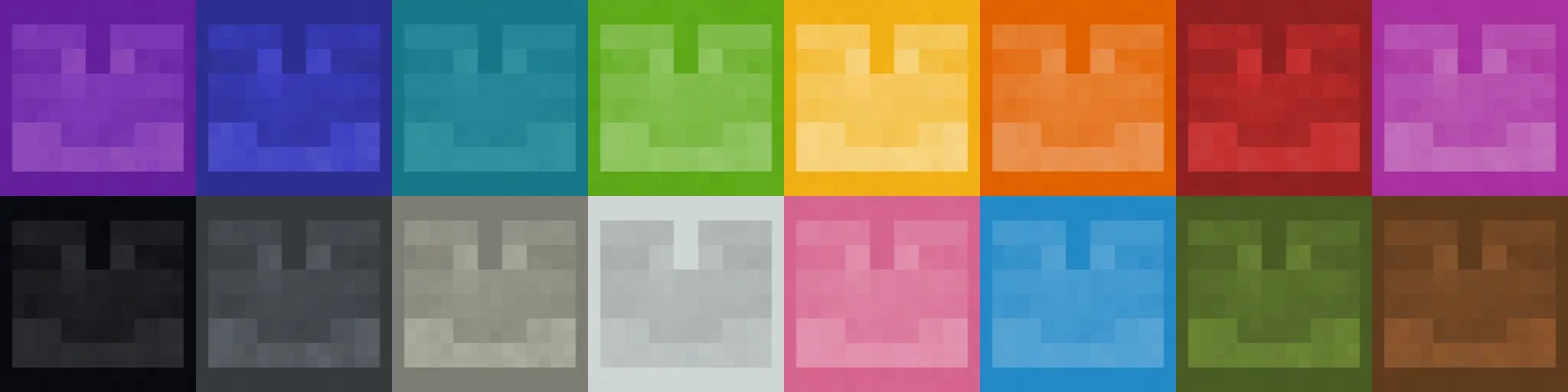
SpaceFrog's Frog Blocks (mod) é obra de spacefrog1984. Adds 16 blocks to the game registry server-side that can be configured by players/ops to have custom names, textures, sounds, recipes, & mining properties…
É compatível com o Minecraft 1.20. Tem 2 downloads em Modrinth. A última atualização saiu em 19/10/2026.
A mais recente é 1.0.26, lançada em 19/10/2026. Ela é feita para o Minecraft 1.20.1. Ela roda em Fabric. O download tem 6.0 MB.
| Versão | Lançado | Minecraft | Tipo |
|---|---|---|---|
1.0.26 | 19/10/2026 | 1.20.1 | Beta |
Frog Blocks is a Fabric mod designed for Minecraft 1.20.1 with the aim to expand to support
additional game versions. It adds 16 blocks to the game registry, each of which can be configured
by the user through either ***Mod Menu*** or the configuration
file (config/frogblocks/frogblocks_config.json). Each block can be independently configured
to have a custom name, custom texture, sound effects, crafting recipe, and mining properties
(tool requirements and drops). The default textures for these blocks blend with the textures
of the 16 vanilla concrete blocks and have and friendly Minecraft frog face in the center.
On their own they can be used as building and decoration blocks with no customizations. By
default, the blocks are not craftable; crafting must be enabled by the user in the config file
or through Mod Menu. The default crafting recipe is shapeless: 1 concrete block + 1 slime ball.
Custom crafting can be enabled where the user can choose from shapeless crafting, shaped crafting,
or smelting (smelting times for furnaces, blast furnaces, and smokers can be independently
configures or disabled).
Frog blocks also serves the purpose of being place holders for customizations by resource packs
and datapacks – leave the blocks unconfigured in the frogblocks_config.json config file and
use resource packs and datapacks to customize each block's properties, recipes, etc.
Mod Menu interface for in-game block connfiguration:
Blocks are registered in the "frogblocks" namespace with IDs of the pattern "block_##" where
"##" represents an incremental two digit ID number. ID's are based on alphabetical color order
(e.g., black is first in the alphabetical order of the 16 standard Minecraft colored block
colors, so frogblocks:block_01 is named "Black Frog Block"; yellow is last in the alphabetical
order, so frogblocks:block_16 is named "Yellow Frog Block").
Supported custom texture files must be .png format and 16x16 pixels (as of the current version
of the mod, textures for blocks with rotation states or models other than the standard 16x16x16
cube shape are not supported). If the user selects a custom texture for a Frog Block, they
must supply that texture in the config folder with a name following the pattern "block_##.png"
where "##" represents the two digit ID number (e.g., the custom texture file for frogblocks:block_01
should be located at config/frogblocks/textures/block_01.png).
Supported custom sound files are .ogg format, and up to 4 custom .ogg files can be used per
sound type (place, break, step), 12 sounds total. Custom sound files must be placed in the
config/frogblocks/sounds/block_##/ directory where "##" represents the two digit ID number.
Sound files should be named for the sounds type (place, break, step) followed by the index
of 1-4 and the ".ogg" file extension. E.g., the first custom place sound for frogblocks:block_01
should be located at config/frogblocks/sounds/block_01/place1.ogg.
The server's config/frogblocks/frogblocks_config.json controls the settings used while players
are connected to a remote server. On remote server logins, Frog Blocks sends the settings to
the client and enables custom texture & sound files, which temporarily applies them as resource
overrides and removes them when the player disconnects. The client does not initiate a resource
reload on disconnect; it restores the local resource override files for the next normal resource
reload. Integrated singleplayer worlds continue to use the local config and assets.
Every player still needs the Frog Blocks mod installed on their client so the block and item
registries exist. Custom sound IDs selected in "Vanilla" option must also refer to sounds available
to that client (e.g., from a client resource pack or installed mod). A block's vanilla sound
ID must not point back to that same Frog Blocks sound event.
Generated client resource overrides are stored in config/frogblocks/resourcepack and loaded
internally; they are not exposed as a selectable resource pack.
Join the ***FroggyCraft*** Discord to report bugs: *https://discord.gg/WBQRfBgQEY*
Escrita por spacefrog1984. Leia com imagens no Modrinth.
Este mod é necessário no servidor e em cada jogador que entra.
Instale Fabric para o Minecraft 1.20.
Baixe o arquivo .jar pelo Modrinth e coloque na pasta mods do seu diretório .minecraft.
Abra o Minecraft com o perfil Fabric.
Mais fácil: no Prism Launcher ou no Modrinth App, procure SpaceFrog's Frog Blocks nos mods da sua instância e clique em Install. Ele adiciona o loader e os mods necessários para você.
| Recurso | Downloads | Versões | Última atualização | Preço |
|---|---|---|---|---|
| SpaceFrog's Frog Blockso que você estava vendo | 2 | 1.20 | 19 out 2026 | Grátis |
| SpaceFrog's Shulker Rules & Toolsspacefrog1984 | 3 | 1.20 | há 26 dias | Grátis |
 HighlightThatGravyBoat | 11.4M | 1.19 – 26.x | há 18 dias | Grátis |
 Sound Physics Remasteredhenkelmax | 58.1M | 1.19 – 26.x | há 10 dias | Grátis |
Ainda não. A versão mais recente compatível é o Minecraft 1.20.
Sim. Você pode baixar SpaceFrog's Frog Blocks de graça em Modrinth.
Os dois. O servidor e cada jogador precisam ter SpaceFrog's Frog Blocks instalado.
Sim. A última atualização saiu no último dia.
Os mais parecidos são SpaceFrog's Shulker Rules & Tools, Highlight e Sound Physics Remastered. Comparar todas as alternativas
SpaceFrog's Shulker Rules & ToolsMods · 1.20Adds whitelists & blacklists for shulker box storage, allows shulkers to stack & nest, adds Drag & Drop function for shulkers, & patches out incompatibilities…
HighlightMods · 1.19 – 26.xHighlight changes the visualization of specific blocks in the game to have more aligned selections to their models.
Sound Physics RemasteredMods · 1.19 – 26.xA Minecraft mod that provides realistic sound attenuation, reverberation, and absorption through blocks.
 Drip SoundsMods · 1.16 – 26.x
Adds sounds for drip particles landing & settings for block particles
 Configured DefaultsMods · 1.18 – 26.x
Allows for providing defaults for files absent in .minecraft like configs. A quintessential modpack utility.
 Shield FixesMods · 1.19 – 26.x
Resolves issues with shield sounds and corrects the animation glitch where the player's shield doesn't display blocking properly.
Entre para deixar uma avaliação.