
 SpaceFrog's Shulker Rules & ToolsMods · 1.20
Adds whitelists & blacklists for shulker box storage, allows shulkers to stack & nest, adds Drag & Drop function for shulkers, & patches out incompatibilities…
Free3 downloads
Adds 16 blocks to the game registry server-side that can be configured by players/ops to have custom names, textures, sounds, recipes, & mining properties…
Direct download from Modrinth · 2 downloads
Source and ownership. This page was generated automatically from public data that Modrinth provides through its public API. The name, descriptions, images, trademarks and all other content of this project belong to spacefrog1984 and their respective owners. CraftRank is not the author of this project and is not affiliated with, endorsed or sponsored by its author or by Modrinth.
Hosting and distribution. CraftRank does not host, store, upload or distribute the download files of this project, and no such file is kept on CraftRank's servers. Every download is provided directly by Modrinth from its own servers; the Download button only links to the file there. The license stated on Modrinth is CC0-1.0.
Use of public APIs. Modrinth, Hangar (PaperMC) and SpigotMC (through the Spiget API) make their APIs publicly available to third-party websites and applications. Modrinth's Terms of Use give API users a license to download, display and query content through their own services (section “API Usage”), and creators who publish on Modrinth grant Modrinth and its licensees the right to display and distribute their content to third parties (section “User Contributions”). CraftRank uses these APIs in line with the platforms' published rules: it identifies itself in every request and respects their rate limits.
No warranty. The information on this page is provided "as is", without any warranty. Downloading and using this project is at your own risk and subject to the license and terms of its author.
Copyright notices (DMCA). Only the copyright owner or someone authorised to act for them may file a notice, and it must come from a person of legal age or from their parent or legal guardian. A valid notice sent to abuse@craftrank.org must contain: the link of this page; the work claimed to be infringed; your full name, postal address, phone number and e-mail; a statement that you believe in good faith that the use is not authorised by the owner, its agent or the law; a statement, under penalty of perjury, that the notice is accurate and that you are the owner or authorised to act for them; and your physical or electronic signature. Incomplete notices are not processed. Valid notices are acted on within 48 hours, with no need to go through Google.
False notices. Anyone who knowingly misrepresents that material is infringing is liable for the damages caused, including costs and attorneys' fees (17 U.S.C. § 512(f)). Notices filed in bad faith or by someone who does not hold the rights are kept on record and will be contested.
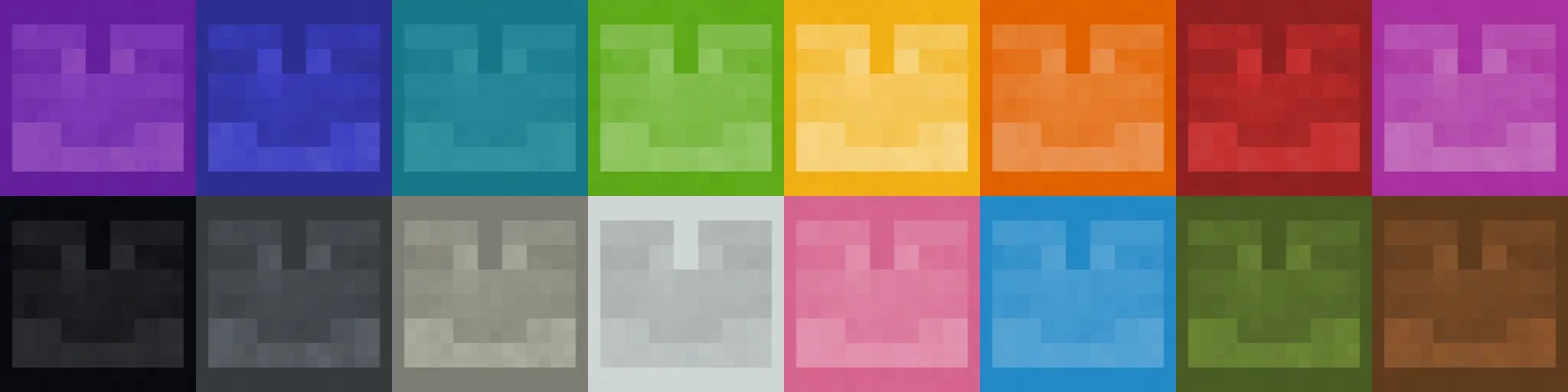
SpaceFrog's Frog Blocks is a mod made by spacefrog1984. Adds 16 blocks to the game registry server-side that can be configured by players/ops to have custom names, textures, sounds, recipes, & mining properties…
It supports Minecraft 1.20. It has been downloaded 2 times on Modrinth. The last update came out on Oct 19, 2026.
The newest is 1.0.26, released on Oct 19, 2026. It is made for Minecraft 1.20.1. It runs on Fabric. The download is 6.0 MB.
| Version | Released | Minecraft | Type |
|---|---|---|---|
1.0.26 | Oct 19, 2026 | 1.20.1 | Beta |
Frog Blocks is a Fabric mod designed for Minecraft 1.20.1 with the aim to expand to support
additional game versions. It adds 16 blocks to the game registry, each of which can be configured
by the user through either ***Mod Menu*** or the configuration
file (config/frogblocks/frogblocks_config.json). Each block can be independently configured
to have a custom name, custom texture, sound effects, crafting recipe, and mining properties
(tool requirements and drops). The default textures for these blocks blend with the textures
of the 16 vanilla concrete blocks and have and friendly Minecraft frog face in the center.
On their own they can be used as building and decoration blocks with no customizations. By
default, the blocks are not craftable; crafting must be enabled by the user in the config file
or through Mod Menu. The default crafting recipe is shapeless: 1 concrete block + 1 slime ball.
Custom crafting can be enabled where the user can choose from shapeless crafting, shaped crafting,
or smelting (smelting times for furnaces, blast furnaces, and smokers can be independently
configures or disabled).
Frog blocks also serves the purpose of being place holders for customizations by resource packs
and datapacks – leave the blocks unconfigured in the frogblocks_config.json config file and
use resource packs and datapacks to customize each block's properties, recipes, etc.
Mod Menu interface for in-game block connfiguration:
Blocks are registered in the "frogblocks" namespace with IDs of the pattern "block_##" where
"##" represents an incremental two digit ID number. ID's are based on alphabetical color order
(e.g., black is first in the alphabetical order of the 16 standard Minecraft colored block
colors, so frogblocks:block_01 is named "Black Frog Block"; yellow is last in the alphabetical
order, so frogblocks:block_16 is named "Yellow Frog Block").
Supported custom texture files must be .png format and 16x16 pixels (as of the current version
of the mod, textures for blocks with rotation states or models other than the standard 16x16x16
cube shape are not supported). If the user selects a custom texture for a Frog Block, they
must supply that texture in the config folder with a name following the pattern "block_##.png"
where "##" represents the two digit ID number (e.g., the custom texture file for frogblocks:block_01
should be located at config/frogblocks/textures/block_01.png).
Supported custom sound files are .ogg format, and up to 4 custom .ogg files can be used per
sound type (place, break, step), 12 sounds total. Custom sound files must be placed in the
config/frogblocks/sounds/block_##/ directory where "##" represents the two digit ID number.
Sound files should be named for the sounds type (place, break, step) followed by the index
of 1-4 and the ".ogg" file extension. E.g., the first custom place sound for frogblocks:block_01
should be located at config/frogblocks/sounds/block_01/place1.ogg.
The server's config/frogblocks/frogblocks_config.json controls the settings used while players
are connected to a remote server. On remote server logins, Frog Blocks sends the settings to
the client and enables custom texture & sound files, which temporarily applies them as resource
overrides and removes them when the player disconnects. The client does not initiate a resource
reload on disconnect; it restores the local resource override files for the next normal resource
reload. Integrated singleplayer worlds continue to use the local config and assets.
Every player still needs the Frog Blocks mod installed on their client so the block and item
registries exist. Custom sound IDs selected in "Vanilla" option must also refer to sounds available
to that client (e.g., from a client resource pack or installed mod). A block's vanilla sound
ID must not point back to that same Frog Blocks sound event.
Generated client resource overrides are stored in config/frogblocks/resourcepack and loaded
internally; they are not exposed as a selectable resource pack.
Join the ***FroggyCraft*** Discord to report bugs: *https://discord.gg/WBQRfBgQEY*
Written by spacefrog1984. Read it with pictures on Modrinth.
This mod is needed on both the server and every player who joins.
Install Fabric for Minecraft 1.20.
Download the .jar file from Modrinth and put it in the mods folder of your .minecraft directory.
Start Minecraft with the Fabric profile.
Easier: in Prism Launcher or the Modrinth App, search for SpaceFrog's Frog Blocks in your instance's mods and click Install. It adds the loader and the mods it needs for you.
Full guide: How to install Minecraft mods
| Resource | Downloads | Versions | Last update | Price |
|---|---|---|---|---|
| SpaceFrog's Frog Blocksthe one you looked at | 2 | 1.20 | Oct 19, 2026 | Free |
| SpaceFrog's Shulker Rules & Toolsspacefrog1984 | 3 | 1.20 | 25 days ago | Free |
 HighlightThatGravyBoat | 11.4M | 1.19 – 26.x | 18 days ago | Free |
 Sound Physics Remasteredhenkelmax | 58.1M | 1.19 – 26.x | 10 days ago | Free |
Not yet. The newest version it supports is Minecraft 1.20.
Yes. SpaceFrog's Frog Blocks is free to download from Modrinth.
Both. The server and every player need SpaceFrog's Frog Blocks installed.
Yes. The last update came out in the past day.
The closest ones are SpaceFrog's Shulker Rules & Tools, Highlight and Sound Physics Remastered. Compare all alternatives
SpaceFrog's Shulker Rules & ToolsMods · 1.20Adds whitelists & blacklists for shulker box storage, allows shulkers to stack & nest, adds Drag & Drop function for shulkers, & patches out incompatibilities…
HighlightMods · 1.19 – 26.xHighlight changes the visualization of specific blocks in the game to have more aligned selections to their models.
Sound Physics RemasteredMods · 1.19 – 26.xA Minecraft mod that provides realistic sound attenuation, reverberation, and absorption through blocks.
 Drip SoundsMods · 1.16 – 26.x
Adds sounds for drip particles landing & settings for block particles
 Configured DefaultsMods · 1.18 – 26.x
Allows for providing defaults for files absent in .minecraft like configs. A quintessential modpack utility.
 Shield FixesMods · 1.19 – 26.x
Resolves issues with shield sounds and corrects the animation glitch where the player's shield doesn't display blocking properly.
Log in to leave a review.