
 PVP zegarn+Anime skyPacks de textures · 1.8 – 26.x
[UPD 1.3.6] Minimalistic PvP resource pack with dark UI, custom sky, clean HUD & crosshair, small fire, and refined visuals (see description)
Gratuit865,185 téléchargements

1.8.8+; Makes all of the GUIs and HUDs in the game transparent (clear; see-through) for a sleek and modern-looking minimal design! + Fire and Pumpkin overlay…
Téléchargement direct depuis Modrinth · 633,331 téléchargements
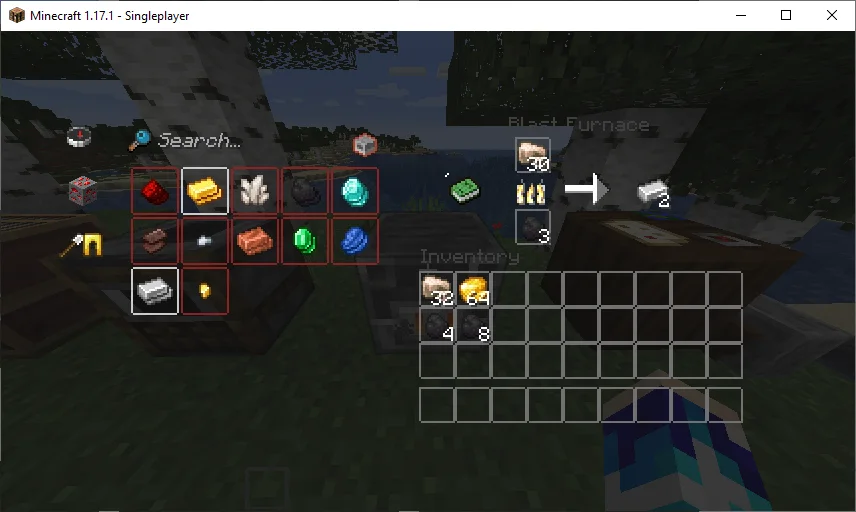
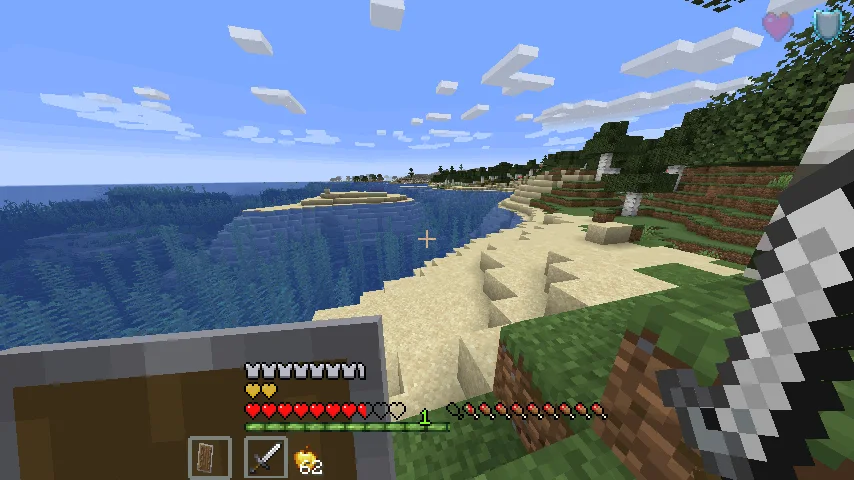
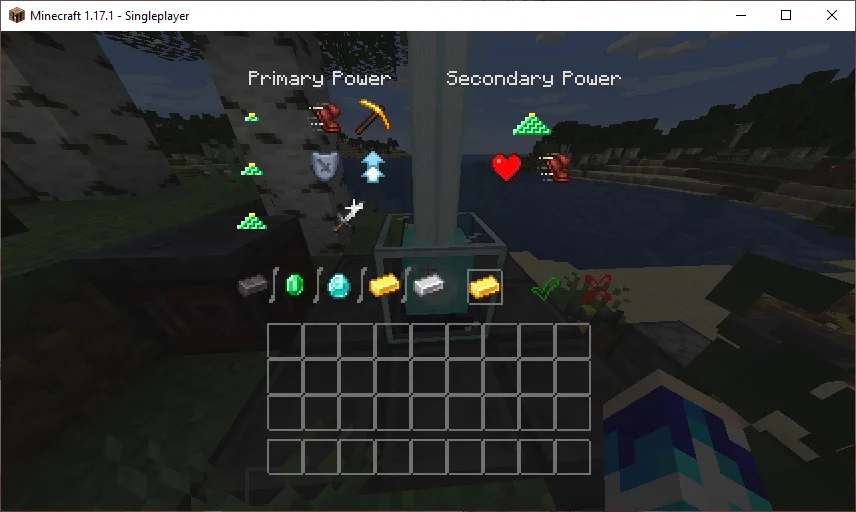
Transparent GUI and HUD (pack de textures) est une création de VirxEC. 1.8.8+; Makes all of the GUIs and HUDs in the game transparent (clear; see-through) for a sleek and modern-looking minimal design! + Fire and Pumpkin overlay…
Versions prises en charge : Minecraft 1.8 – 26.x. On compte 633,331 téléchargements sur Modrinth. La dernière mise à jour date du 20/06/2026.
Transparent GUI and HUD a publié 25 versions sur Modrinth depuis le 16/03/2023. 2 sont sorties au cours de l'année passée. La plus récente est 1, sortie le 19/06/2026. Elle est faite pour Minecraft 26.1 – 26.3. Elle fonctionne sur Minecraft. Le téléchargement fait 127 KB.
| Version | Publié | Minecraft | Type |
|---|---|---|---|
1 | 19/06/2026 | 26.1 – 26.3 | Stable |
1.4 | 13/12/2025 | 1.21.9, 1.21.10, 1.21.11 | Stable |
1.3 | 22/04/2025 | 1.21 – 1.21.10 | Stable |
1.2 | 31/08/2024 | 1.21 – 1.21.5 | Stable |
1.1 | 30/06/2024 | 1.21 | Stable |
26.2.X Release 1 and 1.8.8-9 Release 2.3 are now available!
This is a texture pack that makes all of the GUIs (and HUDs) in the game transparent (transparent means see-through or clear), so you can see the gameplay going on in front of you! The GUI's are specifically designed so you can see both where items should go and so you can see in front of you.
In 1.14-26.2.X, these textures are supported:
In 1.14.X & down, this texture pack also supports shields. Due to a change in 19w45a, future versions can no longer support transparent shields.
This texture pack supports (as of 1.8.X - 1.13.X's latest release):
Écrite par VirxEC. À lire avec les images sur Modrinth.
Télécharge le fichier .zip depuis Modrinth. Ne le décompresse pas.
Dans Minecraft, ouvre Options, puis Packs de ressources, puis Ouvrir le dossier des packs.
Dépose le fichier .zip dans ce dossier et retourne au jeu.
Déplace Transparent GUI and HUD dans la liste de droite et clique sur Terminé.
Il est fait pour Minecraft 1.8 – 26.x. Sur d'autres versions, Minecraft l'indique comme incompatible, mais il fonctionne souvent quand même.
| Ressource | Téléchargements | Versions | Mise à jour | Prix |
|---|---|---|---|---|
| Transparent GUI and HUDcelle que tu regardais | 633K | 1.8 – 26.x | 20 juin 2026 | Gratuit |
| PVP zegarn+Anime skyzegarn | 865K | 1.8 – 26.x | 7 juil. 2026 | Gratuit |
 GUIScroutop | 154K | 1.20 – 26.x | 26 janv. 2026 | Gratuit |
 The Quintessential Quintuplets Custom GUI PackListar | 132K | 1.19 – 1.21 | 3 août 2025 | Gratuit |
Oui. Transparent GUI and HUD prend en charge Minecraft 26.x. Toutes les versions prises en charge : 26.x, 1.21, 1.20, 1.19, 1.18, 1.17, 1.16, 1.13, 1.12, 1.8.
Oui. Transparent GUI and HUD se télécharge gratuitement sur Modrinth.
Oui. La dernière mise à jour date des dernières 24 heures.
Les plus proches sont PVP zegarn+Anime sky, GUI et The Quintessential Quintuplets Custom GUI Pack. Comparer toutes les alternatives
PVP zegarn+Anime skyPacks de textures · 1.8 – 26.x[UPD 1.3.6] Minimalistic PvP resource pack with dark UI, custom sky, clean HUD & crosshair, small fire, and refined visuals (see description)
GUIPacks de textures · 1.20 – 26.xFully black GUI for modern versions of Minecraft.
The Quintessential Quintuplets Custom GUI PackPacks de textures · 1.19 – 1.21The Quintessential Quintuplets Custom GUI Pack
 Modern Skin PacksPacks de textures · 1.20 – 26.x
Post-legacy skin packs ported to Java!
 Low Fire EXTREMEPacks de textures · 1.13 – 26.x
This Resourcepack aims to make the fire overlay even lower then other packs
 basic pvp overlayPacks de textures · 1.20 – 1.21
Basic needs for pvp - No fire on your screen, no shield/totem pop covering up your view, dark gui and transparent inventory.
Connecte-toi pour laisser un avis.