
 PVP zegarn+Anime skyTexture packs · 1.8 – 26.x
[UPD 1.3.6] Minimalistic PvP resource pack with dark UI, custom sky, clean HUD & crosshair, small fire, and refined visuals (see description)
Free861,594 downloads

1.8.8+; Makes all of the GUIs and HUDs in the game transparent (clear; see-through) for a sleek and modern-looking minimal design! + Fire and Pumpkin overlay…
Direct download from Modrinth · 632,262 downloads
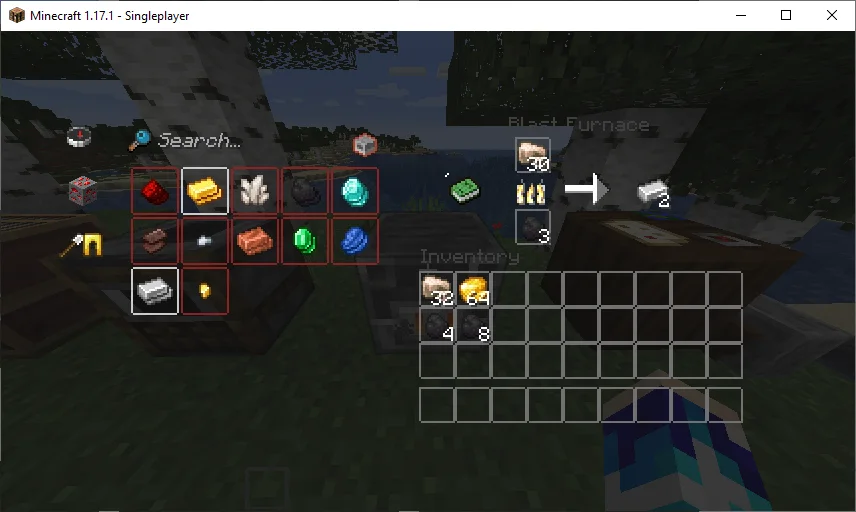
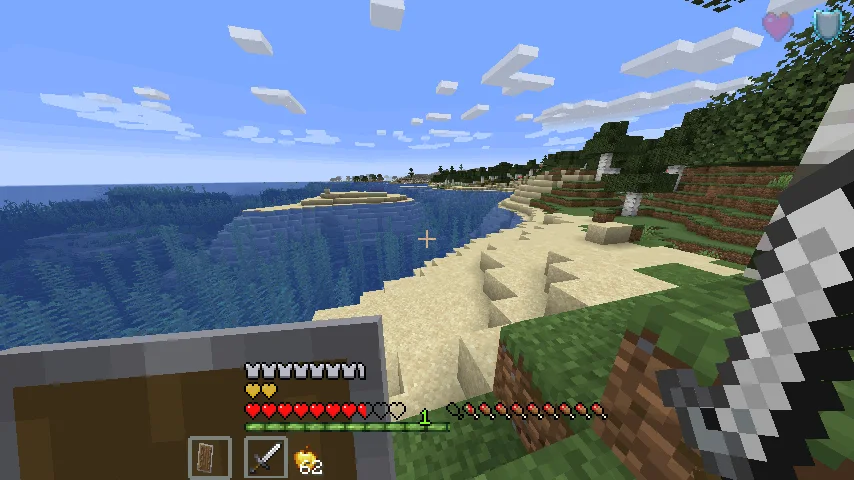
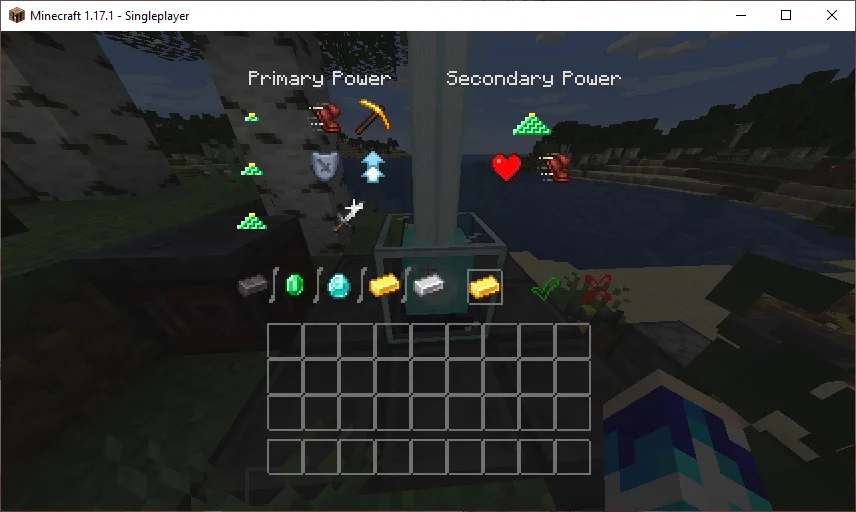
Transparent GUI and HUD is a texture pack made by VirxEC. 1.8.8+; Makes all of the GUIs and HUDs in the game transparent (clear; see-through) for a sleek and modern-looking minimal design! + Fire and Pumpkin overlay…
It supports Minecraft 1.8 – 26.x. It has been downloaded 632,262 times on Modrinth. The last update came out on Jun 20, 2026.
Transparent GUI and HUD has had 25 releases on Modrinth since Mar 16, 2023. 2 of them came out in the past year. The newest is 1, released on Jun 19, 2026. It is made for Minecraft 26.1 – 26.3. It runs on Minecraft. The download is 127 KB.
| Version | Released | Minecraft | Type |
|---|---|---|---|
1 | Jun 19, 2026 | 26.1 – 26.3 | Release |
1.4 | Dec 13, 2025 | 1.21.9, 1.21.10, 1.21.11 | Release |
1.3 | Apr 22, 2025 | 1.21 – 1.21.10 | Release |
1.2 | Aug 31, 2024 | 1.21 – 1.21.5 | Release |
1.1 | Jun 30, 2024 | 1.21 | Release |
26.2.X Release 1 and 1.8.8-9 Release 2.3 are now available!
This is a texture pack that makes all of the GUIs (and HUDs) in the game transparent (transparent means see-through or clear), so you can see the gameplay going on in front of you! The GUI's are specifically designed so you can see both where items should go and so you can see in front of you.
In 1.14-26.2.X, these textures are supported:
In 1.14.X & down, this texture pack also supports shields. Due to a change in 19w45a, future versions can no longer support transparent shields.
This texture pack supports (as of 1.8.X - 1.13.X's latest release):
Written by VirxEC. Read it with pictures on Modrinth.
Download the .zip file from Modrinth. Do not unzip it.
In Minecraft, open Options, then Resource Packs, then Open Pack Folder.
Drop the .zip file into that folder and go back to the game.
Move Transparent GUI and HUD to the right-hand list and click Done.
It is made for Minecraft 1.8 – 26.x. On other versions Minecraft marks it as incompatible, but it often still works.
Full guide: How to install Minecraft resource packs
| Resource | Downloads | Versions | Last update | Price |
|---|---|---|---|---|
| Transparent GUI and HUDthe one you looked at | 632K | 1.8 – 26.x | Jun 20, 2026 | Free |
| PVP zegarn+Anime skyzegarn | 862K | 1.8 – 26.x | Jul 7, 2026 | Free |
 GUIScroutop | 154K | 1.20 – 26.x | Jan 26, 2026 | Free |
 The Quintessential Quintuplets Custom GUI PackListar | 132K | 1.19 – 1.21 | Aug 3, 2025 | Free |
Yes. Transparent GUI and HUD supports Minecraft 26.x. All supported versions: 26.x, 1.21, 1.20, 1.19, 1.18, 1.17, 1.16, 1.13, 1.12, 1.8.
Yes. Transparent GUI and HUD is free to download from Modrinth.
Yes. The last update came out in the past day.
The closest ones are PVP zegarn+Anime sky, GUI and The Quintessential Quintuplets Custom GUI Pack. Compare all alternatives
PVP zegarn+Anime skyTexture packs · 1.8 – 26.x[UPD 1.3.6] Minimalistic PvP resource pack with dark UI, custom sky, clean HUD & crosshair, small fire, and refined visuals (see description)
GUITexture packs · 1.20 – 26.xFully black GUI for modern versions of Minecraft.
The Quintessential Quintuplets Custom GUI PackTexture packs · 1.19 – 1.21The Quintessential Quintuplets Custom GUI Pack
 Modern Skin PacksTexture packs · 1.20 – 26.x
Post-legacy skin packs ported to Java!
 Low Fire EXTREMETexture packs · 1.13 – 26.x
This Resourcepack aims to make the fire overlay even lower then other packs
 basic pvp overlayTexture packs · 1.20 – 1.21
Basic needs for pvp - No fire on your screen, no shield/totem pop covering up your view, dark gui and transparent inventory.
Log in to leave a review.