
 ArchiveSpawnPluginy · 1.21
Lightweight spawn management plugin with full Folia support. Set, manage and teleport players to custom spawn locations with a simple and optimized command…
Za darmoPobrania: 9

DINScreenshare is a lightweight Minecraft moderation plugin that allows staff to easily manage player screenshares with configurable locations, command…
Bezpośrednie pobieranie z Modrinth · 3 pobrań
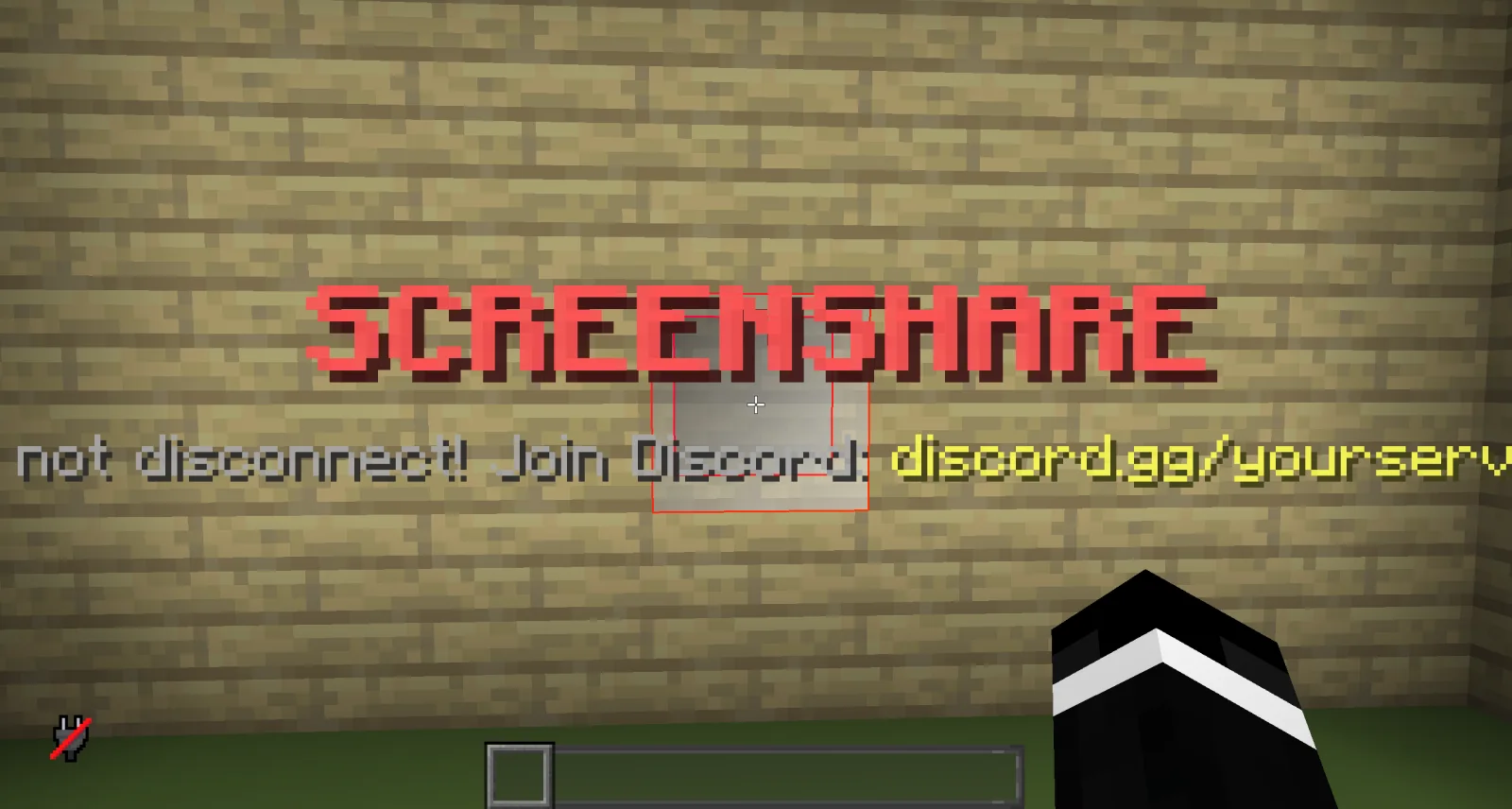
DINScreenshare to plugin do serwerów Paper / Spigot, autor: dinmaurice. DINScreenshare is a lightweight Minecraft moderation plugin that allows staff to easily manage player screenshares with configurable locations, command…
Obsługiwane wersje: Minecraft 1.21 – 26.x. Liczba pobrań w serwisie Modrinth: 3. Zajmuje 402. miejsce w kategorii „pluginy do administracji i uprawnień” (łącznie: 443). Ostatnia aktualizacja: 05.11.2026.
Najnowsza to 1.0.0, wydana 05.11.2026. Jest zrobiona dla Minecraft 1.21 – 26.3. Działa na Bukkit, Folia, Paper, Purpur i Spigot. Plik ma 15 KB.
| Wersja | Wydano | Minecraft | Typ |
|---|---|---|---|
1.0.0 | 05.11.2026 | 1.21 – 26.3 | Wydanie |
Komendy wymienione na stronie DINScreenshare w Modrinth:
/ss/unssDINScreenshare is a lightweight and reliable Minecraft screenshare plugin designed to help server staff perform controlled player inspections.
With DINScreenshare, staff members can easily teleport players into a dedicated screenshare area, prevent them from escaping or using commands, and safely release them once the inspection is finished.
Starts a screenshare with the specified player and teleports them to the configured Screenshare Location.
While being screenshared, the player is restricted from using commands or leaving the screenshare area to prevent them from escaping the inspection.
Sets the Screenshare Location at the staff member's current position.
This is the location where players will be teleported when a screenshare is started using /ss .
Sets the Screenshare Spawn Location at the staff member's current position.
When a player is released using /unss , they will be teleported to this location.
Ends the active screenshare for the specified player and teleports them to the configured Screenshare Spawn Location.
Reloads the DINScreenshare configuration without requiring a server restart.
DINScreenshare provides a simple and effective way for Minecraft server staff to manage player screenshares while keeping the entire process controlled and secure.
Autor: dinmaurice. Z obrazkami na Modrinth.
Upewnij się, że twój serwer działa na Paper i Spigot w Minecraft 1.21 – 26.x.
Pobierz plik .jar z Modrinth i wrzuć go do folderu plugins na serwerze.
Zrestartuj serwer. Unikaj /reload, wiele pluginów źle to znosi.
Wpisz /plugins w konsoli: DINScreenshare powinien być na zielono. Pliki konfiguracyjne tworzą się w folderze plugins przy pierwszym starcie.
Pełny poradnik: Jak zainstalować pluginy na serwerze Minecraft
| Zasób | Pobrania | Ocena | Wersje | Aktualizacja | Cena |
|---|---|---|---|---|---|
| DINScreenshareten, który oglądałeś | 3 | – | 1.21 – 26.x | 7 d. temu | Za darmo |
| ArchiveSpawnArchiveYeez | 9 | – | 1.21 | 7 paź 2026 | Za darmo |
 BanItemAndross | 109K | 4.6 | 1.8 – 26.x | 19 lip 2026 | Za darmo |
 ServerSuiteNoelX | 108 | – | 1.21 | 1 dzień temu | Za darmo |
Tak. DINScreenshare działa w wersji Minecrafta 26.x. Wszystkie obsługiwane wersje: 26.x, 1.21.
Tak. DINScreenshare można pobrać za darmo z serwisu Modrinth.
DINScreenshare działa na serwerach Paper i Spigot.
Tak. Ostatnia aktualizacja wyszła w ciągu ostatniej doby.
Najbliższe to ArchiveSpawn, BanItem i ServerSuite. Porównaj wszystkie alternatywy
ArchiveSpawnPluginy · 1.21Lightweight spawn management plugin with full Folia support. Set, manage and teleport players to custom spawn locations with a simple and optimized command…
BanItemPluginy · 1.8 – 26.xLightweight, powerful & configurable per world ban item plugin
ServerSuitePluginy · 1.21An all in one server management plugin that replaces dozens of separate utility, moderation, teleportation, and staff plugins.
 MentionMePluginy · 1.21 – 26.x
A lightweight, configurable mention system for Paper servers with player mentions, group mentions, sounds, actionbars, permissions and HEX support.
 LightVisionPluginy · 1.21 – 26.x
Lightweight night vision plugin. Players toggle it themselves, staff can control, block and automate it.
A modern, lightweight GUI rewards plugin featuring advanced color support (MiniMessage/Hex), dynamic permissions, and flexible command execution.
Zaloguj się, aby wystawić opinię.