
 ArchiveSpawnPlugins · 1.21
Lightweight spawn management plugin with full Folia support. Set, manage and teleport players to custom spawn locations with a simple and optimized command…
Free9 downloads
DINScreenshare is a lightweight Minecraft moderation plugin that allows staff to easily manage player screenshares with configurable locations, command…
Direct download from Modrinth · 2 downloads
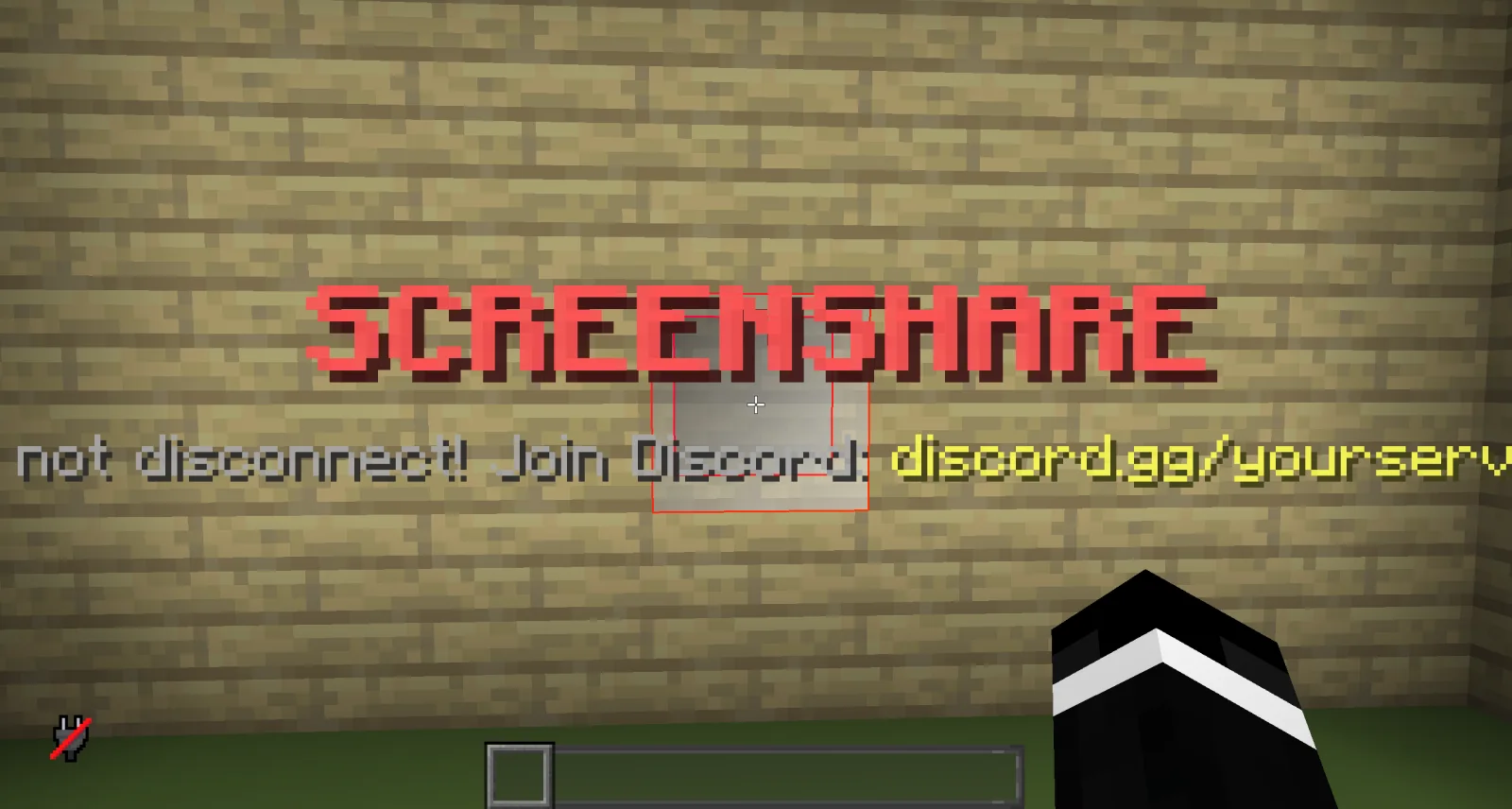
DINScreenshare is a plugin for Paper / Spigot servers, made by dinmaurice. DINScreenshare is a lightweight Minecraft moderation plugin that allows staff to easily manage player screenshares with configurable locations, command…
It supports Minecraft 1.21 – 26.x. It has been downloaded 2 times on Modrinth. That puts it at #414 of the 443 admin and permission plugins listed here. The last update came out on Nov 5, 2026.
The newest is 1.0.0, released on Nov 5, 2026. It is made for Minecraft 1.21 – 26.3. It runs on Bukkit, Folia, Paper, Purpur and Spigot. The download is 15 KB.
| Version | Released | Minecraft | Type |
|---|---|---|---|
1.0.0 | Nov 5, 2026 | 1.21 – 26.3 | Release |
The commands named on the Modrinth page of DINScreenshare:
/ss/unssDINScreenshare is a lightweight and reliable Minecraft screenshare plugin designed to help server staff perform controlled player inspections.
With DINScreenshare, staff members can easily teleport players into a dedicated screenshare area, prevent them from escaping or using commands, and safely release them once the inspection is finished.
Starts a screenshare with the specified player and teleports them to the configured Screenshare Location.
While being screenshared, the player is restricted from using commands or leaving the screenshare area to prevent them from escaping the inspection.
Sets the Screenshare Location at the staff member's current position.
This is the location where players will be teleported when a screenshare is started using /ss .
Sets the Screenshare Spawn Location at the staff member's current position.
When a player is released using /unss , they will be teleported to this location.
Ends the active screenshare for the specified player and teleports them to the configured Screenshare Spawn Location.
Reloads the DINScreenshare configuration without requiring a server restart.
DINScreenshare provides a simple and effective way for Minecraft server staff to manage player screenshares while keeping the entire process controlled and secure.
Written by dinmaurice. Read it with pictures on Modrinth.
Make sure your server runs Paper and Spigot on Minecraft 1.21 – 26.x.
Download the .jar file from Modrinth and put it in the plugins folder of your server.
Restart the server. Avoid /reload, many plugins do not handle it well.
Type /plugins in the console: DINScreenshare should be listed in green. Its config files are created in the plugins folder on the first start.
Full guide: How to install plugins on a Minecraft server
| Resource | Downloads | Rating | Versions | Last update | Price |
|---|---|---|---|---|---|
| DINScreensharethe one you looked at | 2 | – | 1.21 – 26.x | 7 days ago | Free |
| ArchiveSpawnArchiveYeez | 9 | – | 1.21 | Oct 7, 2026 | Free |
 BanItemAndross | 109K | 4.6 | 1.8 – 26.x | Jul 19, 2026 | Free |
 ServerSuiteNoelX | 108 | – | 1.21 | 1 day ago | Free |
Yes. DINScreenshare supports Minecraft 26.x. All supported versions: 26.x, 1.21.
Yes. DINScreenshare is free to download from Modrinth.
DINScreenshare runs on Paper and Spigot servers.
Yes. The last update came out in the past day.
The closest ones are ArchiveSpawn, BanItem and ServerSuite. Compare all alternatives
ArchiveSpawnPlugins · 1.21Lightweight spawn management plugin with full Folia support. Set, manage and teleport players to custom spawn locations with a simple and optimized command…
BanItemPlugins · 1.8 – 26.xLightweight, powerful & configurable per world ban item plugin
ServerSuitePlugins · 1.21An all in one server management plugin that replaces dozens of separate utility, moderation, teleportation, and staff plugins.
 MentionMePlugins · 1.21 – 26.x
A lightweight, configurable mention system for Paper servers with player mentions, group mentions, sounds, actionbars, permissions and HEX support.
 LightVisionPlugins · 1.21 – 26.x
Lightweight night vision plugin. Players toggle it themselves, staff can control, block and automate it.
A modern, lightweight GUI rewards plugin featuring advanced color support (MiniMessage/Hex), dynamic permissions, and flexible command execution.
Log in to leave a review.