
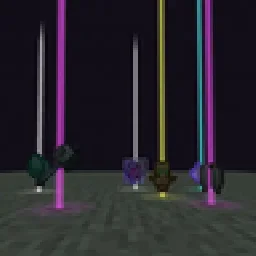
 Yet Another Loot Beams ModMods · 26.x
Fork of a fork of the original lootbeams mod. This client side mod highlights dropped items and loot with cool customizable beams! No more losing items or…
Grátis64 downloads
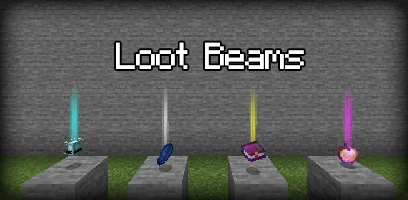
LootBeams (mod) é obra de manorrahamim. A client-side Fabric mod that adds customizable glowing beams of light and nametags above dropped items.
É compatível com o Minecraft 1.21 – 26.x. Tem 118 downloads em Modrinth. A última atualização saiu em 26/09/2026.
LootBeams teve 7 versões no Modrinth desde 26/09/2026. 7 saíram no último ano. A mais recente é 1.0.0+26.3, lançada em 26/09/2026. Ela é feita para o Minecraft 26.3. Ela roda em Fabric. O download tem 66 KB.
| Versão | Lançado | Minecraft | Tipo |
|---|---|---|---|
1.0.0+26.3 | 26/09/2026 | 26.3 | Estável |
1.0.0+26.2 | 26/09/2026 | 26.2 | Estável |
1.0.0+26.1.2 | 26/09/2026 | 26.1.2 | Estável |
1.0.0+1.21.11 | 26/09/2026 | 1.21.11 | Estável |
1.0.0+1.21.10 | 26/09/2026 | 1.21.10 | Estável |
LootBeams is a client-side Fabric mod that renders customizable beacon-style beams of light and floating nametags above dropped items in the world, making valuable loot easy to spot from a distance.
This project is an updated Fabric port of the original Forge mod by Elise (shiroroku).
LootBeams can be configured through two methods:
If OneConfig is present in your mod list, LootBeams registers an interactive configuration page under the Visuals category. You can toggle the master switch, adjust beam height, radius, opacity, render distance, and configure nametags in real time without restarting the game.
Note: The mod is disabled by default upon first install. Open OneConfig in-game to toggle it on and adjust your preferences.
Settings are also stored locally in:
config/lootbeams.json
Key configuration options include:
Escrita por manorrahamim. Leia com imagens no Modrinth.
Este mod roda só no seu jogo. Os servidores não precisam dele, então você pode usar em qualquer servidor.
Instale Fabric para o Minecraft 1.21 – 26.x.
Adicione os mods que ele precisa: API do Fabric.
Baixe o arquivo .jar pelo Modrinth e coloque na pasta mods do seu diretório .minecraft.
Abra o Minecraft com o perfil Fabric.
Mais fácil: no Prism Launcher ou no Modrinth App, procure LootBeams nos mods da sua instância e clique em Install. Ele adiciona o loader e os mods necessários para você.
| Recurso | Downloads | Versões | Última atualização | Preço |
|---|---|---|---|---|
 LootBeamso que você estava vendo | 118 | 1.21 – 26.x | 26 set 2026 | Grátis |
| Yet Another Loot Beams ModderexXD | 64 | 26.x | 11 out 2026 | Grátis |
 Armor Chroma for FabricA5b84 | 3.8M | 1.16 – 1.21 | 28 mar 2025 | Grátis |
 Chat PatchesOBro1961 | 7.3M | 1.18 – 26.x | 4 out 2026 | Grátis |
Sim. LootBeams é compatível com o Minecraft 26.x. Todas as versões compatíveis: 26.x, 1.21.
Sim. Você pode baixar LootBeams de graça em Modrinth.
Do lado do cliente. LootBeams vai na sua própria pasta mods e funciona em qualquer servidor, inclusive sem mods.
Sim: Fabric API. Instale antes de LootBeams.
Sim. A última atualização saiu no último dia.
Os mais parecidos são Yet Another Loot Beams Mod, Armor Chroma for Fabric e Chat Patches. Comparar todas as alternativas
Yet Another Loot Beams ModMods · 26.xFork of a fork of the original lootbeams mod. This client side mod highlights dropped items and loot with cool customizable beams! No more losing items or…
Armor Chroma for FabricMods · 1.16 – 1.21Fabric fork of Armor Chroma, adds different icons in the armor bar depending on the material and can display glint for enchanted items.
Chat PatchesMods · 1.18 – 26.xA Minecraft Fabric client-side mod that touches up a few aspects of Minecraft's mundane chat, with as much configurability as possible!
 IJM's TweaksMods · 1.20 – 26.x
⚙️ A Fabric mod that tweaks the client side of Minecraft.
 Simple WebMods · 26.x
This mod adds client-side screens to Minecraft. No setup is needed; it works on any world or server. Features: Have unlimited web displays around your world…
 EffectiveMods · 1.18 – 1.21
Fabric client-side mod designed to improve Minecraft's ambience through particles, visual effects and sounds
Entre para deixar uma avaliação.