
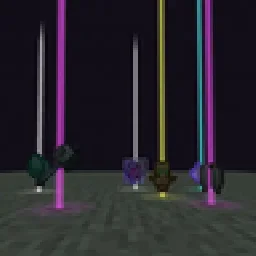
 Yet Another Loot Beams ModМоды · 26.x
Fork of a fork of the original lootbeams mod. This client side mod highlights dropped items and loot with cool customizable beams! No more losing items or…
БесплатноЗагрузок: 23
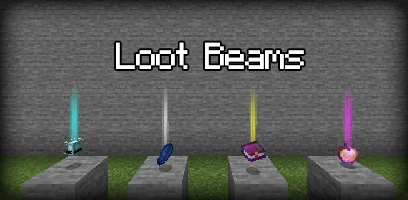
LootBeams — мод от manorrahamim. A client-side Fabric mod that adds customizable glowing beams of light and nametags above dropped items.
Поддерживаемые версии: Minecraft 1.21 – 26.x. Скачиваний на Modrinth: 15. Последнее обновление: 26.09.2026.
С 26.09.2026 у LootBeams вышло 7 версий на Modrinth. 7 из них вышли за последний год. Новейшая — 1.0.0+26.3, вышла 26.09.2026. Она сделана для Minecraft 26.3. Работает на Fabric. Размер файла — 66 KB.
| Версия | Выпущен | Minecraft | Тип |
|---|---|---|---|
1.0.0+26.3 | 26.09.2026 | 26.3 | Релиз |
1.0.0+26.2 | 26.09.2026 | 26.2 | Релиз |
1.0.0+26.1.2 | 26.09.2026 | 26.1.2 | Релиз |
1.0.0+1.21.11 | 26.09.2026 | 1.21.11 | Релиз |
1.0.0+1.21.10 | 26.09.2026 | 1.21.10 | Релиз |
LootBeams is a client-side Fabric mod that renders customizable beacon-style beams of light and floating nametags above dropped items in the world, making valuable loot easy to spot from a distance.
This project is an updated Fabric port of the original Forge mod by Elise (shiroroku).
LootBeams can be configured through two methods:
If OneConfig is present in your mod list, LootBeams registers an interactive configuration page under the Visuals category. You can toggle the master switch, adjust beam height, radius, opacity, render distance, and configure nametags in real time without restarting the game.
Note: The mod is disabled by default upon first install. Open OneConfig in-game to toggle it on and adjust your preferences.
Settings are also stored locally in:
config/lootbeams.json
Key configuration options include:
Автор: manorrahamim. С картинками — на Modrinth.
Этот мод работает только в твоей игре. Серверам он не нужен, так что его можно использовать на любом сервере.
Установи Fabric для Minecraft 1.21 – 26.x.
Добавь нужные ему моды: API Fabric.
Скачай .jar-файл с Modrinth и положи его в папку mods в каталоге .minecraft.
Запусти Minecraft с профилем Fabric.
Проще: в Prism Launcher или Modrinth App найдите LootBeams в модах своей сборки и нажмите Install. Загрузчик и нужные моды добавятся сами.
| Ресурс | Загрузки | Версии | Обновление | Цена |
|---|---|---|---|---|
 LootBeamsтот, что ты смотрел | 15 | 1.21 – 26.x | 26 сент. 2026 | Бесплатно |
| Yet Another Loot Beams ModderexXD | 23 | 26.x | 11 окт. 2026 | Бесплатно |
 Armor Chroma for FabricA5b84 | 3.8M | 1.16 – 1.21 | 28 мар. 2025 | Бесплатно |
 Chat PatchesOBro1961 | 7.3M | 1.18 – 26.x | 4 окт. 2026 | Бесплатно |
Да. LootBeams поддерживает Minecraft 26.x. Все поддерживаемые версии: 26.x, 1.21.
Да. LootBeams можно бесплатно скачать на Modrinth.
На клиенте. LootBeams кладётся в твою папку mods и работает на любом сервере, даже без модов.
Да: Fabric API. Установи это до LootBeams.
Да. Последнее обновление вышло за последние сутки.
Ближе всего к нему Yet Another Loot Beams Mod, Armor Chroma for Fabric и Chat Patches. Сравнить все альтернативы
Yet Another Loot Beams ModМоды · 26.xFork of a fork of the original lootbeams mod. This client side mod highlights dropped items and loot with cool customizable beams! No more losing items or…
Armor Chroma for FabricМоды · 1.16 – 1.21Fabric fork of Armor Chroma, adds different icons in the armor bar depending on the material and can display glint for enchanted items.
Chat PatchesМоды · 1.18 – 26.xA Minecraft Fabric client-side mod that touches up a few aspects of Minecraft's mundane chat, with as much configurability as possible!
 IJM's TweaksМоды · 1.20 – 26.x
⚙️ A Fabric mod that tweaks the client side of Minecraft.
 EffectiveМоды · 1.18 – 1.21
Fabric client-side mod designed to improve Minecraft's ambience through particles, visual effects and sounds
 PunchyМоды · 1.20 – 26.x
A mod that adds various first person animations and visible hands with held items!
Войди, чтобы оставить отзыв.