
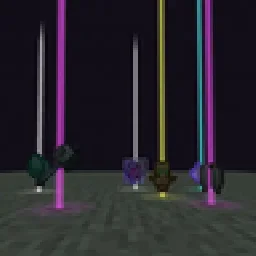
 Yet Another Loot Beams ModMods · 26.x
Fork of a fork of the original lootbeams mod. This client side mod highlights dropped items and loot with cool customizable beams! No more losing items or…
Kostenlos23 Downloads
A client-side Fabric mod that adds customizable glowing beams of light and nametags above dropped items.
Direkter Download von Modrinth · 15 Downloads
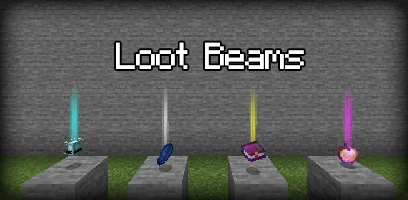
LootBeams (Mod) stammt von manorrahamim. A client-side Fabric mod that adds customizable glowing beams of light and nametags above dropped items.
Unterstützt wird Minecraft 1.21 – 26.x. Auf Modrinth gibt es 15 Downloads. Das letzte Update erschien am 26.09.2026.
LootBeams hat seit 26.09.2026 7 Versionen auf Modrinth veröffentlicht. 7 davon erschienen im letzten Jahr. Die neueste ist 1.0.0+26.3, erschienen am 26.09.2026. Sie ist für Minecraft 26.3 gemacht. Sie läuft auf Fabric. Der Download ist 66 KB groß.
| Version | Veröffentlicht | Minecraft | Typ |
|---|---|---|---|
1.0.0+26.3 | 26.09.2026 | 26.3 | Release |
1.0.0+26.2 | 26.09.2026 | 26.2 | Release |
1.0.0+26.1.2 | 26.09.2026 | 26.1.2 | Release |
1.0.0+1.21.11 | 26.09.2026 | 1.21.11 | Release |
1.0.0+1.21.10 | 26.09.2026 | 1.21.10 | Release |
LootBeams is a client-side Fabric mod that renders customizable beacon-style beams of light and floating nametags above dropped items in the world, making valuable loot easy to spot from a distance.
This project is an updated Fabric port of the original Forge mod by Elise (shiroroku).
LootBeams can be configured through two methods:
If OneConfig is present in your mod list, LootBeams registers an interactive configuration page under the Visuals category. You can toggle the master switch, adjust beam height, radius, opacity, render distance, and configure nametags in real time without restarting the game.
Note: The mod is disabled by default upon first install. Open OneConfig in-game to toggle it on and adjust your preferences.
Settings are also stored locally in:
config/lootbeams.json
Key configuration options include:
Geschrieben von manorrahamim. Mit Bildern auf Modrinth lesen.
Diese Mod läuft nur in deinem eigenen Spiel. Server brauchen sie nicht, du kannst sie also auf jedem Server nutzen.
Installiere Fabric für Minecraft 1.21 – 26.x.
Füge die benötigten Mods hinzu: Fabric API.
Lade die .jar-Datei von Modrinth herunter und lege sie in den mods-Ordner deines .minecraft-Verzeichnisses.
Starte Minecraft mit dem Fabric-Profil.
Einfacher: Suche in Prism Launcher oder der Modrinth App in den Mods deiner Instanz nach LootBeams und klicke auf Install. Loader und benötigte Mods werden für dich hinzugefügt.
| Ressource | Downloads | Versionen | Letztes Update | Preis |
|---|---|---|---|---|
| LootBeamsdie du angesehen hast | 15 | 1.21 – 26.x | 26. Sept. 2026 | Kostenlos |
| Yet Another Loot Beams ModderexXD | 23 | 26.x | 11. Okt. 2026 | Kostenlos |
 Armor Chroma for FabricA5b84 | 3.8M | 1.16 – 1.21 | 28. März 2025 | Kostenlos |
 Chat PatchesOBro1961 | 7.3M | 1.18 – 26.x | 4. Okt. 2026 | Kostenlos |
Ja. LootBeams unterstützt Minecraft 26.x. Alle unterstützten Versionen: 26.x, 1.21.
Ja. LootBeams kannst du kostenlos bei Modrinth herunterladen.
Clientseitig. LootBeams kommt in deinen eigenen mods-Ordner und funktioniert auf jedem Server, auch auf Servern ohne Mods.
Ja: Fabric API. Installiere es vor LootBeams.
Ja. Das letzte Update kam innerhalb des letzten Tages.
Am ähnlichsten sind Yet Another Loot Beams Mod, Armor Chroma for Fabric und Chat Patches. Alle Alternativen vergleichen
Yet Another Loot Beams ModMods · 26.xFork of a fork of the original lootbeams mod. This client side mod highlights dropped items and loot with cool customizable beams! No more losing items or…
Armor Chroma for FabricMods · 1.16 – 1.21Fabric fork of Armor Chroma, adds different icons in the armor bar depending on the material and can display glint for enchanted items.
Chat PatchesMods · 1.18 – 26.xA Minecraft Fabric client-side mod that touches up a few aspects of Minecraft's mundane chat, with as much configurability as possible!
 IJM's TweaksMods · 1.20 – 26.x
⚙️ A Fabric mod that tweaks the client side of Minecraft.
 EffectiveMods · 1.18 – 1.21
Fabric client-side mod designed to improve Minecraft's ambience through particles, visual effects and sounds
 PunchyMods · 1.20 – 26.x
A mod that adds various first person animations and visible hands with held items!
Logg dich ein, um eine Bewertung zu schreiben.