
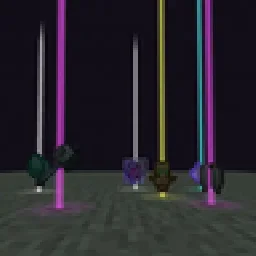
 Yet Another Loot Beams ModMods · 26.x
Fork of a fork of the original lootbeams mod. This client side mod highlights dropped items and loot with cool customizable beams! No more losing items or…
Gratis23 descargas
A client-side Fabric mod that adds customizable glowing beams of light and nametags above dropped items.
Descarga directa desde Modrinth · 15 descargas
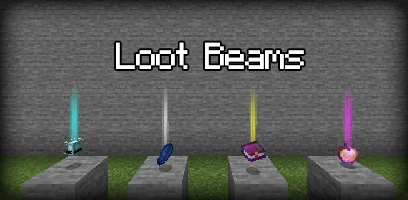
LootBeams (mod) es obra de manorrahamim. A client-side Fabric mod that adds customizable glowing beams of light and nametags above dropped items.
Es compatible con Minecraft 1.21 – 26.x. Se ha descargado 15 veces en Modrinth. La última actualización salió el 26/09/2026.
LootBeams ha publicado 7 versiones en Modrinth desde el 26/09/2026. 7 salieron en el último año. La más reciente es 1.0.0+26.3, publicada el 26/09/2026. Está hecha para Minecraft 26.3. Funciona en Fabric. La descarga ocupa 66 KB.
| Versión | Publicado | Minecraft | Tipo |
|---|---|---|---|
1.0.0+26.3 | 26/09/2026 | 26.3 | Estable |
1.0.0+26.2 | 26/09/2026 | 26.2 | Estable |
1.0.0+26.1.2 | 26/09/2026 | 26.1.2 | Estable |
1.0.0+1.21.11 | 26/09/2026 | 1.21.11 | Estable |
1.0.0+1.21.10 | 26/09/2026 | 1.21.10 | Estable |
LootBeams is a client-side Fabric mod that renders customizable beacon-style beams of light and floating nametags above dropped items in the world, making valuable loot easy to spot from a distance.
This project is an updated Fabric port of the original Forge mod by Elise (shiroroku).
LootBeams can be configured through two methods:
If OneConfig is present in your mod list, LootBeams registers an interactive configuration page under the Visuals category. You can toggle the master switch, adjust beam height, radius, opacity, render distance, and configure nametags in real time without restarting the game.
Note: The mod is disabled by default upon first install. Open OneConfig in-game to toggle it on and adjust your preferences.
Settings are also stored locally in:
config/lootbeams.json
Key configuration options include:
Escrita por manorrahamim. Léela con imágenes en Modrinth.
Este mod funciona solo en tu propio juego. Los servidores no lo necesitan, así que puedes usarlo en cualquier servidor.
Instala Fabric para Minecraft 1.21 – 26.x.
Añade los mods que necesita: API de Fabric.
Descarga el archivo .jar desde Modrinth y ponlo en la carpeta mods de tu directorio .minecraft.
Inicia Minecraft con el perfil de Fabric.
Más fácil: en Prism Launcher o la Modrinth App, busca LootBeams en los mods de tu instancia y haz clic en Install. Añade el loader y los mods que necesita por ti.
| Recurso | Descargas | Versiones | Última actualización | Precio |
|---|---|---|---|---|
| LootBeamsel que estabas viendo | 15 | 1.21 – 26.x | 26 sept 2026 | Gratis |
| Yet Another Loot Beams ModderexXD | 23 | 26.x | 11 oct 2026 | Gratis |
 Armor Chroma for FabricA5b84 | 3.8M | 1.16 – 1.21 | 28 mar 2025 | Gratis |
 Chat PatchesOBro1961 | 7.3M | 1.18 – 26.x | 4 oct 2026 | Gratis |
Sí. LootBeams es compatible con Minecraft 26.x. Todas las versiones compatibles: 26.x, 1.21.
Sí. LootBeams se puede descargar gratis desde Modrinth.
Del lado del cliente. LootBeams va en tu propia carpeta mods y funciona en cualquier servidor, incluso en servidores sin mods.
Sí: Fabric API. Instálalo antes de LootBeams.
Sí. La última actualización salió en el último día.
Los más parecidos son Yet Another Loot Beams Mod, Armor Chroma for Fabric y Chat Patches. Comparar todas las alternativas
Yet Another Loot Beams ModMods · 26.xFork of a fork of the original lootbeams mod. This client side mod highlights dropped items and loot with cool customizable beams! No more losing items or…
Armor Chroma for FabricMods · 1.16 – 1.21Fabric fork of Armor Chroma, adds different icons in the armor bar depending on the material and can display glint for enchanted items.
Chat PatchesMods · 1.18 – 26.xA Minecraft Fabric client-side mod that touches up a few aspects of Minecraft's mundane chat, with as much configurability as possible!
 IJM's TweaksMods · 1.20 – 26.x
⚙️ A Fabric mod that tweaks the client side of Minecraft.
 EffectiveMods · 1.18 – 1.21
Fabric client-side mod designed to improve Minecraft's ambience through particles, visual effects and sounds
 PunchyMods · 1.20 – 26.x
A mod that adds various first person animations and visible hands with held items!
Inicia sesión para dejar una reseña.