
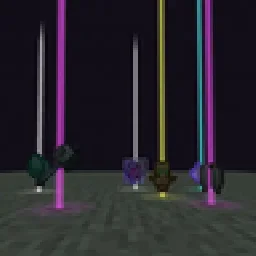
 Yet Another Loot Beams ModMody · 26.x
Fork of a fork of the original lootbeams mod. This client side mod highlights dropped items and loot with cool customizable beams! No more losing items or…
Za darmoPobrania: 23
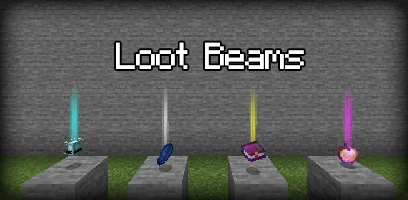
LootBeams to mod, autor: manorrahamim. A client-side Fabric mod that adds customizable glowing beams of light and nametags above dropped items.
Obsługiwane wersje: Minecraft 1.21 – 26.x. Liczba pobrań w serwisie Modrinth: 15. Ostatnia aktualizacja: 26.09.2026.
LootBeams ma 7 wydań na Modrinth od 26.09.2026. 7 z nich wyszło w ostatnim roku. Najnowsza to 1.0.0+26.3, wydana 26.09.2026. Jest zrobiona dla Minecraft 26.3. Działa na Fabric. Plik ma 66 KB.
| Wersja | Wydano | Minecraft | Typ |
|---|---|---|---|
1.0.0+26.3 | 26.09.2026 | 26.3 | Wydanie |
1.0.0+26.2 | 26.09.2026 | 26.2 | Wydanie |
1.0.0+26.1.2 | 26.09.2026 | 26.1.2 | Wydanie |
1.0.0+1.21.11 | 26.09.2026 | 1.21.11 | Wydanie |
1.0.0+1.21.10 | 26.09.2026 | 1.21.10 | Wydanie |
LootBeams is a client-side Fabric mod that renders customizable beacon-style beams of light and floating nametags above dropped items in the world, making valuable loot easy to spot from a distance.
This project is an updated Fabric port of the original Forge mod by Elise (shiroroku).
LootBeams can be configured through two methods:
If OneConfig is present in your mod list, LootBeams registers an interactive configuration page under the Visuals category. You can toggle the master switch, adjust beam height, radius, opacity, render distance, and configure nametags in real time without restarting the game.
Note: The mod is disabled by default upon first install. Open OneConfig in-game to toggle it on and adjust your preferences.
Settings are also stored locally in:
config/lootbeams.json
Key configuration options include:
Autor: manorrahamim. Z obrazkami na Modrinth.
Ten mod działa tylko w twojej grze. Serwery go nie potrzebują, więc możesz go używać na każdym serwerze.
Zainstaluj Fabric dla Minecraft 1.21 – 26.x.
Dodaj potrzebne mody: API Fabric.
Pobierz plik .jar z Modrinth i wrzuć go do folderu mods w katalogu .minecraft.
Uruchom Minecraft z profilem Fabric.
Prościej: w Prism Launcher lub Modrinth App wyszukaj LootBeams w modach swojej instancji i kliknij Install. Loader i potrzebne mody zostaną dodane za ciebie.
| Zasób | Pobrania | Wersje | Aktualizacja | Cena |
|---|---|---|---|---|
 LootBeamsten, który oglądałeś | 15 | 1.21 – 26.x | 26 wrz 2026 | Za darmo |
| Yet Another Loot Beams ModderexXD | 23 | 26.x | 11 paź 2026 | Za darmo |
 Armor Chroma for FabricA5b84 | 3.8M | 1.16 – 1.21 | 28 mar 2025 | Za darmo |
 Chat PatchesOBro1961 | 7.3M | 1.18 – 26.x | 4 paź 2026 | Za darmo |
Tak. LootBeams działa w wersji Minecrafta 26.x. Wszystkie obsługiwane wersje: 26.x, 1.21.
Tak. LootBeams można pobrać za darmo z serwisu Modrinth.
Po stronie klienta. LootBeams trafia do twojego folderu mods i działa na każdym serwerze, także bez modów.
Tak: Fabric API. Zainstaluj to przed LootBeams.
Tak. Ostatnia aktualizacja wyszła w ciągu ostatniej doby.
Najbliższe to Yet Another Loot Beams Mod, Armor Chroma for Fabric i Chat Patches. Porównaj wszystkie alternatywy
Yet Another Loot Beams ModMody · 26.xFork of a fork of the original lootbeams mod. This client side mod highlights dropped items and loot with cool customizable beams! No more losing items or…
Armor Chroma for FabricMody · 1.16 – 1.21Fabric fork of Armor Chroma, adds different icons in the armor bar depending on the material and can display glint for enchanted items.
Chat PatchesMody · 1.18 – 26.xA Minecraft Fabric client-side mod that touches up a few aspects of Minecraft's mundane chat, with as much configurability as possible!
 IJM's TweaksMody · 1.20 – 26.x
⚙️ A Fabric mod that tweaks the client side of Minecraft.
 EffectiveMody · 1.18 – 1.21
Fabric client-side mod designed to improve Minecraft's ambience through particles, visual effects and sounds
 PunchyMody · 1.20 – 26.x
A mod that adds various first person animations and visible hands with held items!
Zaloguj się, aby wystawić opinię.