
 RealisCraft JE: Realistic Default TexturesTexture packs · 1.13 – 26.x
Texture pack for Minecraft provides a realistic look with detailed textures and natural lighting effects. Perfect for fans of natural aesthetics.
Free545,513 downloads

A custom Tortorio-themed Totem of Undying texture pack that replaces the vanilla totem with a unique design, adding a fresh and personalized look to your…
Direct download from Modrinth · 32 downloads
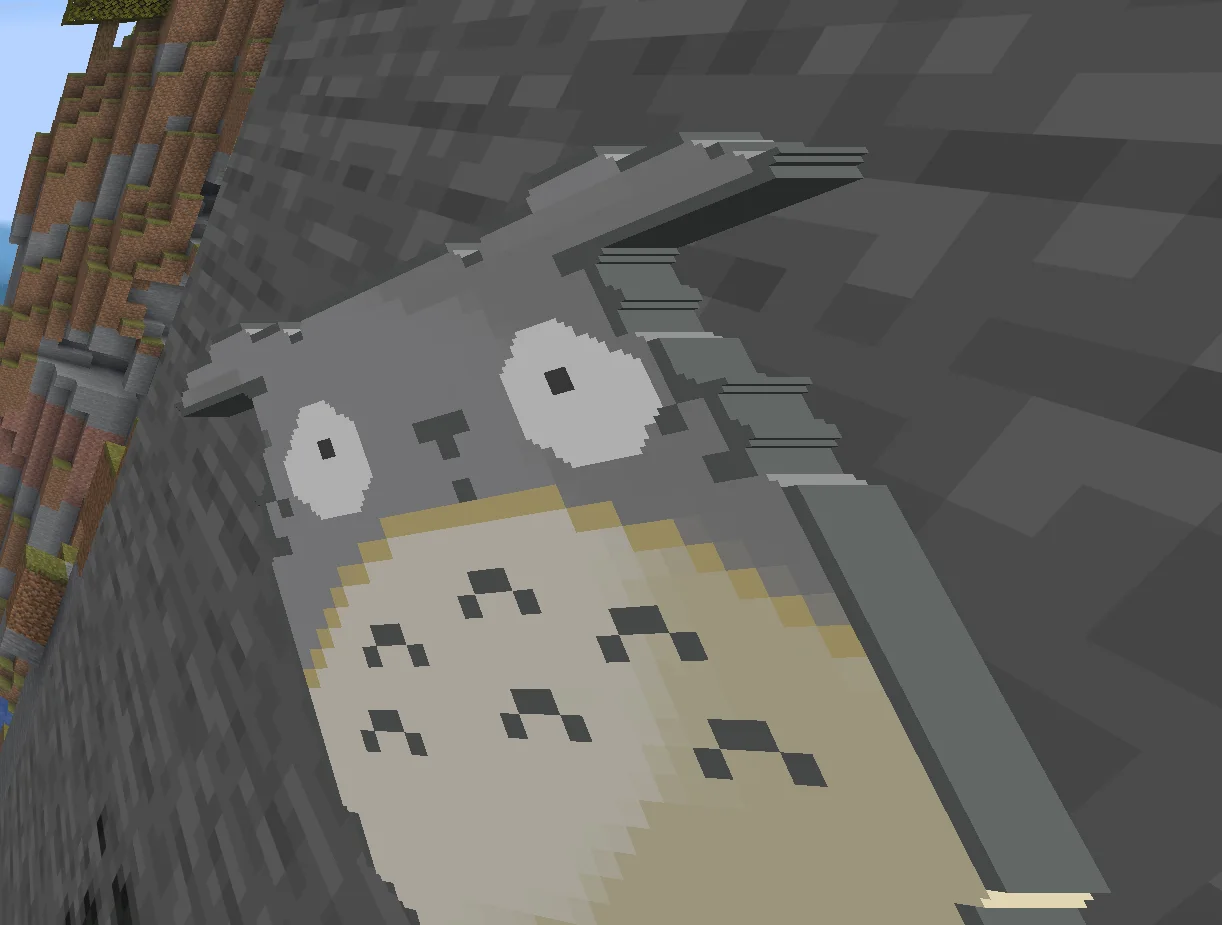
Totoro totem is a texture pack made by Ohhellokira. A custom Tortorio-themed Totem of Undying texture pack that replaces the vanilla totem with a unique design, adding a fresh and personalized look to your…
It supports Minecraft 1.12 – 26.x. It has been downloaded 32 times on Modrinth. The last update came out on Nov 4, 2026.
The newest is 1.0, released on Nov 4, 2026. It is made for Minecraft 1.11 – 1.21.11. It runs on Minecraft. The download is 733 KB.
| Version | Released | Minecraft | Type |
|---|---|---|---|
1.0 | Nov 4, 2026 | 1.11 – 1.21.11 | Release |
Give your Totem of Undying a unique look with this custom animated texture!
Features
Installation
Created by OhhelloKira. Enjoy!
Written by Ohhellokira. Read it with pictures on Modrinth.
Download the .zip file from Modrinth. Do not unzip it.
In Minecraft, open Options, then Resource Packs, then Open Pack Folder.
Drop the .zip file into that folder and go back to the game.
Move Totoro totem to the right-hand list and click Done.
It is made for Minecraft 1.12 – 26.x. On other versions Minecraft marks it as incompatible, but it often still works.
Full guide: How to install Minecraft resource packs
| Resource | Downloads | Versions | Last update | Price |
|---|---|---|---|---|
| Totoro totemthe one you looked at | 32 | 1.12 – 26.x | 9 days ago | Free |
| RealisCraft JE: Realistic Default TexturesGalanticCraft | 546K | 1.13 – 26.x | 2 days ago | Free |
 Fresh XP OrbsBbox | 315K | 1.21 – 26.x | Jul 28, 2026 | Free |
 fehykitop's Void Cross Totemfehykitop | 8 | 1.16 – 1.21 | 1 day ago | Free |
Yes. Totoro totem supports Minecraft 26.x. All supported versions: 26.x, 1.21, 1.20, 1.19, 1.18, 1.17, 1.16, 1.13, 1.12.
Yes. Totoro totem is free to download from Modrinth.
Yes. The last update came out in the past day.
The closest ones are RealisCraft JE: Realistic Default Textures, Fresh XP Orbs and fehykitop's Void Cross Totem. Compare all alternatives
RealisCraft JE: Realistic Default TexturesTexture packs · 1.13 – 26.xTexture pack for Minecraft provides a realistic look with detailed textures and natural lighting effects. Perfect for fans of natural aesthetics.
Fresh XP OrbsTexture packs · 1.21 – 26.xThis resource pack makes xp orbs look like cubes. (Soon coming in animated)
fehykitop's Void Cross TotemTexture packs · 1.16 – 1.21A Resource pack that replaces the Totem of Void Undying (From Void Totem Mod) with an elegant Cross Totem, complete with a custom sound
 rotrBLOCKSTexture packs · 1.13 – 26.x
A pbr/pom resource pack that won't take away your vanilla style, but will make it so much better!
 PixlliTexture packs · 1.12 – 26.x
A new pbr/pom resource pack that will give you more detail, preserving the vanilla of your game and creating a feeling of your favorite pixelation.
 Amazing Mace 3dTexture packs · 1.21 – 26.x
This resource pack Turns 2D texture of mace into 3D..!!
Log in to leave a review.