
 Simple Rich Discord PresenceMods · 1.16 – 26.x
Simple Discord Rich Presence
Free7,589,564 downloads
A music companion app with Discord Rich Presence, Spotify & YouTube Music support, mobile control, and Minecraft mod integration.
Direct download from Modrinth · 30 downloads
AkusticStatus is a mod made by AkusticSklad. A music companion app with Discord Rich Presence, Spotify & YouTube Music support, mobile control, and Minecraft mod integration.
It supports Minecraft 1.8 – 1.21. It has been downloaded 30 times on Modrinth. The last update came out on Aug 24, 2026.
AkusticStatus has had 5 releases on Modrinth since Aug 23, 2026. 5 of them came out in the past year. The newest is 1.0.0, released on Aug 24, 2026. It is made for Minecraft 1.21.11. It runs on Fabric. The download is 31 KB.
| Version | Released | Minecraft | Type |
|---|---|---|---|
1.0.0 | Aug 24, 2026 | 1.21.11 | Beta |
1.3 | Aug 24, 2026 | 1.8.9 | Beta |
1.2 | Aug 24, 2026 | 1.8.9 | Beta |
1.1 | Aug 24, 2026 | 1.8.9 | Beta |
3.10 | Aug 23, 2026 | 1.8.9 | Release |
AkusticStatus - Your Music in Minecraft
AkusticStatus is a client-side mod that seamlessly integrates your music player with Minecraft. Never minimize your game again to check a song title, and share your music taste with other players on the server!
Main Features
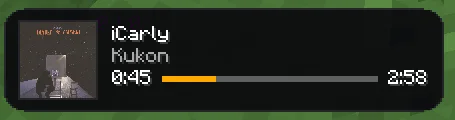
Fully Customizable Music HUD: Displays the artist, track title, currently sung lyrics, and album cover directly on your screen.
Four Unique Visual Styles: Choose the look that fits your UI – from the simple "Classic", through the sleek "Modern" and "Island", to a fully detailed "Player" panel featuring a progress bar.
Multiplayer Integration: The mod syncs data in the background (using a secure Firebase database), displaying floating text above other AkusticStatus users' heads so you can see what they are currently listening to.
Powerful Customization: Press the O key to open the configuration menu. You can drag the HUD anywhere on the screen, adjust its scale, and set custom HEX colors for every text and background element.
Preset System: Save up to three different HUD layouts and switch between them on the fly using the P key.
How it Affects Gameplay (Player Experience)
AkusticStatus significantly improves immersion and adds a new social dimension to multiplayer. Instead of isolating yourself in your headphones, you can connect with other players over a shared love of music. The mod does not alter survival mechanics, but it makes long mining or building sessions much more enjoyable by letting you read the lyrics of your favorite song right in the game window.
In-Game Examples
Situation 1: You're building a massive castle while listening to a generated playlist. A great, unknown track comes on. Instead of Alt-Tabbing, you just glance at the corner of your screen and see a sleek, semi-transparent "Modern" widget with the song title and album art.
Situation 2: You're running through a multiplayer server spawn and pass a friend. Above their character, you notice green music notes and text indicating they are listening to the exact same band as you. It's a perfect conversation starter!
Important Installation Note: For the mod to work correctly, it fetches information from the local port 127.0.0.1:47474. It requires a companion desktop application (Akustic App) running in the background to read your system's media player status.
Written by AkusticSklad. Read it with pictures on Modrinth.
This mod runs only on your own game. Servers do not need it, so you can use it on any server.
Install Fabric and Forge for Minecraft 1.8 – 1.21.
Download the .jar file from Modrinth and put it in the mods folder of your .minecraft directory.
Start Minecraft with the Fabric profile.
Easier: in Prism Launcher or the Modrinth App, search for AkusticStatus in your instance's mods and click Install. It adds the loader and the mods it needs for you.
Full guide: How to install Minecraft mods
| Resource | Downloads | Versions | Last update | Price |
|---|---|---|---|---|
| AkusticStatusthe one you looked at | 30 | 1.8 – 1.21 | Aug 24, 2026 | Free |
| Simple Rich Discord PresenceSunekaer | 7.6M | 1.16 – 26.x | Sep 19, 2026 | Free |
 Scribblechrrs | 3.2M | 1.20 – 26.x | Oct 9, 2026 | Free |
 Music Makerxerca | 2.7M | 1.13 – 26.x | Jul 28, 2026 | Free |
Not yet. The newest version it supports is Minecraft 1.21.
Yes. AkusticStatus is free to download from Modrinth.
Client-side. AkusticStatus goes in your own mods folder and works on any server, including servers without mods.
Yes. The last update came out in the past day.
The closest ones are Simple Rich Discord Presence, Scribble and Music Maker. Compare all alternatives
Simple Rich Discord PresenceMods · 1.16 – 26.xSimple Discord Rich Presence
ScribbleMods · 1.20 – 26.xExpertly edit your books with rich formatting options, page utilities and more!
Music MakerMods · 1.13 – 26.xMusic Maker adds music sheets, instruments and other devices to the game for creating and playing music.
 MidiChatMods · 1.21 – 26.x
A client-side Simple Voice Chat addon that lets you play music using MIDI inputs
 w1xdsT9Mods · 26.x
Offline chat spell checker that underlines spelling errors in the game chat input, with support for Russian and English.
 No Chat ReportsMods · 1.19 – 26.x
Makes chat unreportable (where possible)
Log in to leave a review.