
 Better Enchanting TableResource packs · 1.13 – 26.x
A better model and texture for the enchanting table
Free168,870 downloads
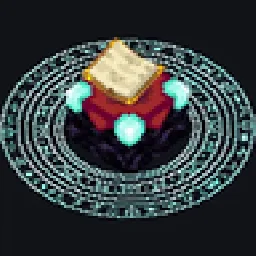
Adds a magic circle to the enchanting table that appears when you approach it
Direct download from Modrinth · 848,539 downloads
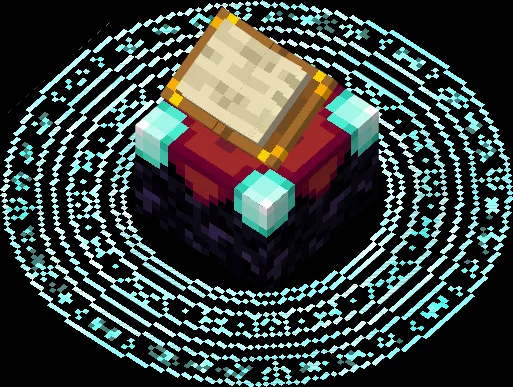
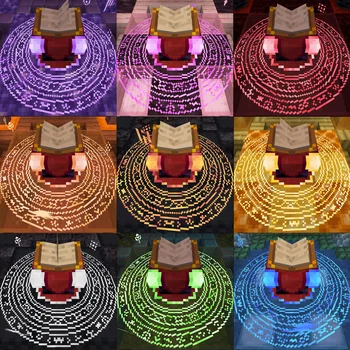
Enchanting Table Magic Circle is a resource pack made by Jacosvaldo. Adds a magic circle to the enchanting table that appears when you approach it.
It supports Minecraft 1.18 – 26.x. It has been downloaded 848,539 times on Modrinth. The last update came out on Nov 5, 2026.
Enchanting Table Magic Circle has had 40 releases on Modrinth since May 22, 2024. 19 of them came out in the past year. The newest is 2.6b, released on Nov 4, 2026. It is made for Minecraft 26.2, 26.3. It runs on Minecraft. The download is 553 KB.
| Version | Released | Minecraft | Type |
|---|---|---|---|
2.6b | Nov 4, 2026 | 26.2, 26.3 | Beta |
2.5 | Apr 5, 2026 | 1.21.9, 1.21.10, 1.21.11 | Release |
2.5 | Apr 5, 2026 | 1.20.5 – 1.21.8 | Release |
2.5 | Apr 5, 2026 | 1.19 – 1.20.4 | Release |
2.4 | Jan 30, 2026 | 1.21.9, 1.21.10, 1.21.11 | Release |
if you're playing in versions above 1.21.6 you can download this version of Animatica, it works, but if you're playing in versions above 1.21.8 you'll need to activete the BRUTEFORCE mode in the texture settings (more about this below)
Should work for every mod that uses a book entity, like Easy Magic mod or Quark Oddities mod
First make sure to enable labPBR support at your shaders config normally it looks like this:
If just this doesn't fix it, try disabling the animated textures, 99% of the time it works
Don't use BRUTEFORCE mode if you're trying to use shaders, it was only made to make the animated textures work in versions >= 1.21.9
To use it you'll probably have to set RenderLayer override to Translucent, to do this go to the mods tab, enter the Entity Model Features mod config and follow this path:
Per entity settings > Enchanting Table > Textures
Now set RenderLayer override to Translucent
🎨 Color Variants
▶️ Video Preview
✨ Shaders Screenshots
Written by Jacosvaldo. Read it with pictures on Modrinth.
Download the .zip file from Modrinth. Do not unzip it.
In Minecraft, open Options, then Resource Packs, then Open Pack Folder.
Drop the .zip file into that folder and go back to the game.
Move Enchanting Table Magic Circle to the right-hand list and click Done.
It is made for Minecraft 1.18 – 26.x. On other versions Minecraft marks it as incompatible, but it often still works.
Full guide: How to install Minecraft resource packs
| Resource | Downloads | Versions | Last update | Price |
|---|---|---|---|---|
| Enchanting Table Magic Circlethe one you looked at | 849K | 1.18 – 26.x | 6 days ago | Free |
| Better Enchanting TableJacosvaldo | 169K | 1.13 – 26.x | Apr 6, 2026 | Free |
 Mace but 3DVolery | 846K | 1.21 – 26.x | Jan 6, 2026 | Free |
 Durability WarningHato9 | 69 | 26.x | Oct 10, 2026 | Free |
Yes. Enchanting Table Magic Circle supports Minecraft 26.x. All supported versions: 26.x, 1.21, 1.20, 1.19, 1.18.
Yes. Enchanting Table Magic Circle is free to download from Modrinth.
Yes: [EMF] Entity Model Features, [ETF] Entity Texture Features. Install it before Enchanting Table Magic Circle.
Yes. The last update came out in the past day.
The closest ones are Better Enchanting Table, Mace but 3D and Durability Warning. Compare all alternatives
Better Enchanting TableResource packs · 1.13 – 26.xA better model and texture for the enchanting table
Mace but 3DResource packs · 1.21 – 26.xAdds a clean 3D model that appears while holding the mace
Durability WarningResource packs · 26.xA texture pack that adds a red outline around your tool when it has less than 10% durability remaining.
 No pumpkin overlayResource packs · 1.21 – 26.x
A simple resource pack that removes the blure caused when you are wearing a pumpkin and adds a little pumpkin image in the top right of your screen so that…
 SGA FontResource packs · 1.13 – 26.x
This resource pack make your font look like the enchanting table language (Standart Galactic Alphabet)
Log in to leave a review.