
 Vivid VisualsShaders · 1.20 – 26.x
Vivid Visuals is a vanilla-friendly Minecraft Java shader pack inspired by Vibrant Visuals
Free3,708 downloads

A performant vanilla-inspired shader for Minecraft Java
Direct download from Modrinth · 241,025 downloads
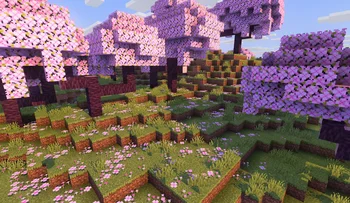
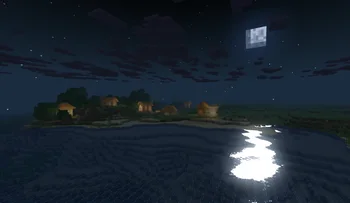

Blocky Shader is a shader pack made by dvimidh. A performant vanilla-inspired shader for Minecraft Java.
It supports Minecraft 1.19 – 26.x. It has been downloaded 241,025 times on Modrinth. The last update came out on May 24, 2026.
Blocky Shader has had 12 releases on Modrinth since Sep 3, 2025. 7 of them came out in the past year. The newest is 0.6.1, released on May 24, 2026. It is made for Minecraft 1.19 – 26.1.2. It runs on Iris. The download is 57 KB.
| Version | Released | Minecraft | Type |
|---|---|---|---|
0.6.1 | May 24, 2026 | 1.19 – 26.1.2 | Beta |
0.6 | Mar 21, 2026 | 1.19 – 1.21.11 | Beta |
0.5.5.2 | Dec 31, 2025 | 1.19 – 1.21.11 | Beta |
0.5.5.1 | Dec 13, 2025 | 1.19 – 1.21.11 | Beta |
0.5.5 | Dec 2, 2025 | 1.19 – 1.21.10 | Beta |
Blocky Enhances the Vanilla Style in a Performance Friendly Way
Feature include:
Written by dvimidh. Read it with pictures on Modrinth.
Install Iris (with Sodium) or OptiFine for your Minecraft version: shaders need one of them.
Download the .zip file from Modrinth. Do not unzip it.
In Minecraft, open Options, then Video Settings, then Shader Packs, and click Open Shader Pack Folder.
Drop the .zip file into that folder, pick Blocky Shader in the list and click Done.
Shaders are heavy on the graphics card. If the game gets slow, pick a lower profile in the shader settings.
Full guide: How to install Minecraft shaders
| Resource | Downloads | Versions | Last update | Price |
|---|---|---|---|---|
| Blocky Shaderthe one you looked at | 241K | 1.19 – 26.x | May 24, 2026 | Free |
| Vivid VisualsYongWoo | 3,708 | 1.20 – 26.x | Jul 3, 2026 | Free |
 ShrimpleNull | 2.2M | 1.16 – 1.21 | Dec 8, 2024 | Free |
 Super Duper VanillaEldeston | 8.3M | 1.13 – 1.21 | Jul 8, 2025 | Free |
Yes. Blocky Shader supports Minecraft 26.x. All supported versions: 26.x, 1.21, 1.20, 1.19.
Yes. Blocky Shader is free to download from Modrinth.
Yes. The last update came out in the past day.
The closest ones are Vivid Visuals, Shrimple and Super Duper Vanilla. Compare all alternatives
Vivid VisualsShaders · 1.20 – 26.xVivid Visuals is a vanilla-friendly Minecraft Java shader pack inspired by Vibrant Visuals
ShrimpleShaders · 1.16 – 1.21A simple Minecraft Java shader that attempts to maintain the vanilla aesthetic while adding optional shadows, colored lighting, and ray-tracing.
Super Duper VanillaShaders · 1.13 – 1.21A shader pack created to convey the style of the cancelled Super Duper Graphics Pack and other popular Minecraft titles.
 I Like VanillaShaders · 1.12 – 26.x
A shader that improves minecraft's style instead of replacing it
 Vanilla Plus ShaderShaders · 1.16 – 1.21
A shaderpack that gives Minecraft a modern visual overhaul while staying faithful to its original look.
 Lux V1Shaders · 1.8 – 26.x
Lux is a high fidelity Minecraft: Java Edition shader pack based on Capt Tatsu's BSL Shaders.
Log in to leave a review.