
 Re-AppliedResource packs · 1.18 – 1.21
Re-Imagines the textures of Applied Energetics 2 to have a improved look than before
Free1,012,083 downloads
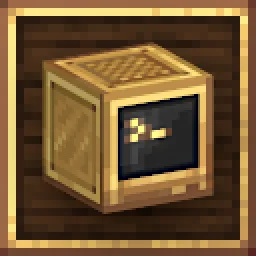
ComputerCraft textures that fit in with Create.
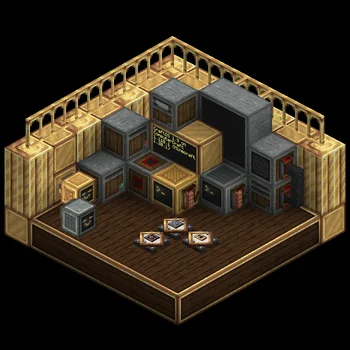


ComputerCraft textures that fit in with Create.
ComputerCraft Create is a resource pack made by sashakoshka. It supports Minecraft 1.19 – 1.20. It has been downloaded 626,963 times on Modrinth. The last update came out on Jul 5, 2024.
ComputerCraft Create has had 6 releases on Modrinth since Jun 11, 2023. None of them came out in the past year. The newest is 5.0.1, released on Jul 5, 2024. It is made for Minecraft 1.20, 1.20.1. It runs on Minecraft. The download is 180 KB.
| Version | Released | Minecraft | Type |
|---|---|---|---|
5.0.1 | Jul 5, 2024 | 1.20, 1.20.1 | Release |
4.0.1 | Apr 17, 2024 | 1.20, 1.20.1 | Release |
4.0.0 | Apr 8, 2024 | 1.20, 1.20.1 | Release |
3.0.0 | Apr 7, 2024 | 1.20, 1.20.1 | Release |
2.0.0 | Oct 2, 2023 | 1.19, 1.19.1, 1.19.2 | Release |
ComputerCraft Create is open source. Its newest release on GitHub is v5.0.0, published on Jul 5, 2024.
Before that: v4.0.1 (Apr 17, 2024), v4.0.0 (Apr 8, 2024).
ComputerCraft textures that fit in with Create. Want brass computers with amber
phosphor screens? Chunky 8-inch floppy disks? Turtles with silly faces? Then
this pack is for you!
This project is affiliated with neither Create nor ComputerCraft.
P.S., if you're wondering what happened to the custom computer models: https://github.com/cc-tweaked/CC-Tweaked/issues/1644
[](creativecommons.org/licenses/by-sa/4.0/)
This work is licensed under a Creative Commons Attribution-ShareAlike 4.0 International License.
Written by sashakoshka. Read it with pictures on Modrinth.
Download the .zip file from Modrinth. Do not unzip it.
In Minecraft, open Options, then Resource Packs, then Open Pack Folder.
Drop the .zip file into that folder and go back to the game.
Move ComputerCraft Create to the right-hand list and click Done.
It is made for Minecraft 1.19 – 1.20. On other versions Minecraft marks it as incompatible, but it often still works.
| Resource | Downloads | Versions | Last update | Price |
|---|---|---|---|---|
| ComputerCraft Createthe one you looked at | 627K | 1.19 – 1.20 | Jul 5, 2024 | Free |
| Re-AppliedLopyLuna | 1M | 1.18 – 1.21 | Jun 2, 2024 | Free |
 CreateMonDeadlywere | 805K | 1.19 – 1.20 | Dec 29, 2023 | Free |
 Cobblemon InterfaceVinnyStalck | 10M | 1.19 – 1.21 | Nov 14, 2025 | Free |
Not yet. The newest version it supports is Minecraft 1.20.
Yes. ComputerCraft Create is free to download from Modrinth.
Yes. The last update came out in the past day.
The closest ones are Re-Applied, CreateMon and Cobblemon Interface. Compare all alternatives
Re-AppliedResource packs · 1.18 – 1.21Re-Imagines the textures of Applied Energetics 2 to have a improved look than before
CreateMonResource packs · 1.19 – 1.20Retexturing cobblemon blocks to fit with the Create mod.
Cobblemon InterfaceResource packs · 1.19 – 1.21Cobblemon inspired GUI Textures and Sounds
 YouTube ThemedResource packs · 1.21 – 26.x
This Texture Pack Introduces new textures for items and equipment to enhance gameplay themed like YouTube
 Saturation++Resource packs · 1.12 – 26.x
Increases the saturation of all vanilla textures
 Create DarkmodeResource packs · 1.16 – 1.20
Adds a Darkmode for the Create Mod Forge/Fabric
Log in to leave a review.