
 Better LeavesTexture packs · 1.16 – 1.21
Adds bushy leaves without any mods. Make trees beautiful again.
Free1,665,779 downloads

Bushy leaves built to be extremely fast, without compromising vanilla aesthetics.
Direct download from Modrinth · 580,260 downloads
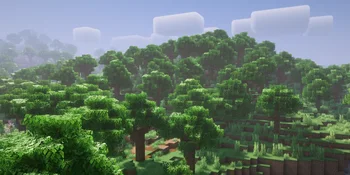
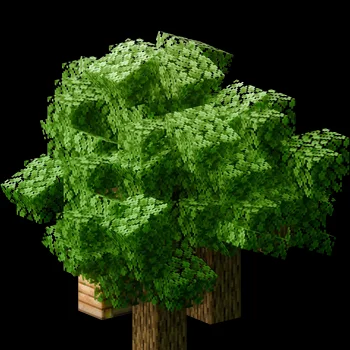
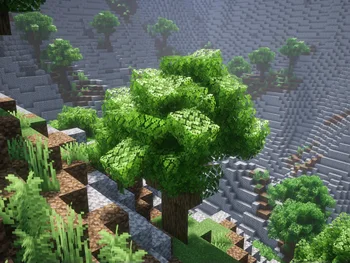
Cubic Leaves is a texture pack made by zanderest. Bushy leaves built to be extremely fast, without compromising vanilla aesthetics.
It supports Minecraft 1.13 – 26.x. It has been downloaded 580,260 times on Modrinth. The last update came out on Sep 16, 2026.
Cubic Leaves has had 27 releases on Modrinth since Mar 23, 2025. 8 of them came out in the past year. The newest is 2.4-perf, released on Sep 16, 2026. It is made for Minecraft 1.13 – 1.21.11. It runs on Minecraft. The download is 813 KB.
| Version | Released | Minecraft | Type |
|---|---|---|---|
2.4-perf | Sep 16, 2026 | 1.13 – 1.21.11 | Release |
2.4-compat | Sep 16, 2026 | 1.13 – 1.21.11 | Beta |
2.3-perf | Dec 9, 2025 | 1.13 – 1.21.11 | Release |
2.3-compat | Dec 9, 2025 | 1.13 – 1.21.11 | Beta |
2.2-perf | Nov 18, 2025 | 1.13 – 1.21.10 | Release |
Gives leaves a simple bushy look while keeping things looking blocky, without impacting performance a ton! There's two editions of the resource pack: one designed for performance, and one designed to work with any resource pack, though at the cost of performance. Cubic Leaves also supports a good handful of mods too!
For the best look and performance: I highly recommend installing both Sodium and More Culling!
Because of Minecraft's Ambient Occlusion (AO), leaves may have weird and inconsistent shading. It can even cause leaves to have missing colors on older versions! Sodium's AO is much more accurate than vanilla, and fixes all of it's issues.
More Culling culls or "hides" leaves deep inside of trees to save a ton of performance. This can come at the cost of making trees look hollow though.
I recommend setting the culling type to "Check Surroundings" for the best results.
Fixing odd shading with Complementary Shaders:
When using Complementary with the "Detail Quality" set to "Potato", it can cause the bushy parts of the leaves to appear dark and permanently in shade. Make sure this is set to at least "Medium".
Alternatively, you can go to the "Lighting" category, and set "Leaf Shadow Optimization" to "ON", if you really need "Detail Quality" set to "Potato".
Supported Mods List
A-D
E-Z
Other
Ars Nouveau
Atmospheric
Autumnity
Big Globe
Biomes O' Plenty
Cobblemon
Dynamic Trees
Dynamic Trees: Autumnity
Dynamic Trees: Biomes O' Plenty
Dynamic Trees: Nature's Spirit
Dynamic Trees: Quark
Dynamic Trees: The Aether
Environmental
Frights and Foliage
Nature's Spirit
Oh The Biomes We've Gone
Paradise Lost
Promenade
Quark
Regions Unexplored
The Aether
Twilight Forest
Wilder Wild
[Let's Do] Beachparty
[Let's Do] BloomingNature
[Let's Do] Meadow
[Let's Do] Vinery
More support to come!
Check out my other projects! modrinth.com/user/zanderest
[
](modrinth.com/resourcepack/beefy-tools)
[
](modrinth.com/resourcepack/homogeneous-dirt)
[
](modrinth.com/resourcepack/crude-glass)
Longer tool handles, beefier tool heads, and competently held tools!
Homogeneous Dirt is a resource pack that homogenizes all of the dirt-related textures!
Glass looks impossibly perfect for coming out of a cobblestone furnace...
Written by zanderest. Read it with pictures on Modrinth.
Download the .zip file from Modrinth. Do not unzip it.
In Minecraft, open Options, then Resource Packs, then Open Pack Folder.
Drop the .zip file into that folder and go back to the game.
Move Cubic Leaves to the right-hand list and click Done.
It is made for Minecraft 1.13 – 26.x. On other versions Minecraft marks it as incompatible, but it often still works.
Full guide: How to install Minecraft resource packs
| Resource | Downloads | Versions | Last update | Price |
|---|---|---|---|---|
| Cubic Leavesthe one you looked at | 580K | 1.13 – 26.x | Sep 16, 2026 | Free |
| Better LeavesPandaDEV | 1.7M | 1.16 – 1.21 | Nov 18, 2025 | Free |
 Ashen Simple FoliageAim_Boot | 1.3M | 1.19 – 1.21 | Jun 18, 2025 | Free |
 Bushy LeavesAwoolanche | 330K | 1.16 – 1.21 | Jan 31, 2026 | Free |
Yes. Cubic Leaves supports Minecraft 26.x. All supported versions: 26.x, 1.21, 1.20, 1.19, 1.18, 1.17, 1.16, 1.13.
Yes. Cubic Leaves is free to download from Modrinth.
Yes: More Culling, Sodium. Install it before Cubic Leaves.
Yes. The last update came out in the past day.
The closest ones are Better Leaves, Ashen Simple Foliage and Bushy Leaves. Compare all alternatives
Better LeavesTexture packs · 1.16 – 1.21Adds bushy leaves without any mods. Make trees beautiful again.
Ashen Simple FoliageTexture packs · 1.19 – 1.21Removes bushy leaves from Ashen 16x.
Bushy LeavesTexture packs · 1.16 – 1.21As the title implies, Bushy Leaves makes leaves more bushy. Support for 130+ mods!
 Mizuno Better LeavesTexture packs · 1.19 – 26.x
Better Leaves for Mizuno Craft without any mods.
 Fullbright UBTexture packs · 1.19 – 26.x
Experience Fullbright UB in Sodium, Optifine and Vanilla
 Simple Grass FlowersTexture packs · 1.16 – 26.x
Gives Grass, Podzol, Mycelium, Crimson Nylium, and Warped Nylium vanilla-friendly flowers, clovers, and rocks!
Log in to leave a review.