
 Goosker's Modpack UtilityMods · 1.20
This mod is a required Utility that adds a full questline in place of advancements and is also used to patch certain bugs and compatibility issues within the…
Free12 downloads

This mod adds a super basic compass hud that shows your spawn, recent death locations, and has compatibility with waystones.
Direct download from Modrinth · 25 downloads
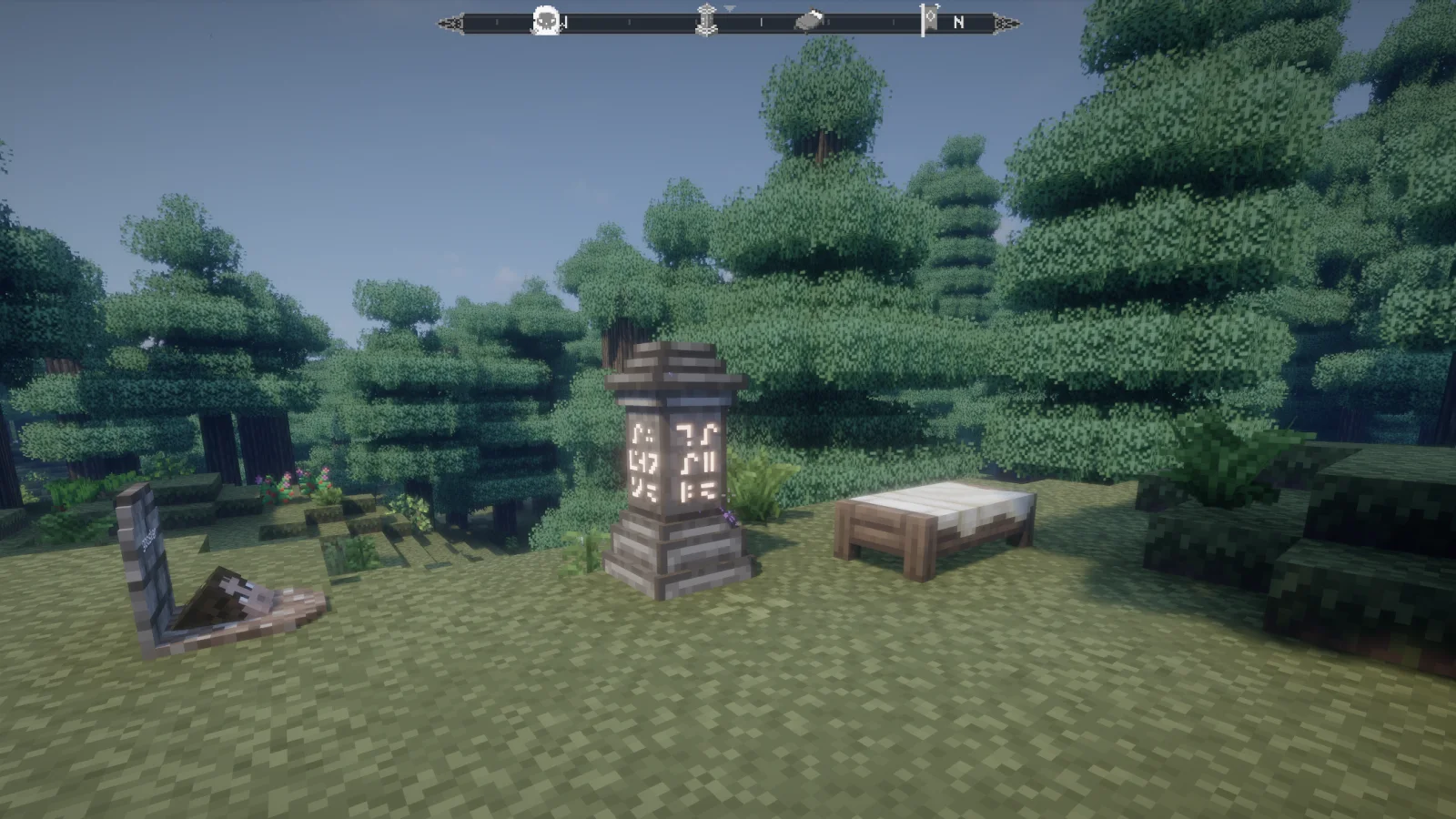
Goosker's Compass is a mod made by Goosker. This mod adds a super basic compass hud that shows your spawn, recent death locations, and has compatibility with waystones.
It supports Minecraft 1.20. It has been downloaded 25 times on Modrinth. The last update came out on Nov 10, 2026.
Goosker's Compass has had 2 releases on Modrinth since Oct 9, 2026. 2 of them came out in the past year. The newest is Beta-1.1.15, released on Oct 30, 2026. It is made for Minecraft 1.20.1. It runs on Fabric. The download is 71 KB.
| Version | Released | Minecraft | Type |
|---|---|---|---|
Beta-1.1.15 | Oct 30, 2026 | 1.20.1 | Beta |
alpha-0.1.11 | Oct 9, 2026 | 1.20.1 | Alpha |
Goosker's Compass is open source. Its newest release on GitHub is Beta-1.1.16, published on Nov 9, 2026.
-Death waypoints are saved per world and reappear on the compass when you get close again.
-The cache accounts for e4mc world identity so markers can persist when you rejoin.
-Compass detects nearby Forgotten Graves and clears the associated death marker after you recover the grave.
Before that: Beta-1.1.15 (Oct 30, 2026), Beta-1.1.14 (Oct 30, 2026).
Recommend having this on client and server. Spawn point functionality may not work properly if using on client only.
This mod adds a simple compass to the top of your hud that shows your spawn point, recent death points, and has built-in compatibility with the mod Waystones as well as Forgotten Graves
There are configurability options to change the amount of recent death icons are shown, change hud layout, and more.
Feel free to use this mod, build on to it, fork it, all that jazz. This mod was built with the intention of integrating into Goosker's Medieval Modpack
Written by Goosker. Read it with pictures on Modrinth.
This mod runs only on your own game. Servers do not need it, so you can use it on any server.
Install Fabric for Minecraft 1.20.
Download the .jar file from Modrinth and put it in the mods folder of your .minecraft directory.
Start Minecraft with the Fabric profile.
Easier: in Prism Launcher or the Modrinth App, search for Goosker's Compass in your instance's mods and click Install. It adds the loader and the mods it needs for you.
Full guide: How to install Minecraft mods
| Resource | Downloads | Versions | Last update | Price |
|---|---|---|---|---|
| Goosker's Compassthe one you looked at | 25 | 1.20 | 2 days ago | Free |
| Goosker's Modpack UtilityGoosker | 12 | 1.20 | 9 days ago | Free |
 Spotify HudDragonMCPVP | 4 | 1.21 | 20 days ago | Free |
 Xaero's World Mapthexaero | 105.5M | 1.8 – 26.x | 17 days ago | Free |
Not yet. The newest version it supports is Minecraft 1.20.
Yes. Goosker's Compass is free to download from Modrinth.
Client-side. Goosker's Compass goes in your own mods folder and works on any server, including servers without mods.
Yes. The last update came out in the past day.
The closest ones are Goosker's Modpack Utility, Spotify Hud and Xaero's World Map. Compare all alternatives
Goosker's Modpack UtilityMods · 1.20This mod is a required Utility that adds a full questline in place of advancements and is also used to patch certain bugs and compatibility issues within the…
Spotify HudMods · 1.21Spotify HUD shows the song you're playing in Spotify (Windows desktop app) as a small card on your Minecraft screen. The card has the title, artist, cover art…
Xaero's World MapMods · 1.8 – 26.xAdds a full screen world map which shows you what you have explored in the world. Works great together with Xaero's Minimap.
 MiniHUDMods · 1.8 – 26.x
A "mini F3" HUD mod, also with various overlays like light level, spawn chunks, slime chunks etc.
 Sodium Options Mod CompatMods · 1.20 – 1.21
Adds compatibility for various mods through Sodium Options API
 Undergarden DelightMods · 1.18 – 1.21
Adds Farmer's Delight & The Undergarden compatibility. Vanilla style.
Log in to leave a review.