
 Rubius HorizonsResource packs · 1.20
This is the Resource Pack for the "Horizons" series from the streamer Rubius.
Free186,110 downloads

Use Source Han Sans in Minecraft! Integrated in XPlus Series Modpack.
Direct download from Modrinth · 269,525 downloads
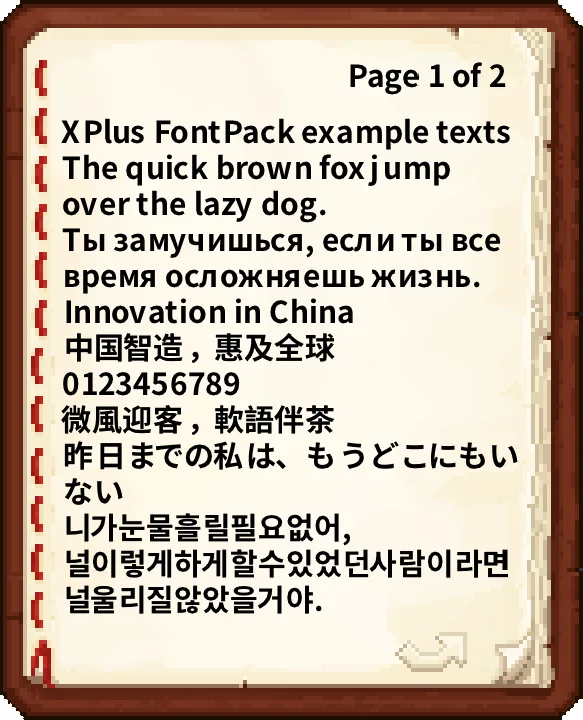
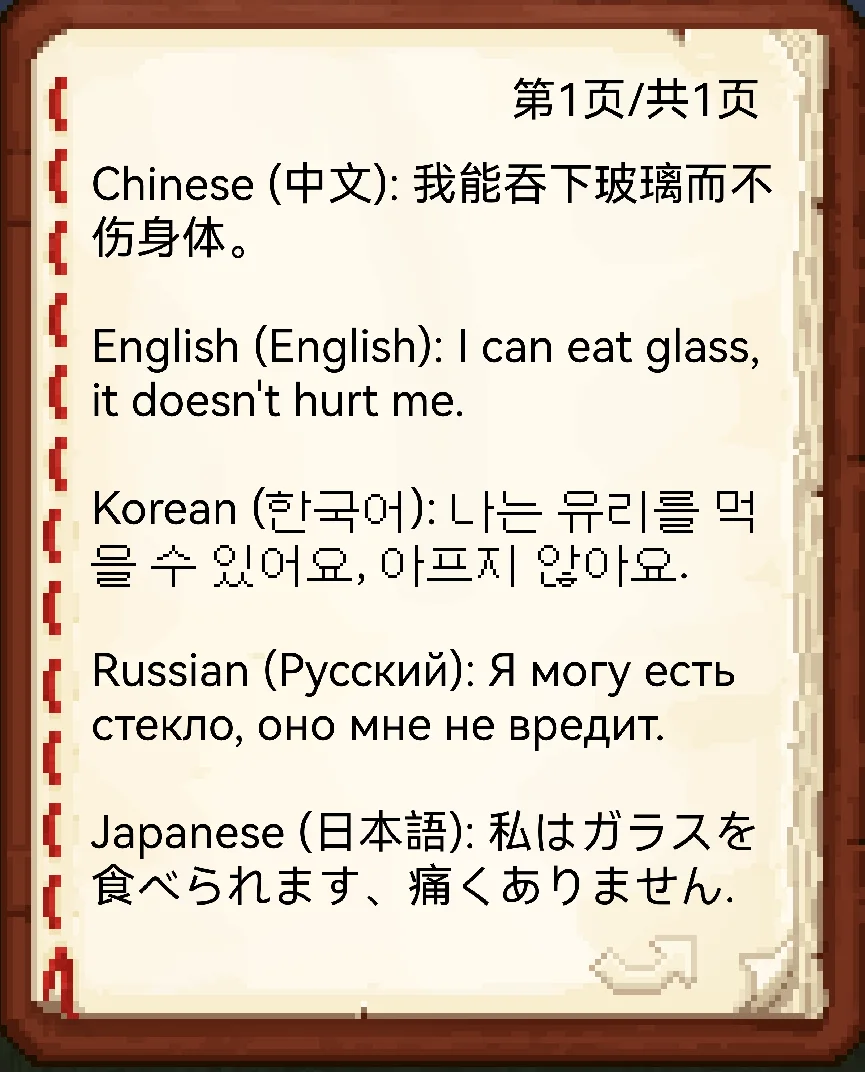
XPlus Font Pack is a resource pack made by Wudji. Use Source Han Sans in Minecraft! Integrated in XPlus Series Modpack.
It supports Minecraft 1.16 – 1.21. It has been downloaded 269,525 times on Modrinth. The last update came out on Jun 13, 2024.
XPlus Font Pack has had 3 releases on Modrinth since Apr 5, 2024. None of them came out in the past year. The newest is 1.1.1, released on Jun 13, 2024. It is made for Minecraft 1.18.2 – 1.21.11. It runs on Minecraft. The download is 8.0 MB.
| Version | Released | Minecraft | Type |
|---|---|---|---|
1.1.1 | Jun 13, 2024 | 1.18.2 – 1.21.11 | Release |
1.1.0 | Apr 16, 2024 | 1.18.2, 1.19.4, 1.20.4 | Release |
v1.0.0 | Apr 5, 2024 | 1.14.4 – 1.21.11 | Release |
XPlus Font Pack is a Minecraft Font Pack developed by XPlus Team, which is used in XPlus Modpack. XPlus Font Pack transforms in-game fonts to the sleek and elegant Source Han Sans typeface. Say goodbye to bland default fonts and immerse yourself in a world of clarity and style.
With XPlus Font Pack, players can enjoy a seamless gaming experience across multiple languages, as it supports a wide range of language characters. Whether you're communicating with friends in English, Korean, Russian,Chinese, or any other language, XPlus Font Pack ensures readability and consistency without the need for additional mod downloads.
Source Han Sans is licensed under SIL Open Font License, Version 1.1
Dovahkiin is made by Pixel Sagas, which is licensed as Freeware.
Written by Wudji. Read it with pictures on Modrinth.
Download the .zip file from Modrinth. Do not unzip it.
In Minecraft, open Options, then Resource Packs, then Open Pack Folder.
Drop the .zip file into that folder and go back to the game.
Move XPlus Font Pack to the right-hand list and click Done.
It is made for Minecraft 1.16 – 1.21. On other versions Minecraft marks it as incompatible, but it often still works.
| Resource | Downloads | Versions | Last update | Price |
|---|---|---|---|---|
| XPlus Font Packthe one you looked at | 270K | 1.16 – 1.21 | Jun 13, 2024 | Free |
| Rubius HorizonsRyu2o77 | 186K | 1.20 | Aug 5, 2024 | Free |
 Cobblemon Official Modpack Chinese Translationjingqi_ohhh | 114 | 1.21 | Oct 11, 2026 | Free |
 SGA Fontmeow4me | 12 | 1.13 – 26.x | 15 days ago | Free |
Not yet. The newest version it supports is Minecraft 1.21.
Yes. XPlus Font Pack is free to download from Modrinth.
Yes: Caxton. Install it before XPlus Font Pack.
Yes. The last update came out in the past day.
The closest ones are Rubius Horizons, Cobblemon Official Modpack Chinese Translation and SGA Font. Compare all alternatives
Rubius HorizonsResource packs · 1.20This is the Resource Pack for the "Horizons" series from the streamer Rubius.
Cobblemon Official Modpack Chinese TranslationResource packs · 1.21整合包汉化包 - [ Cobblemon Official Modpack ] Simplified Chinese translation resource pack for the Cobblemon Official Modpack.
SGA FontResource packs · 1.13 – 26.xThis resource pack make your font look like the enchanting table language (Standart Galactic Alphabet)
 Recolourful Containers GUI + HUDResource packs · 1.19 – 26.x
Do you want more immersive, more interesting, more colourful GUIs and HUD? Than this pack is for you!
 Hypixel PlusResource packs · 1.8 – 26.x
A Resource Pack built for the Hypixel server that textures all of SkyBlock, Bedwars, and so much more!
 Better 3D BedsResource packs · 1.12 – 1.21
Better 3D Beds is a texture pack for Minecraft that significantly enhances the appearance of beds in the game, making them more realistic and detailed with…
Log in to leave a review.